Wacom Intuos: Analysis of straight lines at the beginnings (or ends) of strokes

Type of device: Graphics tablet
Brand and version of the device: Wacom Intuos CTH-690
System: Arch Linux x86_64, 6.5.6-arch2-1, KDE Plasma, Wayland


I just switched to Arch (Plasma Wayland) and I’m experiencing an issue with my drawing tablet (Wacom Intuos CTH-690). The beginning of every brush stroke is a straight line. I tried it in Krita (5.1.5 Flatpak), Aseprite, Blender and the GNU Image Manipulation Program, and it’s the same in all of them.

This seems to be a common issue, it’s even mentioned at Introduction to User Support — Krita Manual 5.2.0 documentation, but I’ve only found mentions of this issue relating to Windows, nothing at all for Linux. The KDE drawing tablet settings on Wayland only have a few mapping settings, so it doesn’t look like there’s anything in there that could fix it. I read Graphics tablet - ArchWiki and if I understand correctly, the default out-of-the-box way to handle drawing tablets on Wayland is libinput, so I assume that’s what I’m using when I haven’t specifically installed a driver. I tried the other drivers listed in that article, as well as a live Ubuntu 22.04.3 X11 system and the official Wacom driver on a fresh Windows 11, to see if they have the same problem. As it turned out, all of them have slightly different versions of this issue for me.

Using OpenTabletDriver installed via the AUR on my Arch Wayland, the beginnings of strokes are fine but the ends have straight lines instead. And these ends don’t follow the direction of the brush stroke like with libinput, they go backward to where the pen used to be a moment ago, so parallel to the stroke if I draw a straight line and at bigger angles if I draw a curved line. I didn’t find anything that could help in the OpenTabletDriver settings.
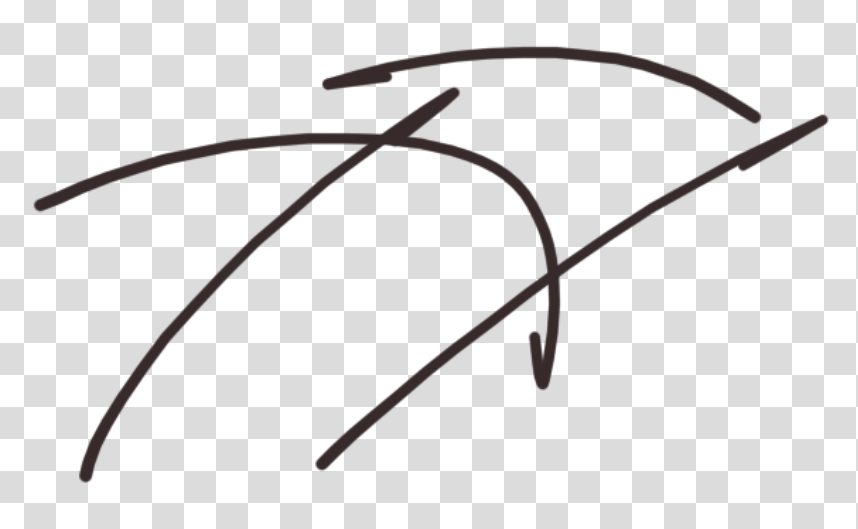
Using xf86-input-wacom on my Arch with X11 has the same result as when I tried it on a live Ubuntu 22.04.3 X11 system. The beginnings of strokes are fine here, too, but the ends are straight and in the same way as the beginnings are on Wayland+libinput, only shorter.
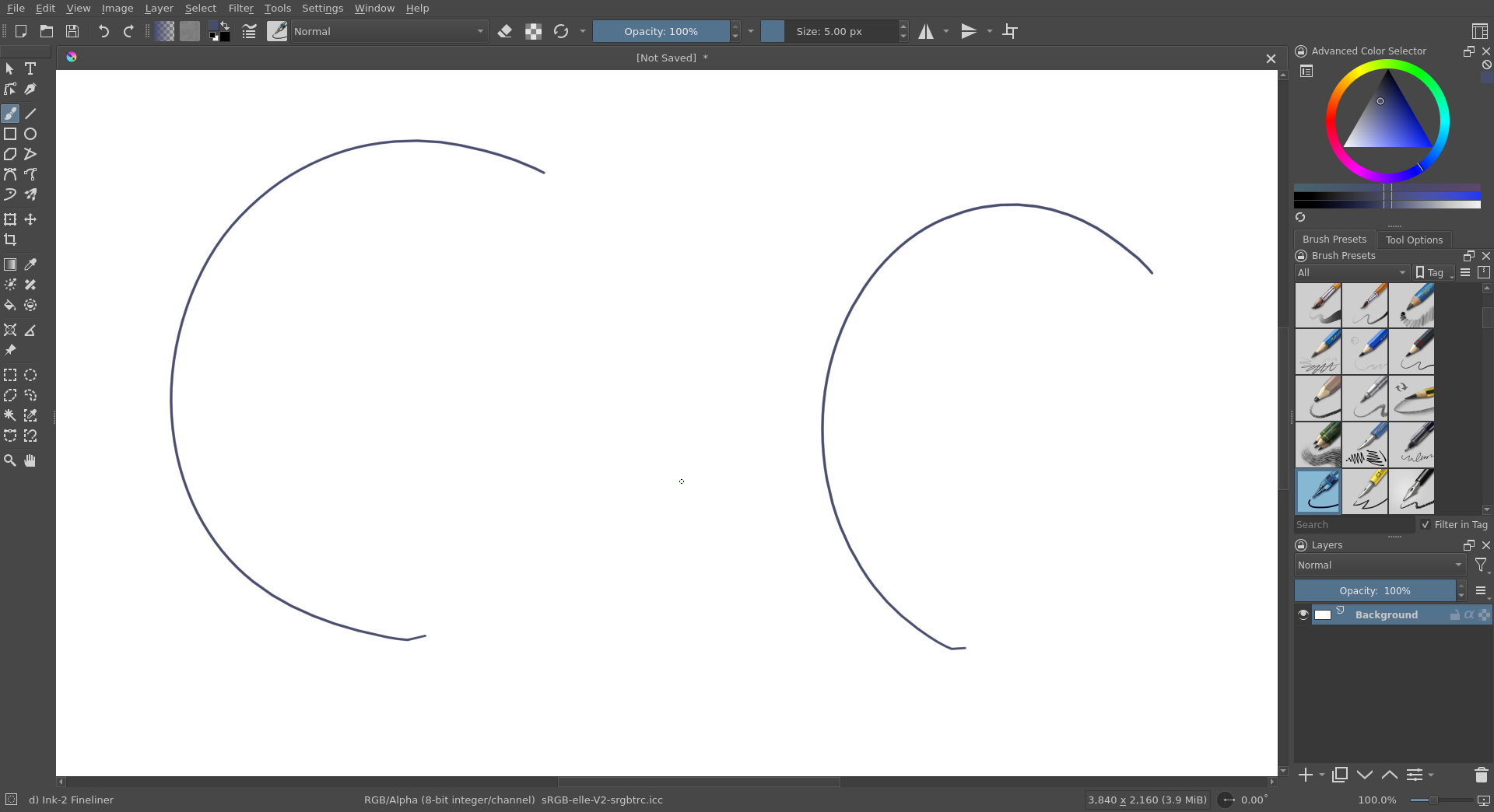
On Windows 11 with the official Wacom driver (6.4.3-1), both beginnings and ends of strokes are straight (tested in Krita, Paint and Paint.NET). I tried fixing it with the things I found online, namely lowering the tip double click distance and unticking/ticking Use Windows Ink, but it made no difference.
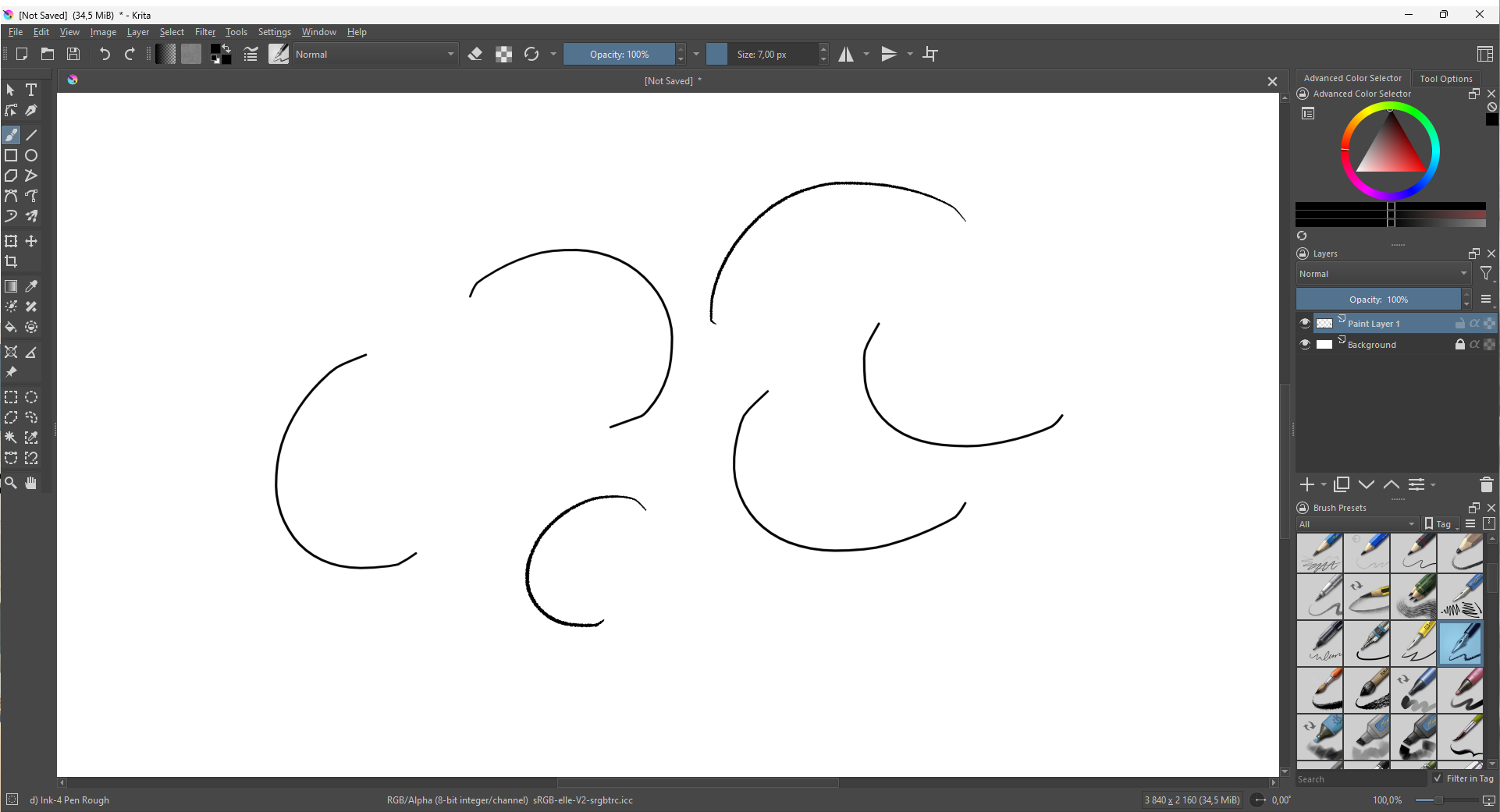
So, all drivers have an issue like this and I haven’t managed to fix it anywhere so far. I have made two other interesting observations, though.

The xf86-input-wacom driver has two sliders in the KDE system settings. The second one didn’t seem to do anything, but the raw sample rate slider influences not only smoothing, latency and seemingly cutting off more from the end of the stroke. It’s set to 4 by default which results in the small straight end shown above. Setting it to 1 however turns the end into a bigger straight line going backwards, exactly as with OpenTabletDriver, so both of them seem to have the same issue, only that OpenTabletDriver doesn’t seem to have this slider to influence the bugged end. Increasing the value makes the straight end shorter and more aligned with the direction of the brush stroke, probably because of increased smoothing and ending the stroke earlier. I found that setting it to 6 makes the straight end pretty much unnoticeable in practice without increasing latency too much, so I could theoretically use this. Going back to X11 for this would be very unfortunate, mostly because I can somehow only run games well on Wayland (I have a Nvidia 1080), but I have another issue in Aseprite that only happens with xf86-input-wacom and OpenTabletDriver. The end of every stroke lags and only appears like a quarter of a second after ending the stroke. Maybe solving this straight line issue will also solve this Aseprite issue, otherwise I’ll report it to Aseprite. But for now, this also makes xf86-input-wacom with the slider set to 6 no real alternative to me.
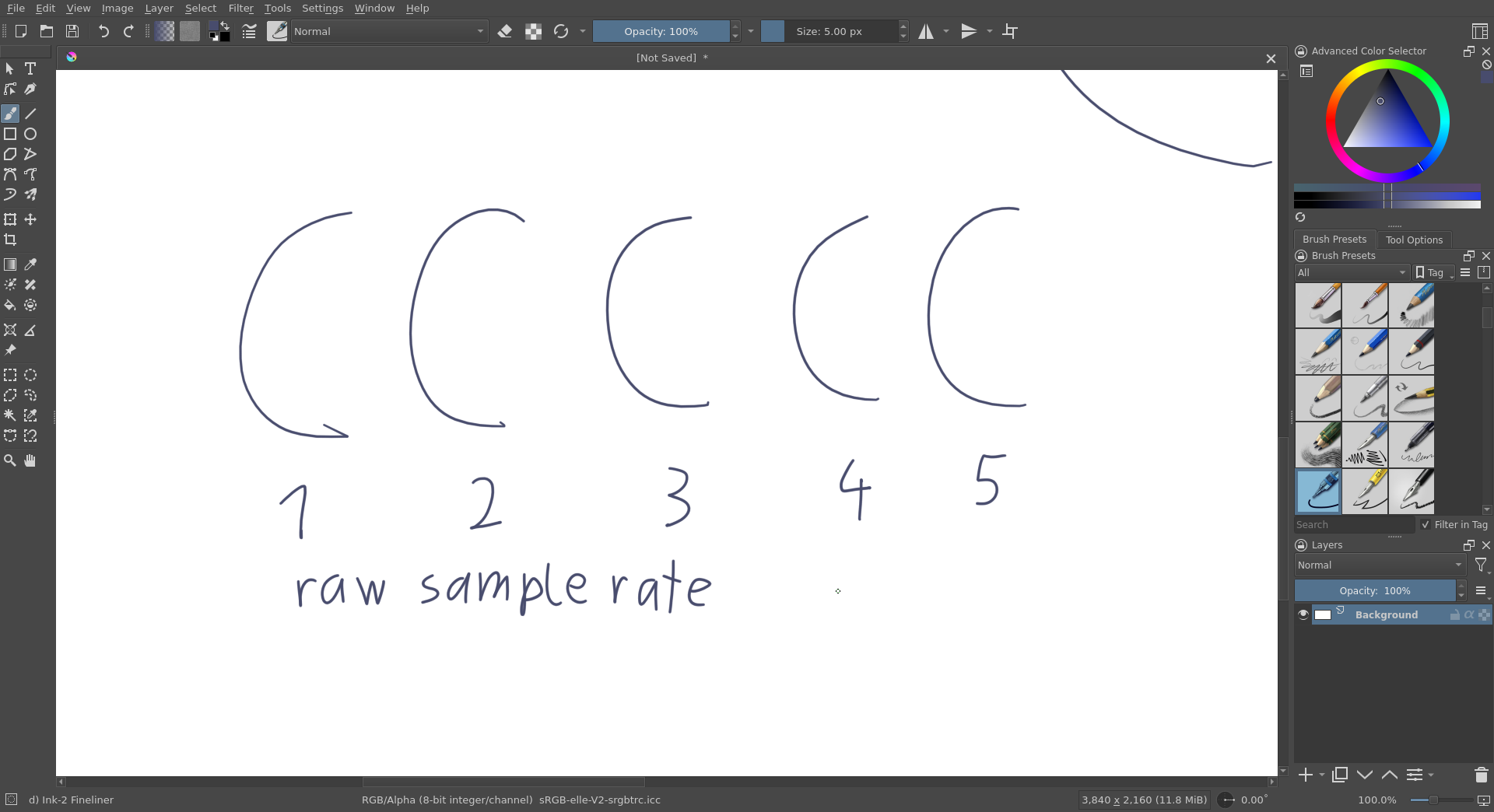
Back on Arch Wayland with libinput, I messed around a little with Krita’s Tablet Tester and was amazed to discover that drawing in its test area works perfectly, both the beginning and end of strokes look consistently fine! So it seems that this is possible after all and Krita even receives the right signals from the tablet/driver. But how is it working fine in there and not on actual Krita canvases or other applications?
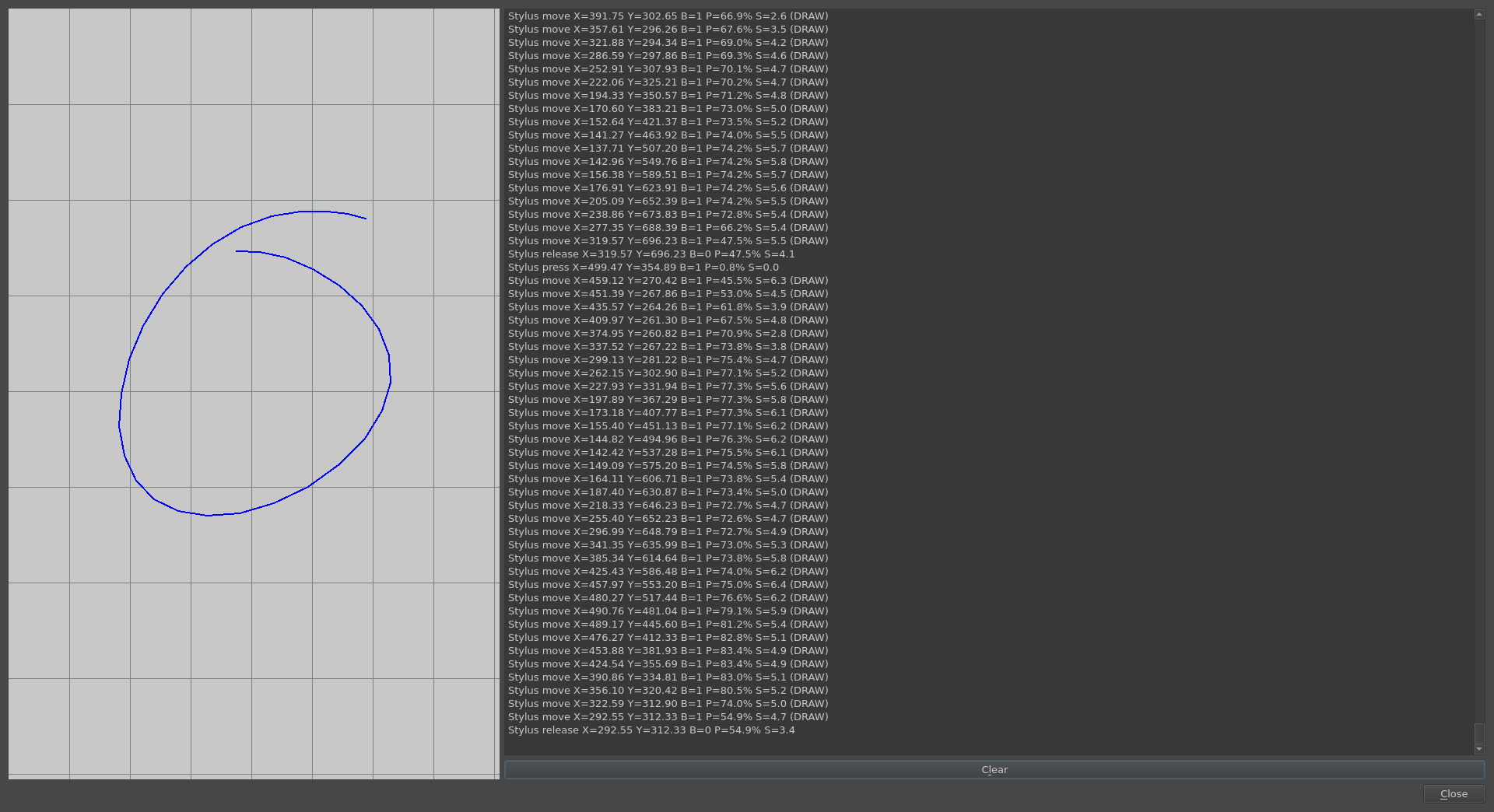
Some additional information: I’ve only drawn in Aseprite so far and want to get into Krita now, too. These two are all I currently need the tablet for, anything else I’ve mentioned was just to test this issue. Before Arch I used Kubuntu (20.04 X11) and before that Windows 10. I know that I had an issue like this before but I don’t remember where or when. I also don’t remember if the beginnings or ends of strokes were affected, but I know that it wasn’t both as it is now on Windows and also not ends going backwards. And I don’t remember having managed to fix it. I might have just lived with it because it might not have been noticeable in low-res pixel art which is all I’ve been doing so far. But I tried “regular” art in Krita on Kubuntu 20.04 X11 once before in mid 2021 and the lines in those drawings look fine to me.

1 Like

Hello @Lily5
I’ve changed the category of your topic and modified the title slightly to give it more visibility to any developers or people who know and understand the details of this subject area.

3 Likes

I got this in the KDE Plasma Wayland 5.27 session in Debian 12 as well, however that was the only place where it happened. I doesn’t happen in GNOME Wayland nor in the KDE X11 session for whatever reason.

My tablet is a Wacom Intuos Pro M, though, so maybe that’s the difference.

3 Likes

I just tried GNOME and I can confirm that strokes look fine on GNOME Wayland! I still get straight ends on GNOME X11, and everywhere with OpenTabletDriver. But on Wayland+libinput, the straight beginnings seem to be exclusive to Plasma. I guess I should report that to KDE, then.

I also tried the Krita Tablet Tester with OpenTabletDriver and xf86-input-wacom, and the Tablet Tester doesn’t make a difference for those, the ends are “bugged as normal”. So the Tablet Tester with libinput on Plasma Wayland is the only situation where it has a different result compared to how strokes look on regular canvases. Which might be another indicator that it should generally work on Wayland+libinput but Plasma somehow messes it up.

3 Likes

I opened an issue for the “straight beginnings on Plasma Wayland” bug at 475619 – Straight lines at the beginnings of strokes with a Wacom Intuos on Plasma Wayland, let’s see if it can be figured out.

Regarding the bugged ends, I think I’ve found the solution. I was made aware of this When I draw a line with Wacom CTL-490, it always squiggle weirldy at it's end. · Issue #2806 · OpenTabletDriver/OpenTabletDriver · GitHub and told that it’s a hardware/firmware issue in Wacom tablet models ending on 90. Mine (CTH-690) is therefore affected while the Intuos Pro M seems to have the model number PTH-660 and is not affected. That means that the straight ends on OpenTabletDriver, xf86-input-wacom and the official Windows driver all have the same cause. But OpenTabletDriver has a plugin that can remove the bugged input values from the end of strokes (see the linked issue) and that makes it work perfectly for me, on any OS, distro, desktop environment and windowing system! Conveniently that also solved both issues I had in Aseprite, the one I mentioned really having been caused by this straight ends bug and the other one only happening on Plasma Wayland with libinput. So, my use cases now work flawlessly! :kiki_star_stuck:

Until the straight beginnings bug on Plasma Wayland has been figured out, I recommend just using OpenTabletDriver as well. The same goes for the issues with the official Windows driver.

4 Likes

I might try this, thank you!! This really was one of the only showstoppers for me moving completely over to Plasma Wayland, so I might try and do this
:kikiexcited:
Hopefully the bug is eventually also picked up

1 Like

It looks like I was too hasty in thinking OpenTabletDriver fixes all problems. I’ve mostly been using the pressureless fineliner brush to test these issues so I can see the wrong positions in strokes more clearly without pressure changes being in the way, and that made me not notice that I was using OpenTabletDriver in the default Absolute Mode, which is actually absolute mouse mode and sends mouse signals without any pressure. That’s also why it fixed my Aseprite issues that don’t happen with a mouse. You have to change to Artist Mode to get an absolute mode that sends pen signals including pressure. And that mode brings the bugged beginnings of strokes back. Apparently this issue has nothing to do with the driver and instead sits somewhere later in the chain. So unless you’re fine with having no pressure, we’re back to square one on Plasma Wayland. Sorry for getting your hopes up, @mashmerlow :frowning: (Is there really no sad Kiki emote? That’s doubly sad :frowning: )

The current workaround in OpenTabletDriver for the bugged end on my tablet is also not as perfect as I thought. It does remove the wrongly positioned last input, but the position is not the only thing wrong with the bugged end. The pressure value is also always at 0 for the bugged inputs, and the last input with the workaround in place is still always 0. Even setting the minimum pressure curve value in OpenTabletDriver to 100% still results in the last input always having 0% pressure. This is not always noticeable in practice and it depends on the stroke and brush, but I just don’t like that lines now often have a very pointy end that looks different from the beginning of the stroke. In addition, it feels like the cursor is always stuck for a tiny moment when I lift the pen with this workaround enabled, probably because of the suppressed bugged input. This doesn’t matter in practice but it doesn’t feel that good and it doesn’t happen with Wayland+libinput where the end is not bugged.

The bugged beginnings on Plasma Wayland also always start at 0% pressure, but I made a screen recording of strokes along with their libinput values so the Plasma people can see what exactly is going wrong (see the attachment at 475619 – Straight lines at the beginnings of strokes with a Wacom Intuos on Plasma Wayland) and the input values in the recording look fine to me. There seem to be input values during the straight line and the inputs definitely don’t start at 0% pressure even though the drawn line does. So I again assume it should work on Wayland+libinput, as it does on GNOME and in the Krita Tablet Tester, and something on Plasma messes up the first inputs. The cursor also seems to disappear when touching the tablet and it reappears a moment later, and the straight line is drawn between those two points.

The bugged end inputs from my tablet model on the other hand can be seen in the libinput values. There is always one 0% pressure value at the end of strokes and you can see the position coordinates going backwards. But stroke ends still look perfect on Wayland+libinput out of the box, the only place where it does. And the bugged input values from libinput don’t make it into the Krita Tablet Tester’s displayed input values. So apparently there is already a workaround for this firmware bug implemented in Wayland+libinput, and unlike the current one in OpenTabletDriver it results in perfect ends with the right pressure value.

So, we’re back to waiting if the Plasma Wayland bug can be figured out. Unless there’ll be more new things happening tomorrow, I’ll just use OpenTabletDriver in mouse mode on Plasma Wayland for Aseprite and temporarily switch to GNOME Wayland whenever I want to draw non-pixel art in Krita. Maybe the OpenTabletDriver people can figure out a workaround for the bugged ends that works as well as the one on Wayland so I can use it on Plasma X11 for Krita sessions instead of GNOME.

1 Like

This topic was automatically closed 30 days after the last reply. New replies are no longer allowed.