In all the various brush options - size, opacity, flow, mirror etc. - there’s a strength slider. What, precisely, does it do? I didn’t find a description in the manual and haven’t quite been able to figure it out by experimenting.
Hi @hulmanen ,
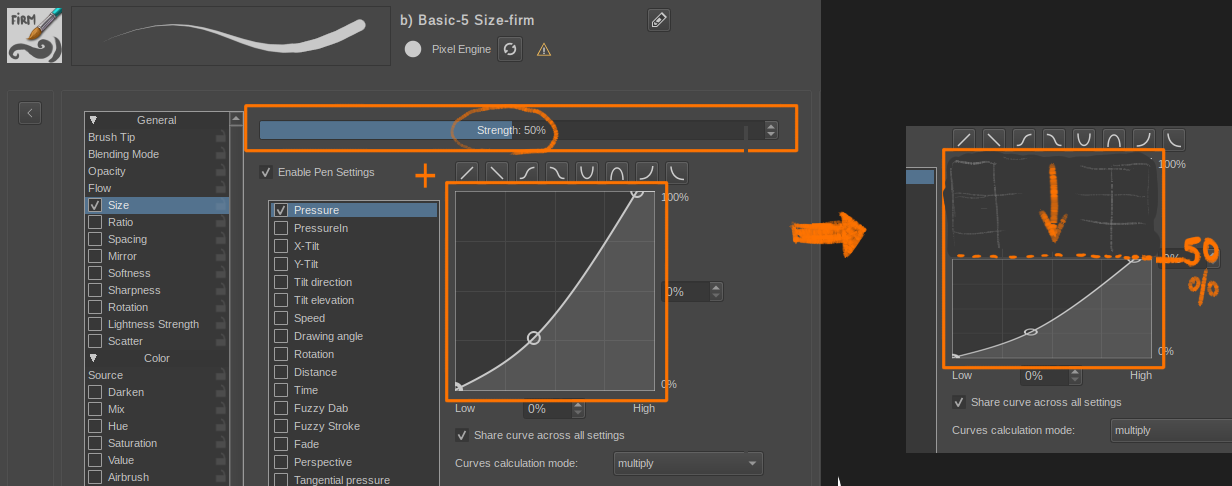
Interesting question, from what I understood and experienced about it; it’s like compressing the max value of the curves, reducing the overall effect of the curve.
Example with a rounded brush with just a pressure sensor on Size:
But if someone who knows it better (or able to read the code) has more explanations about it, I’ll be very curious to know it too. 
@Deevad, that was my expectation as well. But if you try setting the strength on e.g. the pattern strength to 0, and your pattern is set to multiply with the brush tip, the result is not just the brush tip with no pattern, but a brush that produces no stroke at all. So I’m wondering if the logic is bugged there or if I don’t understand the math here.
Also, I don’t think it works, or should work at any rate, quite like you show for size. If it just multiplies the curve by strength/100, then at 50% strength, a 100 pixel brush would max out at 50 pixels. I think the expected behaviour would be for it to lift the 0 point, so that at 50% a 100 Px brush would be at minimum 50 Px wide.
And of course some brush options are simple tweaks to numerical values, while others like the pattern strength end up getting plugged into a more complex compositing operation. So I was thinking if I could get some word on what the math here is, maybe I could help document this part of the brush engine.
The case of the pattern opacity is difficult: patterns controls a layer of opacity over the stroke as far as I know. Reducing the effect to zero and obtaining a full transparent stroke doesn’t sounds like a bug to me but logic. The real question is “Is it helpful/wanted/predictible?”… To this one, I can’t reply, and that’s why the question is difficult.
About the decision of ‘strenght’ controling the maximum effect (eg. the maximum size) or the minimum effect (the minimum size); it depends what the default is. I tend to think it is currently 100% the default value, and Strenght is a slider designed to be decreased. It’s goal might be just to ‘turn volume down’ of a sensor and make the output stroke more subtle behavior than when the stroke has 100% ‘Strenght’. If the sliders had 0% by default, and the purpose of this slider was to boost a preset a bit weak and add more ‘Strenght’ to it; then having it control the minimum could make sens.
I made the experiment and it matches the prediction. I measured the pixels (values are a bit fuzzy with anti-aliasing and counting pixels). It looks predictible and similar to what I described in my first comment, at least for size. Screenshot:
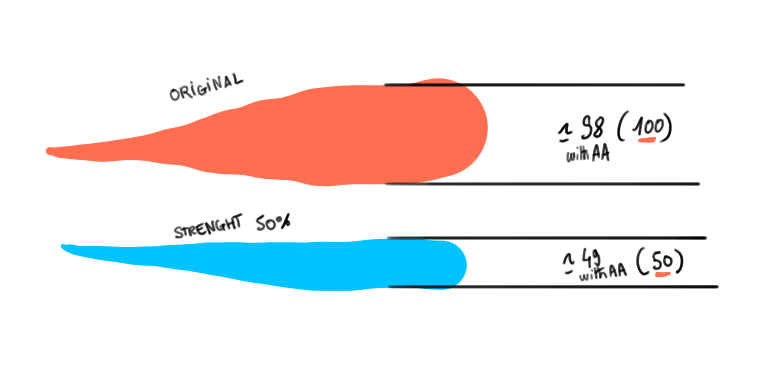
Listing the behavior of Strenght for each sensors could be a valuable contribution for the documentation.
Thank you if you investigate into that.
1 Like
@Deevad, you’re correct of course. It would have been obvious to me if I’d had Krita in front of me when writing about it. The Strength parameter appears to be just a multiplier for the option in question. Indeed, for Opacity, the slider isn’t labeled Strength, but Opacity.
For size specifically, this feels redundant, since we already have a size slider for the brush tip. I’d prefer lifting the 0 point in that particular instance, since to my mind the default is the brush tip with max size. OTOH how it is now is consistent with the behaviour across the other, so that’s perhaps more important.
As for how it behaves with e.g. pattern strength, I think I would prefer a different approach.
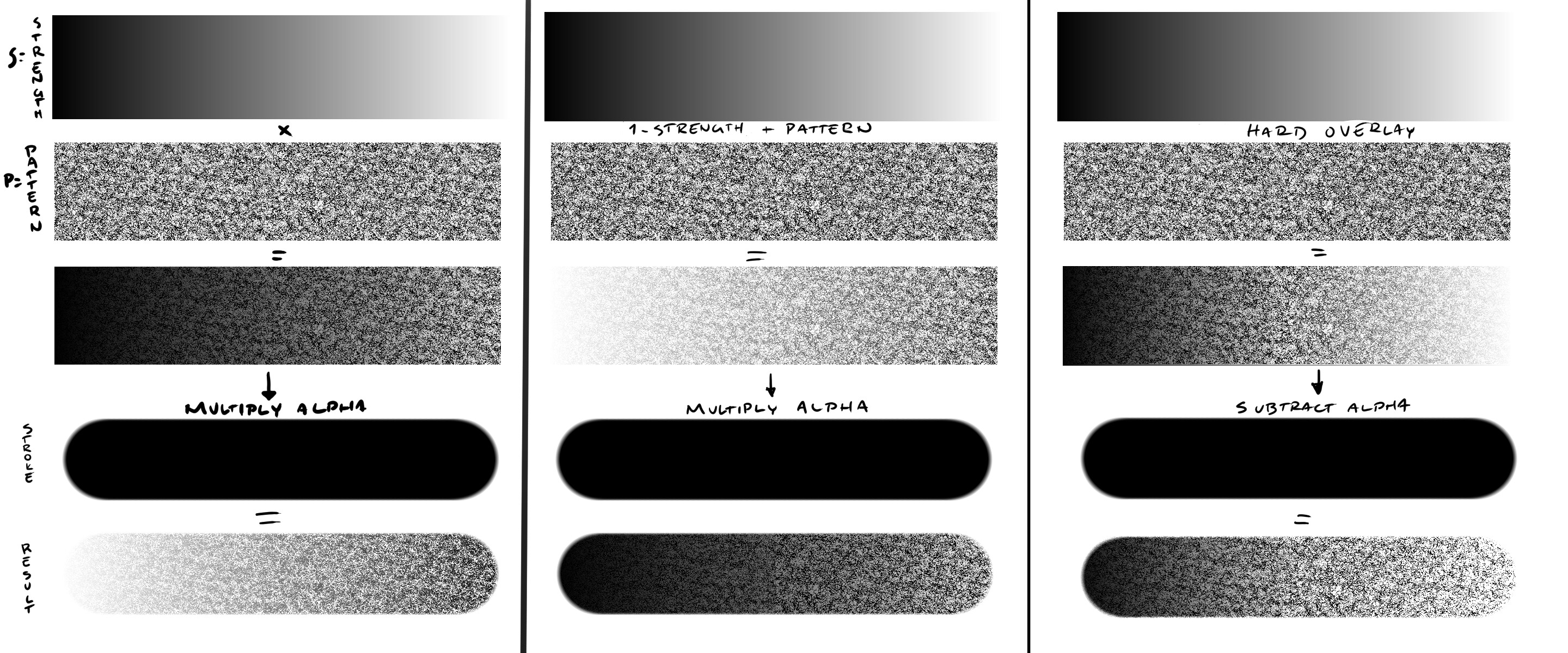
I think currently the formula for multiply alpha mode is Strength * Pattern * Stroke_Alpha. So if any of these goes to 0, you get no stroke output. I’d prefer strength to adjust the contribution of the pattern to the stroke, not the strength of the whole stroke. I tried to mess around with blending modes to get some idea of what might work better - I’ll spend some more time on this to see if I can figure out something better. But on the left is what I think is happening now, and the other two are what could be done, perhasp. I’m looking for something close to the rightmost option, but it has some minor issues at low and high pressure still.
2 Likes
Edit: I spent the day figuring out a way to get what I think I want, and made a feature request.
1 Like
This topic was automatically closed 15 days after the last reply. New replies are no longer allowed.