What is a good Android tablet that works well with Krita?

What is a good Android tablet that works well with Krita? I already a have XP Pen displays I use on a Windows or Linux desk, but want something I can use that is portable that isn’t too laggy.

I have been looking at reviews for the Ugee UT3 which seems alright for its price considering its features and Digidraw Turing 14. I know Digidraw is not a standalone device, but seems like it can be used with any Android device with bluetooth although I’m not sure how fast it is. I prefer something I can use with Krita since its already my regular software I use.

Most of the reviews for these kind of devices I see are people that don’t use Krita as their main main app. I was hoping others could share their experience.

I’m 100% Android user on a Samsung S10 FE. I opted for the 12 GB RAM model. It’s absolutely lovely with Krita.

I don’t do any animation so I can’t comment on how good it would be with that type of work. And you cannot easily render MP4s from the time lapse recorder. You have to use other software to do the rendering and editing.

I use a wacom movinkpad 14 pro for my main drawing device now. I never really liked drawing on a tablet, but that + Kritas new changes - really changed that. I find my laptop+kamvas stands unused.
It is a very high pricepoint, and you can probably get an android tablet with better specs (processor nd RAM) for the same price, but the drawing experience and pen is just great.

(I don’t like the samsung s pen, it feels weird in my hand and I like buttons on the pen. I also don’t like glossy screens and a matte screen protector wears the nibs down in a single drawing for me. Drawing-wise the pen was great on the samsung I had before, good sensitivity and tilt).

I have the XP-pen magic notepad, and based on that I think their magic drawing pad would also be a good option. (better specs and screen ratio). The notepad feels nice to draw on, the pen lies well in the hand. Tilt is not 100% reliable but it’s nothing that bothered me.

I would assume the lower-price wacom movinkpad is nice to draw on too, but I suspect you get more for the money from the xp-pen magic drawing pad (check youtube reviews to make up your own mind).

I think you can probably find a used samsung easier than the other options, which might be a point in their direction.

Or are you not refering to an android tablet, but a graphics tablet that can be connected to an android tablet? In which case I lack experience.

The Samsung Galaxy Tab S10 FE was the other tablet I considered, but seems like there are so many variants I was overwhelmed of what to look at and uncertain if they had tilt on the S-pen on all of the models. Lenovo is another one with so many model options, but have to buy more expensive one to get a tilt pen. Option for 12 GB RAM seemed more common for generic tablets compared to the artist tablet manufacturers provide offer. It looks like only Wacom has 12GB models, but they are cost more. I don’t plan to buy monthly prescription service software.

Besides my desktop I own, I am currently using a Surface Pro 3 which is quite old and heats up so fast and battery life is too short after several years. I still see myself leaning towards Ugee UT3 just becauses its price point just above $500 CAD on sale and 14" screen seems hard to beat.

I looked at the review and specs for the XP Pen Magic Notepad and it doesn’t have tilt, but is priced well for it. Magic Drawing pad has tilt, but it’s price as high as a 12GB RAM Samsung tablet. Generic tablets screen generally need a separate screen film or pen nib, but I’ve been using a Surface Pro that feels like i’m drawing on a slippery surface that I do not like.

I’m mainly looking for a standalone device and only mentioned Digidraw device because from the review I saw it was wireless and can be used with a Android tablet. It could probably be used with a phone through bluetooth, but I think it would be too laggy. I never heard of Digidraw until a few days ago and the reviews seems okay, but not sure how well it would function using Krita.

I’m looking at the ugee and it seems to be at the same price point as the xp-pen drawing pad, both seem to be 8gb ram and I have no idea about processors. (both are 429usd at the moment and claim 499 as regular price)

The difference as I see it is the pen and the size.
Based o the charging port on the ugee pen, and it’s not the regular display-tablet technology, I would think it’s less ideal. Not having tried it, I think the xp-pen is a nicer drawing experience. And charging pens is annoying, they always run empty just when inspiration hits :stuck_out_tongue:
But 14" screen is nice.

The 11" on the magic notepad bothered me untill I realized I could konfigure Krita in a way that makes the dockers unecessary (by using gestures), and I can utilize all of the screen. Before that I personally would have opted for the larger screen but now I’m not so sure.

Can you find any video reviews for both tablets and see if that helps you decide?
Is the tilt something you utilize a lot? Is it reliable on the ugee? (Both say they have it, but it is a weakness in xp-pen). Is the ugee giving straight or wobbly diagonal lines - and is it something that’s important to you?

Sorry if I’m not helpful, just trying to help you bounce ideas.
(charging and opening the notepad to remind myself of how it works. I realize the pen only have one button, I remembered it to have two)

Edit:
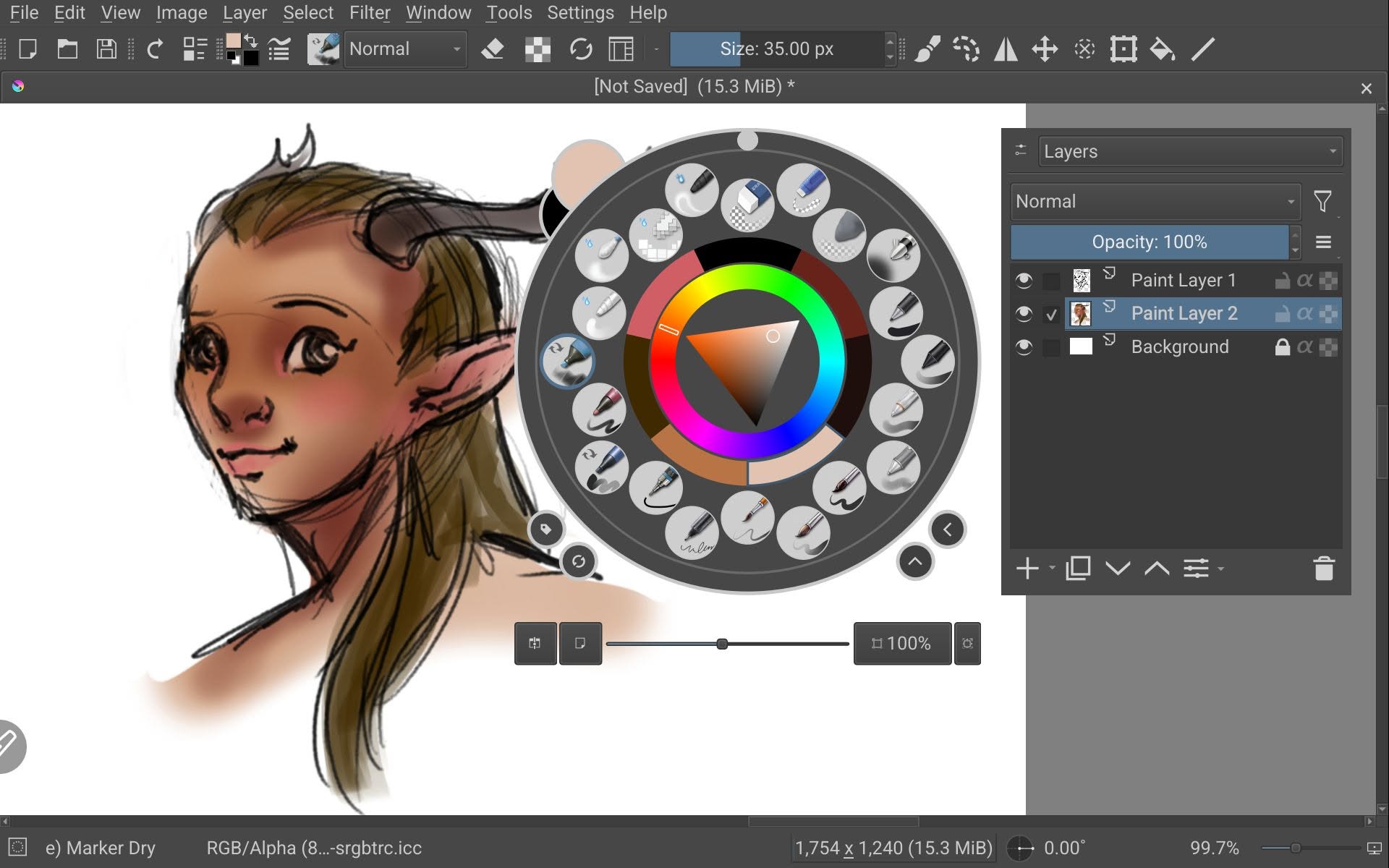
Revived my xp-pen notepad, and a few things to know with Krita; the menues and pop-up palette is annoyingly large. I don’t know if that’s the same with the drawing pad. I assume it’s due to the screen resolution.
The pen has one button, I set it to color pick. I have twofinger tap to bring out the pop-up menue, three finger to undo and one finger drag to change brush size. I couldn’t find if I had anything to toggle eraser, but I kept the eraser available in the top menue. I put one finger tap to nothing as it helps with palm rejection and accidentally undoing stuff. (I do prefer to have more buttons on the pen though)

I’ve also configured the top bar to just keep the tools I use frequently.

A larger screen would indeed be nice still. Especially because the toolbar and pop-up is so large (I have it on the smallest setting).

As for android that works well with Krita; I think any android tablet with a good pen, screen and specs will work with Krita. If it handles the other programs like clip in a review, it probably works with Krita just as well. And you can configure Krita to suit your needs. So you need to know what to sacrifice in budget-pen-display-capacity in the tablet.

My notepad only has 6gb Ram, it opens Krita a bit slow but once open it works fine. Large brushes does lag.

Watching ugee reviews - the palm rejection seems a con (but changing the one finger tap to nothing might help),the pen seems to work well for the reviewers, so perhaps it is the one you should go for. The screen size does seem like a good argument for it too.

I haven’t tried it though, so I can only share my experience with the xp-pen.

Screenshot from my xp-pen magic notepad and how Krita looks. (just a very quick test sketch)
1 Like

I think 'll try to be patient and hold off from buying a tablet for now, but I’ll keep an eye on if anything comes on sale. UT3 does come close to my needs, but I think the processor might be a tad slow for me.

The XP Magic Pad pen does seem to have exact Mediatek processor as the Ugee UT3, but XP Pen calls it by something different. Overall UT3 seems to be packaged better, but I feel as though it is lacking in diagonal direction and might be some latency issues for me. I see Samsung Galaxy Tab S10 Lite (CAD Version) has tilt with the pen, but I got the feeling the pen is too thin like my Surface Pro pen. I think I too use my Artist 24 Pro pen being so chunky and easier to hold.

1 Like

Sounds smart :slight_smile:
I’m very curious to what you think of whtever tablet you get, especially if you get the ugee as I haven’t heard about that before. I am curious about drawing stuff, and it seemed better than I assumed when I watched reviews on youtube.

Huion also has one, but it has gotten lukewarm reviews.
And wacom movinkpad 11 should give a very nice drawing experience (I have the 14 pro and I think it’s the same pen?) but the small screen and as a tablet (RAM band processor) it seems mediocre, especially for the price.
I will say I do not regret getting my movinkpad pro 14, it has quickly become my main drawing device. But it’s not budget friendly.