In advanced mouse setting, I found those setting, but there is no information on Internet.
Could anyone tell me what is that?
Where did you find it?
Is it a krita option??
Can you provide a screenshot of options?
Grum999
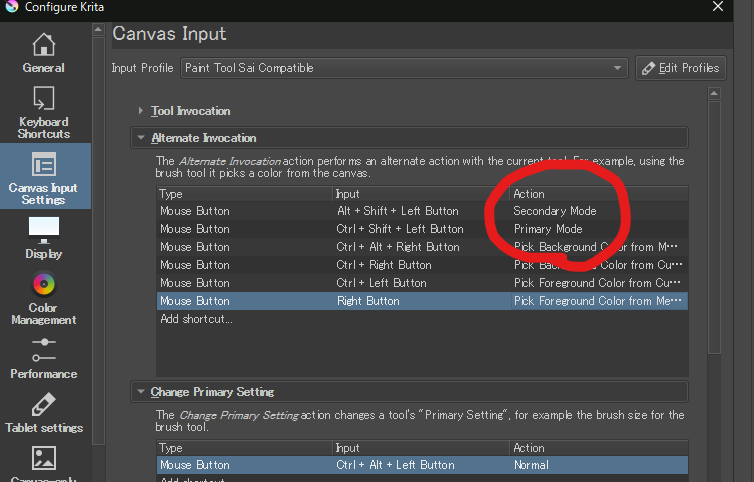
Oh…
I’m not really sure of what it really means.
I suppose that all tools have a primary mode (the default way the tool work) and maybe some of them have a secondary and/or tertiary mode, that allows to use it differently with a combination of mouse button+key
Trying to find an explanation, I see that even @tiar didn’t know the signification 
But it was 3 years ago…
Maybe someone else here have an answer to this interesting question 
Grum999
They are called the Canvas Input Settings and you’re looking in the Alternate Invocation group.
I can’t find any reference to ‘tertiary mode’. Where did you see it?
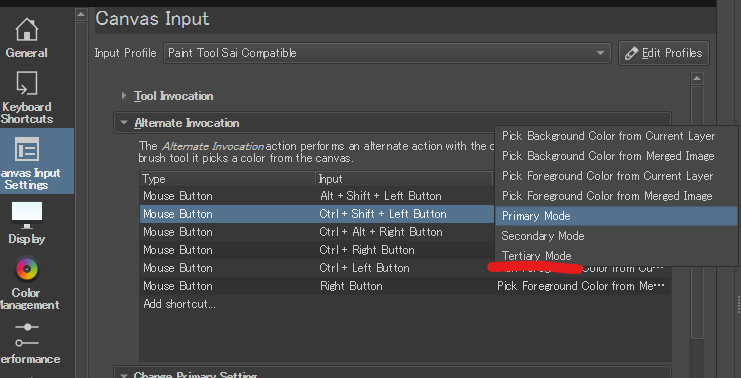
Wow, If Chief Bug Wrangler does not know it, few people know it. only who code it.
Maybe, it is some artifact or legacy something🤔
i only know them in terms of brush.
brush primary is size, secondary i think is opacity control , tertiary is probably flow control.
on other tools i have no idea.
Edit: seems my understanding is wrong. now im wondering what they are for.
Maybe when the entire structure of the Canvas Input Settings was designed and coded, someone made provison for Primary, Secondary and Tertiary modes (because they could) but nobody after that had any ideas for what to do with Tertiary mode?
Heh I just had to look it up in code too, actually, the only tool that has secondary/third modes seems to be the Colorize Mask Editing Tool, it lets you toggle the view options (hide the colorize result, or hide the key strokes).
But to make it more confusing, “Primary” (internally PrimaryAlternateModeShortcut) gets mapped to KisTool::AlternateSecondary, and “Secondary” (internally SecondaryAlternateModeShortcut) to KisTool::AlternateThird
Also, the “+ Left Button” doesn’t even work for hidden key strokes…
There doesn’t seem to be a tool that uses “Tertiary” (fourth mode) yet.