It seems it’s Wacom Intuos Pro Medium PTH-660. But ill happily listen to everybody’s opinion.
2 Likes
The tablet does look like a very nice tablet and it’s a good size too.
It’s Wacom so you should have no problems using it with krita, provided that you set its config/settings correctly and have the appropriate matching settings on the krita side.
If you’re using Windows then the drivers and control centre for it should be installed automatically when you connect it.
I believe that Huion will have an equivalent tablet at a lower price if you want to save money and Huion also have a good reputation.
3 Likes
I use a small Intuos that I really enjoy. Sometimes I wish I had gotten a bigger one or the Pro version but another consideration is how much desk real estate the pen tablet requires. I can put the small one on my lap or in a few different places on the desk.
If you look at non-Wacom pen tablets, be sure to read up on whether the pen needs to be charged.
2 Likes
I’ve been using a Wacom Intuos medium for several years, and I’m very happy with it. Not being a screen tablet, eye-hand coordination will be difficult in the beginning, but you’ll get used to it after a couple of weeks if you do stroke exercises.
3 Likes
Yep, that’s what I have and I love it!
1 Like
I’ll throw my 2 cents in here, maybe it will help someone.
I only buy new things if I must. I never bought a new Wacom. The last one I got, it was from a web ad, with local pickup so I could test it in person. My friendly chat with the seller revealed that he was a member of some local art club or art school, and from time to time Wacom makes new models available to them (either with deep discount or for free) and they get rid of the older ones. So, maybe ask around, because you may be able to find a great deal on professional grade tablet (good size, rotation and pen angle support, etc).
3 Likes
Wacom has better and worse models, but Intuos Pro specifically has one of the best possible pens, which is its main selling point in my opinion. It should also work without additional drivers on Linux.
My biggest gripe with Wacom is that – to me – their Windows driver looks dated and the UI is a bit clunky.
However, there isn’t that big of a gap between Wacom and other major brands. It depends on the model, but their respective top pen tablets will be almost just as good.
Regarding Pro Pen 2 (the one provided with Intuos Pro), it has a wide pressure range, and may feel really firm. When I switched from Huion, I had to adjust the pressure curve a fair bit to match what I was used to. And if you buy used, don’t freak out that the pen button feels barely attached to the pen  That’s normal. When you press down, the other end of the button sticks out of the body.
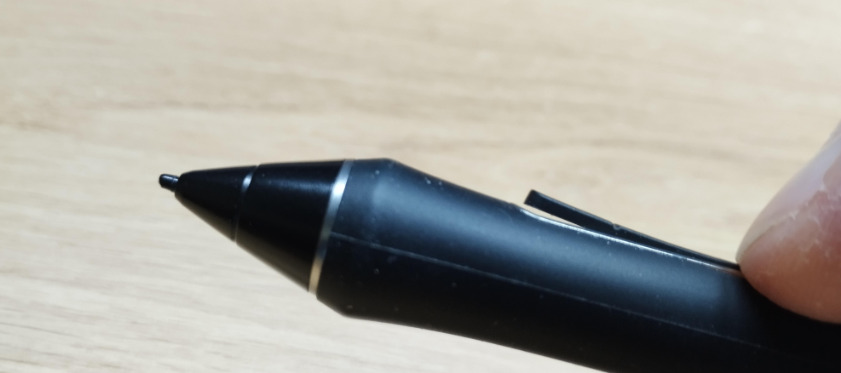
(photo by me)
2 Likes
@YRH If that photo was taken by you then please make a simple statement that it is your photo, either immediately before or immediately after the photo.
2 Likes
Thanks, amended.
2 Likes
I had Wacom intous a4 and Huion 610 pro. Huion. Huion. Huion. The best for such a low price!
1 Like
in my opinion one of the huion 13’s are pretty good thats what i uses and its been pretty goof.
2 Likes
You should make up your mind, are the 13’s good or goof(y)? Because this one letter, which could be a typo, changes the meaning of your sentence colossally …

Michelist
1 Like
You mean for a pen display? Yes, I heard the new Huion Kamvas 13 Gen3 is very good. But you need to be careful, there are last gen 13 models at a similar price and these should be avoided (because there’s no good reason to buy a worse model).
3 Likes
G-o-o-d
2 Likes
This topic was automatically closed 30 days after the last reply. New replies are no longer allowed.