Hi in the animation timeline I was able to change the “Image Compression” setting to 1 but I cannot find it now. Please tell me where it is. Thanks.
The only thing I can think of, in the animation timeline when you say, “Image Compression”, is the playback speed setting or the frame rate.
The frame rate is in the Animation settings menu, which is the icon with three horizontal lines, to the right of the onion skins icon, at the far right of the timeline.
If that isn’t what you mean then please explain more clearly what this ‘image compression’ setting does.
Hi thanks. It’s not frame rate. I am using 16 fps. The compression setting is for image compression and is set to 1 by default. It is to allow for lower file size at the cost of image quality. I did a test at setting of 1 and then a test at a higher setting and it made the image (animation more blurry). I cannot find the setting now though. crazy.
The only adjustable compression that would make an image more blurry is a .jpg compression and .jpg is not used in rendering an animation.
In the animation timeline, there are no settings related to the ‘quality’ of the final rendered animation video.
The only compression setting is for the Image Sequence or Both output options, which is .png files, which can be compressed with a factor ranging from 1 (large file size) to 9 (small file size). However, that is lossless compression.
(You can Render out an Image Sequence as .jpg but not when Rendering an animation video.)
That setting may be carried over for the intermediate frames used to produce a video output but .png is lossless compression so I’d be surprised if it affected the video output quality.
Here is where you find it when Rendering:
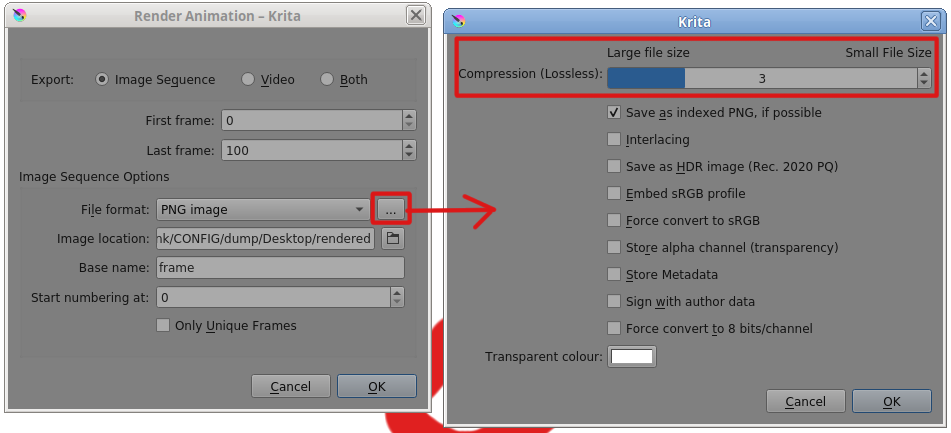
Is that the one?
100%. Yes it is. Thanks for finding it. 