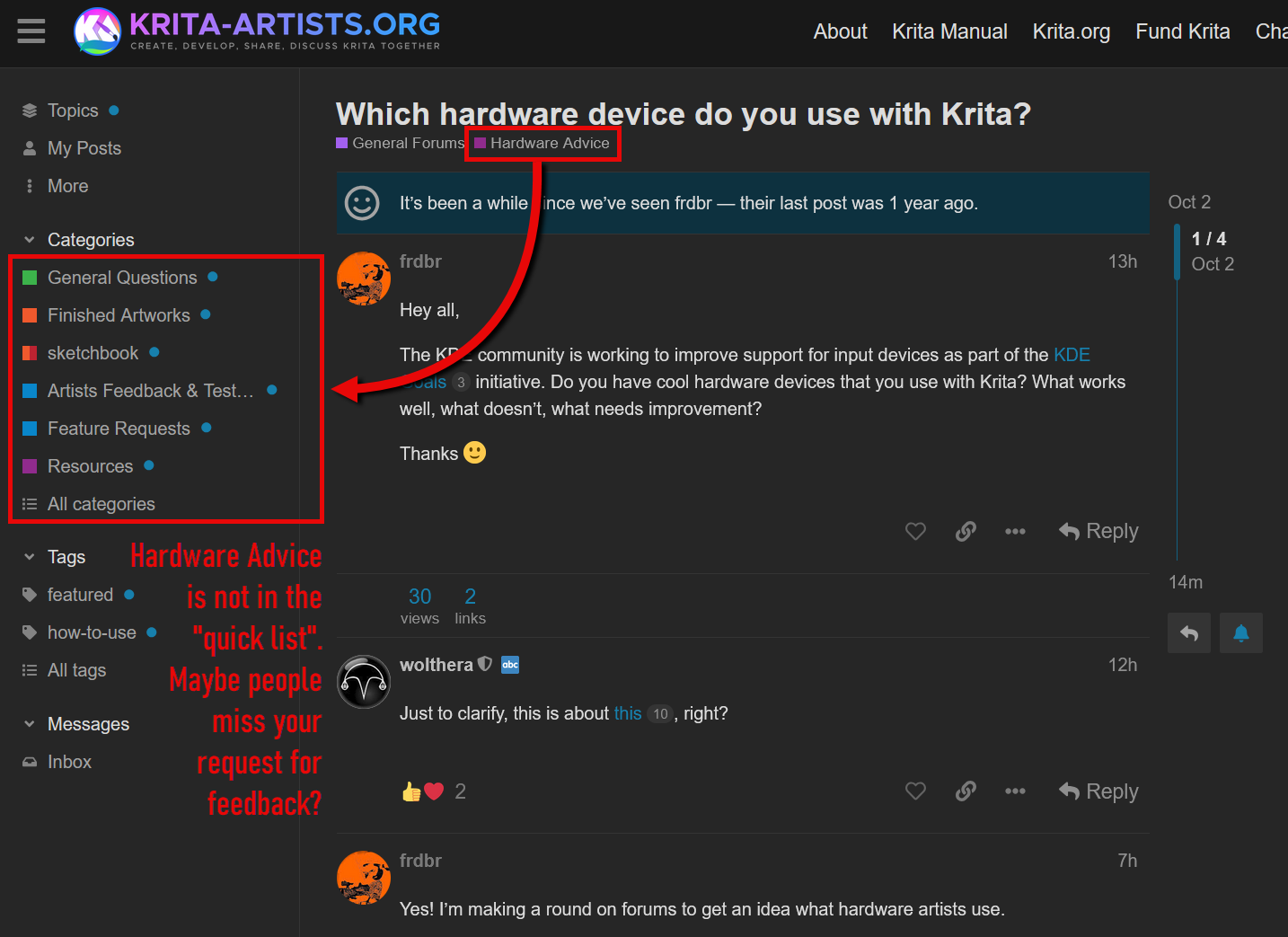
Hey all,
The KDE community is working to improve support for input devices as part of the KDE Goals initiative. Do you have cool hardware devices that you use with Krita? What works well, what doesn’t, what needs improvement?
Thanks 
Hey all,
The KDE community is working to improve support for input devices as part of the KDE Goals initiative. Do you have cool hardware devices that you use with Krita? What works well, what doesn’t, what needs improvement?
Thanks
Just to clarify, this is about this, right?
Yes! I’m making a round on forums to get an idea what hardware artists use.
My feedback:
System is:
A:
Remote controller and Krita
I am using a remote controller (TourBox Elite) to drive Krita functions like canvas rotate, brush size etc.
It works in general (no issues with the driver etc.)
I wrote a feature request regarding a limitation in the way how the remote controller and Krita interact with each other.
B:
Pen display and resizing Krita UI elements
Pen and pen display work in general (no issues with the driver etc.)
I made a support request regarding the difficulty to resize Krita UI elements (e.g. dockers) with the pen:
C:
Pen displays and right aligned popup menus and hint texts:
Popup menus and hint texts appear on the right side of the current pen position. I am right handed and so the menus and the hint text are covered by my hand and difficult to read.
Here is a feature request from another user describing the issue:
D:
Tiny UI elements difficult to hit with the pen:
Some UI elements in Krita (e.g. expand / collapse layer group) are tiny and difficult to hit with a pen:
Here is a support request about it:
https://krita-artists.org/c/develop/feature-requests/17trian
E:
Rotating around pen / cursor position instead of around center of canvas:
I have set a remote controller dial to drive the canvas rotation in Krita. There seems to be no way to let the rotation happen around the pen / cursor position instead of around the canvas center.
Here is a support request about it:
https://krita-artists.org/c/develop/feature-requests/17trian
Regardless of the above remarks - in general Krita works quite well with pen and remote controller.
— EDIT —
The Hardware Advice forum is not in the quick list on the left site of the web page. Maybe people do not click “All categories” and then “Hardware Advice” very often. Could it make sense to post in “General Questions” as well and make a link to the Hardware Advice post, to get more feedback?
Here is my hardware list
I am assuming this request is for linux users but I am not sure.
Yes, definitely, I sometimes forget that people use Windows 
Would it be possible to pin this post to make it more discoverable for a little while @wolthera?
@AhabGreybeard, @raghukamath, @Sooz, could you help @frdbr with this:
Michelist
I think my remarks might be valid for Linux as well.
I leave general pinning decisions to @raghukamath.
I only use ordinary and quite boring devices.
I have no cool devices, just aging ones that do the job. 
I’m coming from a lifetime of using Windows as both home and work stations. My current OS is OpenSUSE Tumbleweed KDE, x11.

My wireless keyboard and mouse combo receiver and the tablet are plugged into USB ports of the Dell display.
I use the setup for work and it works well enough. I really like Krita’s responsiveness to the pen. It’s a dream compared to how PS were (no tilt enabled brushes unless I really wanted it to stutter). It’s really nice, I rarely feel input lag.
I like how robust the distro is. My local power grid had severe issues this year, meaning lots of outages, but the OS always happily comes back without any corruption. And when I manage to crash the window manager it’s very easy to restart it without having to restart the entire system.
Ditto the software for the input devices, I’ve never had an issue with unplugging and plugging the tablet and the driver not kicking in, something that occasionally happened on Windows across multiple windows versions.
There are some hiccups but I think it’s software and driver-specific?
Setting up the tablet was easy, the settings are located in the System Settings which is nice. The only issue is that it’s one of these tablets with a wheel and a button in the middle. You can use the button to switch the wheel config to 4 different shortcuts for the wheel, but not in Linux.
There’s something about the pen and tool shortcuts in Krita that doesn’t quite work right sometimes. For example, activating the freehand selection tool with a canvas input shortcut then trying to open the popup palette when Krita has 2 windows open will cause the palette show up on the inactive window. It only happens with the tablet pen, the mouse doesn’t have this issue. It’s like Krita loses the position of the pen for a moment after a freehand selection.
The also system isn’t a fan of sleeping. I’m trying .conf files now (without success) but sometimes the display just doesn’t come back from sleep or it loses the second display until I reconfigure it. Because I got everything plugged into the Dell to keep the desk tidy I also lose my input devices, which sometimes confuses the mouse causing the scroll to stop working until I reset it. The tablet doesn’t mind the loss of connection though.
You should test wayland too. I think the feedback is gathered from a wayland perspective since it is going to replace X11 so future software needs to be tested against wayland to see if there is something missing.
Hey, so I’m one of the unworthy Windows users, but I keep bouncing back from Linux each time. Monitors are output devices, but in case this is still helpful:
 (with modes like fit, center)
As much as Windows sucks and its worsening progresses, this “basic” stuff is rock solid. It’s these mundane things that prevent me from switching for a personal system (I use Linux a lot for work, in terminal, single screen, etc.).
As for the tablets, being able to use Wacom and popular 2nd tier brands without proprietary drivers would be great.
Could you please provide the info for the xp pen device by typing this in the terminal:
sudo libinput list-devices
Could you please provide the info for these devices by typing this in the terminal:
sudo libinput list-devices
Hi @frdbr , in case it helps, here are my devices as reported on Ubuntu 24.04:
Device:           Wacom Intuos Pro L Pen
Kernel:           /dev/input/event24
Group:            3
Seat:             seat0, default
Size:             311x216mm
Capabilities:     tablet
Tap-to-click:     n/a
Tap-and-drag:     n/a
Tap drag lock:    n/a
Left-handed:      disabled
Nat.scrolling:    n/a
Middle emulation: n/a
Calibration:      n/a
Scroll methods:   none
Click methods:    none
Disable-w-typing: n/a
Disable-w-trackpointing: n/a
Accel profiles:   none
Rotation:         n/a

Device:           Wacom Intuos Pro L Pad
Kernel:           /dev/input/event25
Group:            3
Seat:             seat0, default
Capabilities:     tablet-pad
Tap-to-click:     n/a
Tap-and-drag:     n/a
Tap drag lock:    n/a
Left-handed:      disabled
Nat.scrolling:    n/a
Middle emulation: n/a
Calibration:      n/a
Scroll methods:   none
Click methods:    none
Disable-w-typing: n/a
Disable-w-trackpointing: n/a
Accel profiles:   n/a
Rotation:         n/a
Pad:
	Rings:   1
	Strips:  0
	Buttons: 9
	Mode groups: 1 (4 modes)

Device:           Wacom Intuos Pro L Finger
Kernel:           /dev/input/event26
Group:            3
Seat:             seat0, default
Size:             310x216mm
Capabilities:     pointer gesture
Tap-to-click:     enabled
Tap-and-drag:     enabled
Tap drag lock:    disabled
Left-handed:      disabled
Nat.scrolling:    disabled
Middle emulation: n/a
Calibration:      n/a
Scroll methods:   *two-finger edge
Click methods:    none
Disable-w-typing: n/a
Disable-w-trackpointing: n/a
Accel profiles:   flat *adaptive custom
Rotation:         n/a
It’s worth noting that pen doesn’t work without Huion’s proprietary driver. There’s even an error on top of the output.
event24 - HUION Huion Tablet_G930L Pen: libinput bug: missing tablet capabilities: resolution. Ignoring this device.

Device:           HUION Huion Tablet_G930L
Kernel:           /dev/input/event25
Group:            3
Seat:             seat0, default
Capabilities:     keyboard
Tap-to-click:     n/a
Tap-and-drag:     n/a
Tap drag lock:    n/a
Left-handed:      n/a
Nat.scrolling:    n/a
Middle emulation: n/a
Calibration:      n/a
Scroll methods:   none
Click methods:    none
Disable-w-typing: n/a
Disable-w-trackpointing: n/a
Accel profiles:   n/a
Rotation:         0.0
I am on Xorg on Debian 12, it says libinput command not found. I will try to test this in neon iso.
Also @Deevad wrote recently an article about this shortcut keyboard here - https://www.davidrevoy.com/article1047/configuring-the-xppen-ack05-remote-with-only-floss-on-gnulinux-my-investigation-and-workarounds
You can check out the comments to the blog post too it has some observations too
Okay testing under neon unstable iso I got this output for the command