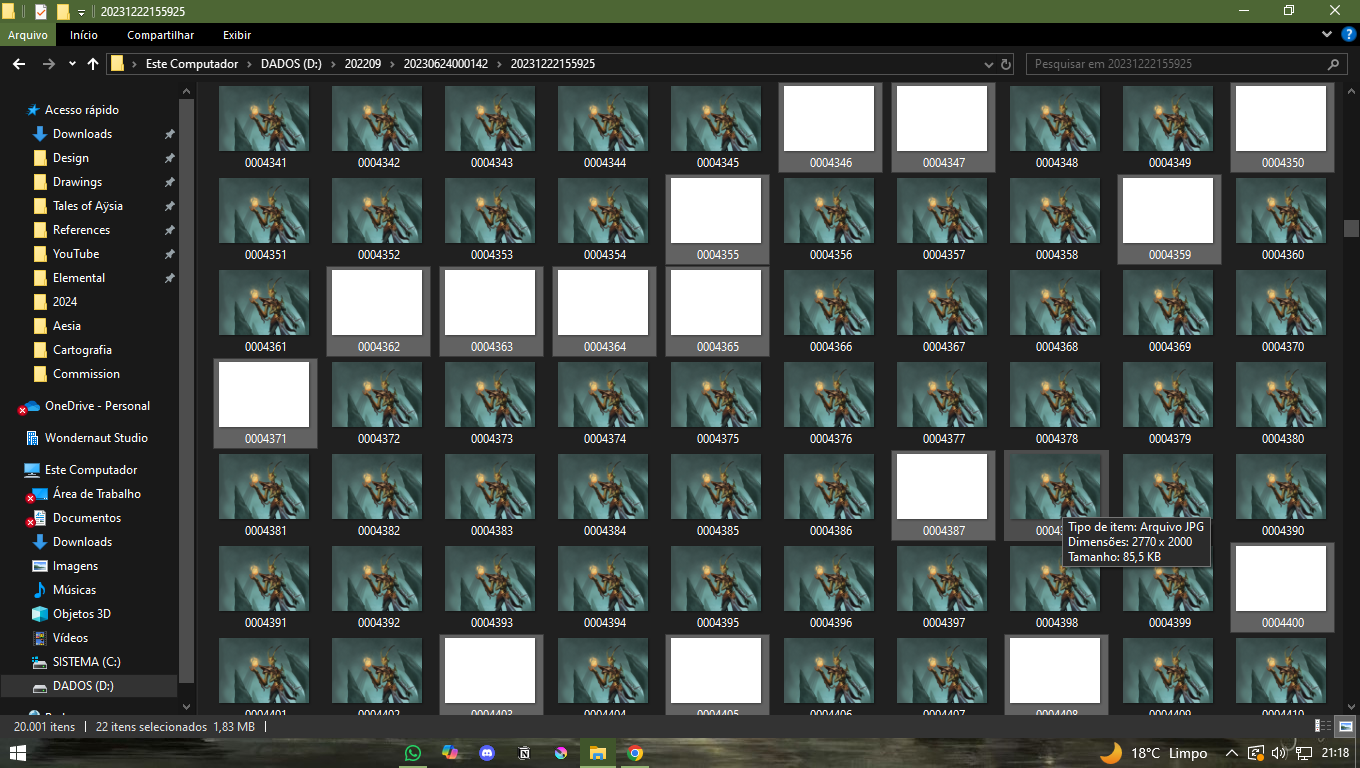
It has been a while since I noticed some white flashes during the recordings of my drawings, and didnt know what that was. Now I just found out these white empty frames in the middle of the frames of the process, and its awful to watch the video later. Does someone know what this is? How to deactivate? now I’m trying to delete each one manually, but I dont know how this will work, if the rendering will work without some of the frames.
OBS: it didnt work, as I imagined. deleting the white frames manually makes the exporting later not work. not sure what to do now
Hi @JoaoGGarin
I changed your title to something that will help you get assistance more quickly.
This has been seen by other people and there are some topics that describe this problem.
A useful topic to read is this one:
Problems with the recorder (blinking)
The cause:- That is uncertain. There is a formal bug report
476326 – White Frames/Missing Frames during Recording
That mentions possibly one way to stop it happening.
Something I can think of is to disable Microsoft One Drive if you’re using it. That thing can cause problems with any kind of activity involving creation of many files.
Repairing:- You can’t just delete the white images. The ffmpeg rendering process expects a complete numerical sequence of filenames to be present.
You can delete white frame images and replace them with copies of adjacent images that you then rename to replace the deleted filenames.
Or, you can delete the white frame images then use some kind of utility to renumber the entire contents of the folder in sequence.
There is a krita plugin for that renumbering method:
Plugin: Rebecca's Krita Tools
damn, thanks for that. After deleting manually the white frames, I imported the remaining frames to blender, and exported the video there. its the easier way I guess