Why do clone layers positions work this way?

I’ve been unwittingly spending a lot of time with clone layers of late.

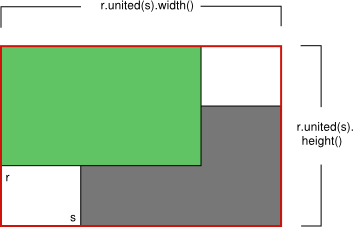
They’re odd. Their positions are relative to their source layers and I don’t understand why this works this way, which corner case it covers. Even their bounds are strange, they don’t reflect element bounds, they’re a product of their relative positions:

From a user point of view I’d like them to be independent so I can easily place repeatable elements wherever I want without having to correct their positions if I move the source. A bit like a file layer, but without having to create a file for every element in need of repeating.

You can’t even reliably set their position in the tool panel because depending on where they are and how many ancestors they have it’ll change to a different number as soon as you set it.

From a dev point of view it’s a bit of a nightmare. :joy: I’m working on an universal layer type arrange plugin. That’s a lot of layers moving around in various ways. Because clone layers can be clones of clones of clones their positions are relative to relative positions that are themselves relative and I find myself running up and down the ancestor tree to grab real positions and cover every corner case in which clone layers might present.

So I’m wondering: Why are they relative? Wouldn’t it be better to give the user the choice of having them independently positioned or making them “relative” by grouping them?

It’d give users greater control and solve the bounds bug.

2 Likes

What are you trying to achieve? Maybe you don’t need clone layers that much to do it.

As a user sometimes I want repeatable elements to create design options for clients, tutorials, etc. I find myself duplicating layers at the expense of the non-destructive workflow because I don’t want to deal with the counter-intuitive positioning and I also don’t want to keep a folder of hidden untouchable sources.

As a dev working I wish clone layers didn’t do anything by themselves other than updating to look like their sources. To clarify I’m working on a Arrange docker plugin that supports all kinds of layers, not only vectors.

I’m trying hard to include clones in the types of layers that can be aligned so users can align a mix of them and paint layers, groups and others, but when I think I’m done I keep stumbling on cases where clones unexpectedly moved because it’s not enough to consider where they should be moved to and what the immediate source does, you’ve got to think about what every ancestor might do.

If one moves and your clone of a clone is the first in a series of nodes being spaced equally, you have to counter the movement of that one ancestor, then the movement of the other ancestors in the other directions and list goes on, only to make it not visibly move.

And you can’t count on learning about all possible clones of a source layer by looking at the source, they don’t list them, you can only learn the immediate source of a clone. To deal with it right now I’m looking at the selected nodes, checking who is a clone, grabbing every source in their tree, building a list ordered by senior source >> clone children, storing their positions and bounds + the dimensions of the source (because clones can inform wrong dimensions too and I need them for spacing and a couple of alignment options), processing all nodes while skipping clones (to not be forced to go back and check if clones were affected in this round), then going back to the clones list and processing each one, forcing a refresh and testing for position again to see if it moved, doing a diff and applying to the clone where it’s convenient or recalculating target position where it isn’t.

Some alignment options are straightforward like aligning edges, but others like spacing nodes are incremental and require you to know node position and size when you reach its turn. So I’m having to store these target positions for clones too. Lots of lists to juggle, worse performance too because you can’t just create a list of properties and trust positions won’t change midway.

1 Like

It’s probably a bug :slight_smile:

For what I see:

original layer clone layer
position (0, 0)
bounds (0, 0) - (100, 100)
position (0, 0)
bounds (0, 0) - (100, 100)

Move clone layer to position (50, 50)

original layer clone layer
position (0, 0)
bounds (0, 0) - (100, 100)
position (50, 50)
bounds (0, 0) - (150, 150)
Should be:
position (50, 50)
bounds (50, 50) - (100, 100)

Move original layer to position (25, 25)

original layer clone layer
position (25, 25)
bounds (25, 25) - (100, 100)
position (50, 50)
bounds (25, 25) - (150, 150)
Should be:
position (50, 50)
bounds (75, 75) - (100, 100)

If I have time I’ll try during the week-end to check what happen in KisCloneLayer::exactBounds()
(I think the problem come from here, need to be checked/confirmed…)

Grum999

3 Likes

I’d like your post twice if I could! Don’t feel pressured to fix it, just knowing it’ll be looked at is a great relief because things are getting very weird right now when you have matroska clones.

2 Likes

I need to check, but it could be the explanation:

On a QRect the | operator act as an unit() of rectangles.

Then:

QRect KisCloneLayer::exactBounds() const
{
    QRect rect = original()->exactBounds();

    // HINT: no offset now. See a comment in setDirtyOriginal()
    return rect | projection()->exactBounds();
}

Implies that

  1. we retrieve the bounds of original layer
  2. we do a union of original bounds with projection bounds

The comment // HINT: no offset now. See a comment in setDirtyOriginal() let me think that having no offset is expected here :thinking:

Nevertheless this comment has been introduced with commit

So it’s seems related to try to fix a bug with transformation masks, it will give tips to try to understand the bug - probably there’ll be additional tests/check to do to understand how transform mask act on the original layer bounds + clone layer bounds to.

No, no worries :slight_smile:

But I’m curious and for me it’s clearly a bug and it seems to be a small bug I can try to fix.
I’ll time during the week-end to take a closer look on it and do some tests.

Grum999

2 Likes

Hi

Good and bad news.

The good news, it seems I have something: the bounds for the clone layer looks Ok now:

  • works if original layer contains an active transform mask
  • the values returned from Python script are Ok too (not visible in video but it’s ok :slight_smile: )

The bad news is, when an active transform mask is applied on clone layer, there’s a weird thing:

It seems the second transform is not working properly anymore :sweat_smile:
(I’ve already faced the second transform things here, but I didn’t really understand it, it’s too complex for me…)

Note: in this case, the bounds are totally wrong (empty bounds…)
I need to try to understand what happen here but I’m not sure to be able to fix this case…

Grum999

1 Like

Oh no. :joy:

I’m hoping you succeed because that bounds thing definitively seems like a bug even if it was introduced to work around other issues.

It goes beyond an outline visual glitch or values the user never sees, you can actually see it when moving a clone of a clone using the Tool Options for the Move tool. The layer will refuse to report the same position you just moved it to, making the panel useless in that case. :melting_face:

I hope too :sweat_smile:
The current bounds are clearly an issue.

Not in this case.
The way transformation mask are applied is complex (at least for me) but there’s a first quick and dirty computation (the one you can see before the clone content disappear) and then 3 seconds later, an asynchronous update is applied with HQ filtering.

I’m not sure why but with my version and for this second one computation, it seems the bounds are lost (bounds rect = (0,0)-(0,0) and implies there’s nothing to render).

I have to put debug point here and there, in “original” source code and in mine, to try to find the difference and where/why it happens.

I’m sure now that this won’t be fixed during the week-end, but at least I’ve made a progress :grimacing:

Grum999

4 Likes