
i’ve already watch some tutorial on youtube how to set up a ffmpeg folder, and i’ve done it. even though i thought i’ve made it, when i tried to export a speedpait/timelapse of my art it showing this notification errors. what should i do? im lost
The solution will depend on which operating system you’re on (Windows? macOS?..)
and the actual version # of Krita (go to Help > About Krita to grab the number).
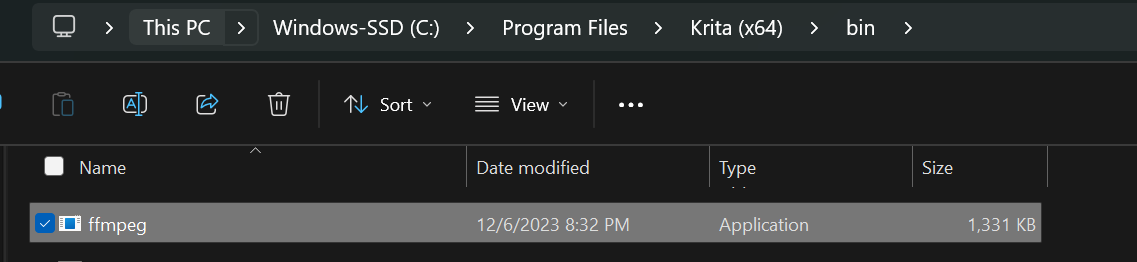
If you are using Krita 5.2.2 then FFmpeg is built in and you didn’t have to install FFmpeg anywhere. You will need to change the FFmpeg location in the export dialog to point to the FFmpeg.exe that came with Krita. It’s in Krita’s system files, in the Bin folder.
Hello @lovelycenn and welcome to the forum 
Yes, that is the ffmpeg that is built in to krita 5.2.2 so that it people no longer need to get ffmpeg as a separate task before they can make timelapse videos or animations.
Before you had that error message, you would have used the Export Timelapse window.
Please take a screenshot of that window and drag it out horizontally to include as much information as possible. It’s ok to paint out your Windows username before posting it here if you want to do that.
Also, provide a screenshot of the Recorder docker making sure to resize it, if needed, so that all information in it is shown.


I’ve just tried the latest Gyan essentials 7.0.1 build with Timelapse Export rendering as MP4 x264 and it fails with exactly the same error message as you posted.
The built-in ffmpeg inside krita, the one you’ve already found, does not have that problem.
The easiest solution would be to use the built-in ffmpeg.
However, I think that has a different problem if you use some other codecs. I can’t remember the details about that.
The Gyan essentials ffmpeg 6.1.1 also does not have the problem with MP4 x264 and you can get it from here if you like:
https://www.gyan.dev/ffmpeg/builds/packages/ffmpeg-6.1.1-essentials_build.zip
So, please try one of those possible fixes and report how it goes.
Note: If you have a timelapse with a small number of recorded frames, having Input and Video FPS = 30 will give you a very short video.
For initial testing with 10 or so seconds of painting, use Video and
Input FPS = 1.
You can make it faster by increasing that number.
1 Like


This topic was automatically closed 4 days after the last reply. New replies are no longer allowed.