I would wear one. Good quality cotton preferred.
Where would the money to make them come from?
I would wear one. Good quality cotton preferred.
Where would the money to make them come from?
from sales… not sure to say beyond the obvious there. that is not a big problem. I printed tons of custom shirts. you just need 1 for a order.
I’m painting right now and ran into common problem, drawing straight lines is clunky. To do draw one (if you came from photoshop) you would assume holding shift while clicking (pre/post) would make a straight line or diagonal. Having a dedicated line tool means either you find the icon to click on it every time, or use a hotkey which is one less key for some other action. To top it off you cannot resize the brush while the line tool is active, so either make a hotkey for resizing the brush or switch back to mouse for resizing (assuming you set shift+click to resize brush). Shift clicking with line tool does work…
These quirks of design interrupt flow, and probably compound to the point some will choose a different program. You can get around a lot of issues with python but modifying how the tools themselves behave is just not possible without a lot of extra study. Better get back to painting…
I think theres many reasons. I have fellow artist friends that have made some comments when I mention I mainly use Krita for illustration.
One of the main reasons is the “stiff” learning curve, specially when you’re used to other programs. Krita does most things any other application does, even more in some cases. But Krita does things in a different way opposed to the standard programs like Photoshop or clip studio. An example of this is clipping layers, Krita is the only art software where you must group llayersin a folder for the cliping where every other software works without that. For people coming from other programs this is a common pet peeve that for some is too annoying to get used to.
Also, this may sound silly but because Krita is free (as in price) many people have the incorrect idea or perception that Krita is a simpler and less capable program, as well as some people find the default UI to be ugly or “cheap” looking.
Those are some of the most common talking points I have seen when people ask why Krita is not used by more people.
But another thing I haven’t seen mentioned, is that not many people are aware Krita is also available for android mobile devices, at least from what ive observed.
I say this from my perspective as a Gen Z, it is a lot more common for Zoomers (specially late genZ) to draw on mobile devices rather than desktop computers because of how easier to access it is to get something like a phone or a tablet than a computer. With this, I think something that holds krita from being more widely used is that the mobile version is only available for android devices, but specifically tablets, there is no way to use Krita on a phone. I am aware theres reasons why of this, if I remember correctly, licensing is difficult on apple devices and having a Krita version for phones would require a complete rework of the interface.
So Krita can’t really compete with other software outside of android tablets, it is a very small market.
There is also the issue that the android application is just very slightly more limited than the desktop app, while everything that is available by default on krita is available, you can’t use plug ins on the android app, which in my opinion is one of the biggest advantages krita has in the desktop version.
Krita is wonderful and a very powerful tool. But sadly is also a program you need to learn how to use to be able to use at its full potential. Many great features Krita has are often hidden to the new users. And is also seen as a cheap and dated program due to its (default) looks, which ideally should not be an issue if the program works well and it keeps being mantained, but unfortunately it is a reason many people overlook it.
At least this what I’ve observed
Had a quick convo with an ex colleague from a few years ago. I left animation some time ago but got into chatting with them again lately.
One of the major blockers I reckon would be established workflows. Majority of industry clients they are in contact with tend to use specific programs (Clip Studio Paint is very dominant in East Asian countries it’s not funny) therefore for workflow compliance they just had to use whatever everybody else uses. To do something we view as trivial as changing to another application requires everyone else to do the same, and I don’t think this will change some time soon.
For solo freelancers however I reckon people have more freedom as they are not tied to a certain standard program everyone else uses, but when you need to work with other people and they use one certain tool, you’re expected to follow suit or risk not being able to meet project requirements.
Just my 2cents.
So here’s my 2c and a professional illustrator/enviro concept artist:
I want to love Krita, As far as FOSS goes Krita is an outstanding piece of software. But when you compare it to its two biggest competitors photoshop, csp, and procreate. I feel it falls flat in a few integral areas (for me)
There’s definitely a ton to like about Krita but I can’t give it a glowing review to anyone whose looking to do professional work. In my space I think if a lot of professionals or high profile artists are into a piece of software and talking about it the hype and popularity trickles down stream. I’d love to see Krita blow up and start getting more popular and bigger donations, but for me I’m not entirely sure I can see the vision for it to become the kind of software I’d personally like to be my main art software.
Another 2cents:
At least for transforming there is one setting that might help:
If one need a package to do both, this might be a hinderance.
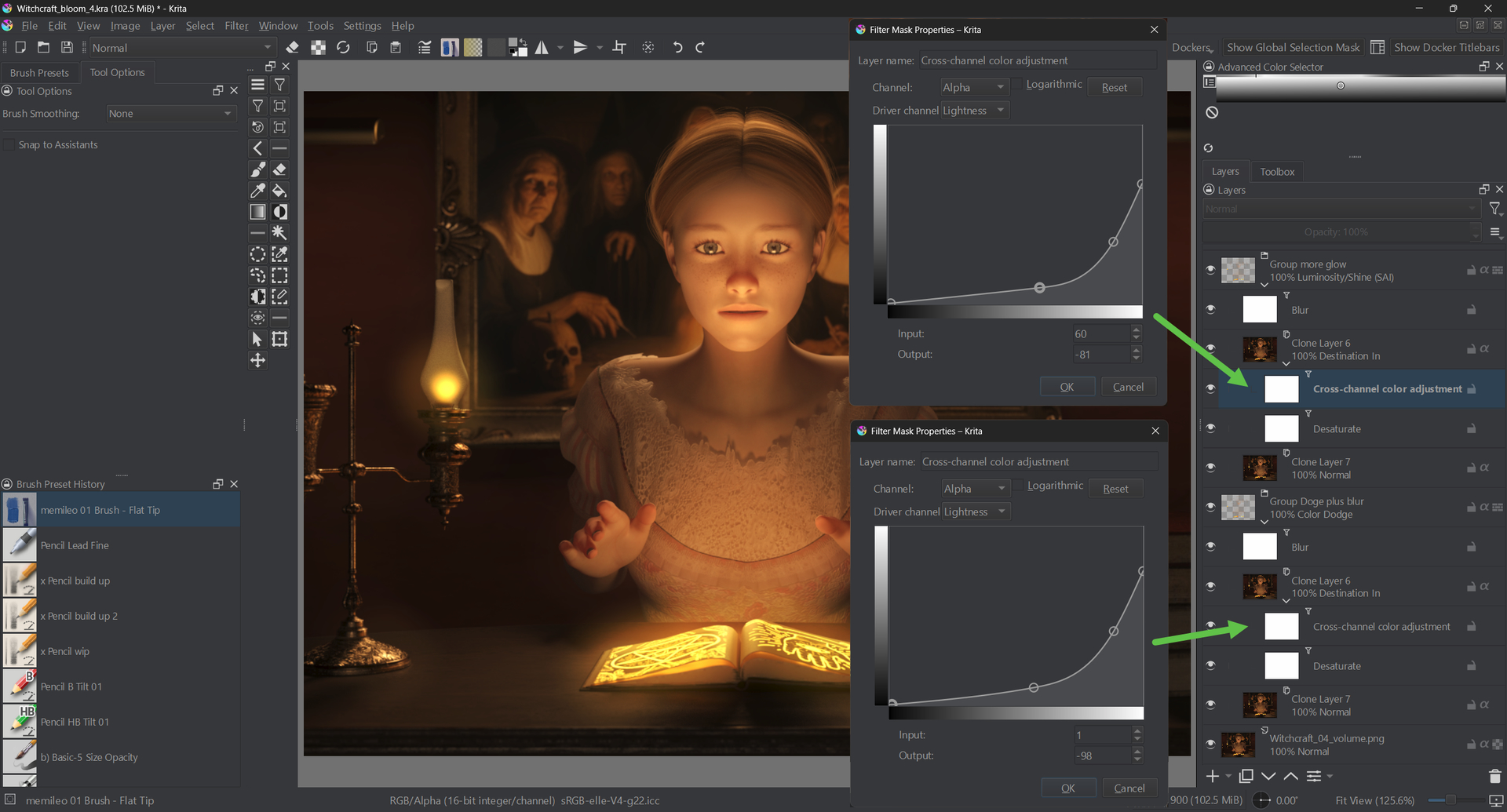
Some time ago I made a test with a render image of mine (1200 x 900 16bit integer) to checkout a setup for adding a non-destructive glow effect. I consider this a simple, non demanding task.
The setup uses blur filters and cross channel alpha luma masks.
This setup is so slow, that I wouldn’t use it for work (liquify tool etc. are a similar issue)
Example: enabling the luma groups:
(right click → watch in new tab or window to see the gif better / bigger - ignore the bad image quality, I had to compress heavily to get below the 3 MB upload limit)

The edits I try to do in the groups lead to the shown waiting time. This is an example of where Krita is just not the right tool for the work and let me choose other software.
CPU: Intel Core i7 - 10750H (6 cores, 12 threads)
Ram: 16 GB
Storage: NVMe SSD
GPU: Nvidia RTX 2070 MaxQ + Intel® UHD Graphics
As you can see, the CPU’s potential is not really used.
I assume most people working as designers / graphics artists and not specifically as digital painters need fast painting, fast editing, fast and fully featured text and fast and fully featured vector features.
Those people might choose other tools.
Then there is the group of tablet painters (pros or non pros). They have so many choices and some of them just have a better tablet UI and / or are available on the Apple ipad eco system.
Krita is free what makes it attractive. But, for example, the Affinity suit was below 200$ which, I think, was ok for most professional users (now, since the Canva aquisition, it is even free like Krita).
Krita is cool in its realm - digital painting - but, for me, it is not the choice to do work because painting is not the main part of it. And others, who mainly do painting, have so many choices.
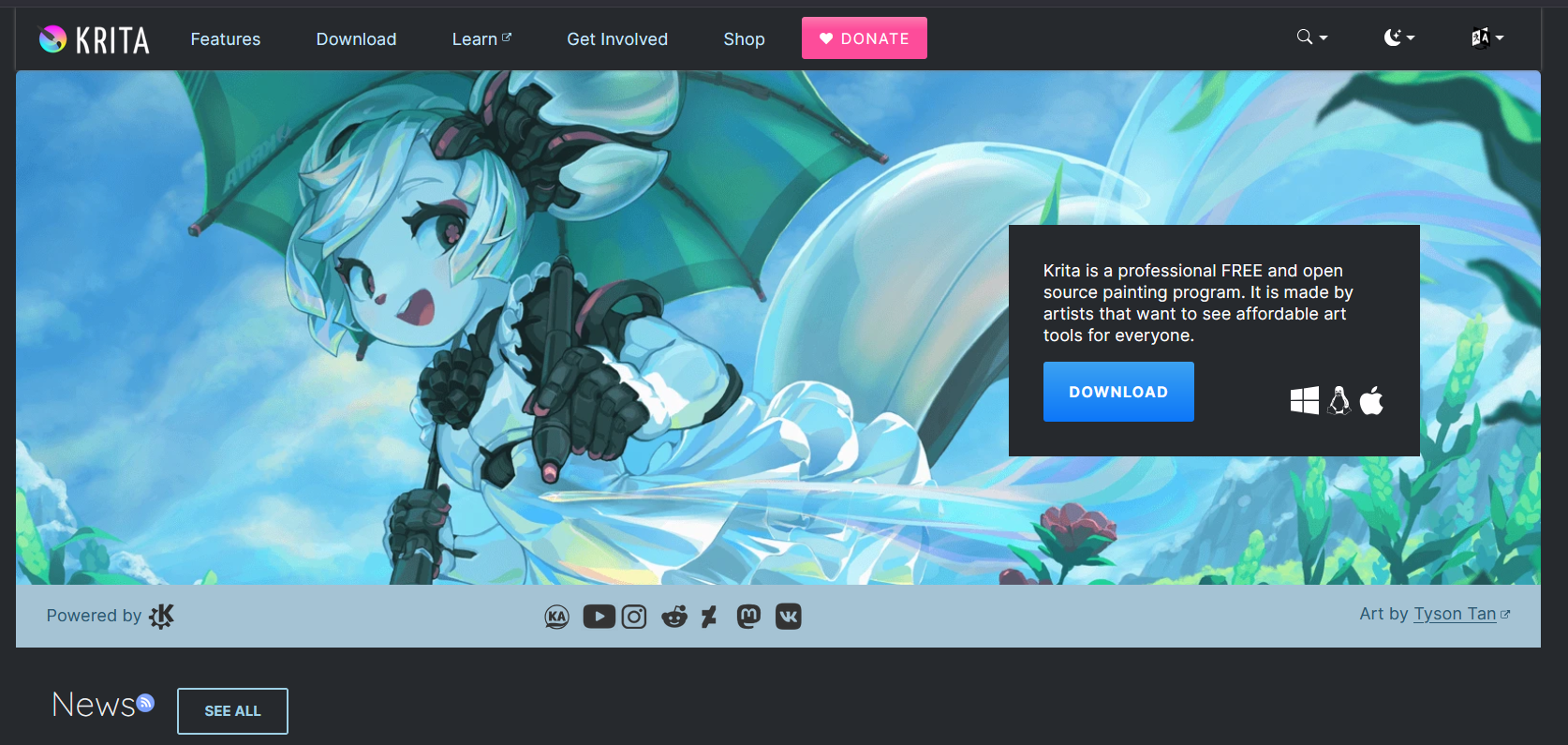
Potential new users - who are not yet into the details - see this when they find krita.org:
This is the “you can’t see your cursor” issue. I noticed it, when trying to use a pen tablet attached to the notebook. In my opinion, this makes painting with Krita and a pen tablet less fun than it could be.
I know, it is worked on, but this issue is there for years and might bother potential new users.
So, all in all, Krita is good in what it is mainly does - digital painting. But it has its quirks.
As the inital question was about “professionals” (do we have a definition of that term?), I think, for general purpose digital artists, there are more complete packages.
Nonetheless, I guess, the userbase of Krita is bigger than we think and a lot of people use it for doing paid work. It’s just that the small Krita team does not have a marketing department which spreads this into the world.
I forgot to mention one big positive of Krita:
It supports 16 and 32 bit images. I, for axample, can composite exr render passes in it. Most painting apps don’t offer this. But in 32 bit the slow editing is a limitation. In the end, I am using the mighty Davinci Fusion for this, but Fusion / Resolve are not very good at painting 
My definition would be that the artist is paid for his work. It would either be a fulll time job in some wage slave commercial shop, or living off art sales. A one time comission would be considered professional art, but the artist would not actually be a professional.
I was a professional frisbee player once upon a time, now I’m a guy who likes to play frisbee.
As a Zoom-zoom I agree on the aspect that more people are drawing on mobile devices as you don’t need to dump the dosh on a rig and then pay for a drawing tablet. I have a Samsung S9 FE+ I draw on it and use Krita. For desktop I have a Huion Q11kV2 I draw with.
But overall, the issues I see with Krita is the same with every other piece open source software. Open Source Jank disease. Krita may do the exact same things as some programs. But overall it’s confounded by the fact that it will be a wonky way to achieve it. It’s not bad like GIMP where you open the silverware drawer to get a fork and there’s a handheld router in there instead.
I’ll give an example. When using the colorize mask for the first time it was completely antithetical to how I’ve seen any other art program have a smart coloring system. I was expecting a lasso fill.
Okay, sure I’ll figure it out. I use the tool. I color. Then what next? There’s nothing that really tells you “You go to convert and change it to a paint layer.” I can’t reliably caveman it and go “Urgghh… Ugo go press button” I had a friend who couldn’t put it into words and I just told him “It feels like it was made by nerds.” and instantly he agreed.
With 4.0. with CSP. They added a warmth slider. Something photoshop had something similar to. Krita doesn’t have that, you can get the same effect. But instead of a simple option, you get the ultimate granular control which puts people off as that’s MORE stuff to figure out.
But at the same time, Krita has a slightly different flow it wants you to follow compared to other programs that more or less mimic one another. Krita heavily wants you to use the non-destructive editing features, and they have that down better than both CSP and PS
Agreed. Liquify needs a major rework.
I agree with this too. It links you to this forum and tells you to go from there. It’s the same frontend that the War Thunder forum uses. It’s not conducive as a download hub and frankly, if you haven’t used this frontend before. it’s VERY very wonky to get used to it. You get lost easily.
I forgot to add. The comic paneling is not good. You need a dedicated tutorial and like 4 layers, and once you set it. DONT TRY AND MESS WITH IT. Unlike CSP where it’s a tool with it’s own dedicated functions that automatically puts thing together for you whilst making it easy to edit it’s borders afterwards.
For Krita to do the same, you have to make it manually (Please correct me on this if there’s a way to make it automated), but with the comic preset you get the first one for free at least to copy and paste. Seriously the fact that you have this as a tutorial is good when you want to know how it functions. Sometimes you just want it to work instead of diagnosing why the panel is jank, where your border you can move one corner but the brush doesn’t go beyond the original dimensions of the border.
As someone returning to Krita after having used PS for a short time and CSP for a longer time, I think that what prevent Krita from being known and adopted by a larger community of users are mainly the following points :
- Krita doesn’t advertise much on it’s releases and roadmap, so it’s difficult to get an idea of where the development goes, and which are the new features and future development.
- It doesn’t have a very active, organized and dedicated place with clear video and text tutorials, organized by level and type of arts. The ones existing (this community and the Krita Youtube channels) are not very easy to grasp for beginners, because you need to sort of know what you’re looking for to be able to find your way to the ressource, (or have a lot of time and patience to go through it all). Total beginners will not know that because they never used a drawing software before. Having used other softs made my returning to Krita a great experience, but my first try when I was discovering digital painting for the first time didn’t convince me as the program seemed too complicated and overwhelming for a beginner.
- The manual is very detailed, but kind of complex as basics and advanced features are mixed, and not every part is translated.
- The interface is wonderfully customizable, but a few features are not clearly indicated or proposed by default and require to dig in the manual or search for plugins (for example switching from painting brush to eraser, or prevent dockers from docking, or how to rotate canvas using stylus just to name a few…). Someone using a digital painting program for the first time will not necessary think of checking the “if you come from…” other programs section of the manual.
- Importing ressources might be off-putting for people with little experience in computer skills and feel quite nerd-oriented. And resources are not centralized, since on the Krita Artist, you’ll be redirected to downloads hosted on multiples different places. What’s more, not all plugins have a clear description and user manual, while others are just in development phase.
- People that are put off by their first attempt to use Krita will move to other softs, and then tend to stick to this unless they run into limitation that hinders their artistic development.
- you hardly can import other softs brushes format “as is” and need to tweak them in the complex yet wonderful brush editor.
-The ratio of beginner artwork versus pro artwork is misleading, it gives the feeling that Krita is a simplistic soft with basic capabilities. And pro level art is really painterly, which might put off artists looking to obtain a more realistic style.
ok, I’ll stop here, these are the main issues that come to my mind when trying to answer the big question “why is Krita so under-rated and under-used by pros”. Hope this will help someone somewhere in making Krita more widespread…
(English is not my mother language, so please be kind regarding spelling and phrasing, sorry if some things are not very clear)
The thing that putted me out of krita for a long time and prevented me from using it as my main app is the lack of simple way to change brush hardness/softness. I’m mostly using a couple of brushes with opacity, size and hardness modification. It requires much more extra steps compared to Ps or CSP, where a simple slider is available ! I understand though that krita’s philosophy is different and more oriented towards mimicking traditional mediums, so I learned to use the blending brushes over time and I kind of manage to get a good workflow with that, but whenever I’m trying to convince other artists to use krita, I know the lack of quick hardness modification is the one that is mostly turning off people .
Professional artists often have a series of tools that they built themselves to facilitate their workflow. Take a look at how many brushes are being sold on ArtStation; they are a mere fraction of the tools that anyone who cares about efficiency will create (a large portion of them are not really marketable, so they just stay local forever).
Developing those tools takes trial and error, and it is not easy to switch. Switching software is a much higher leap than switching from a tablet to a screen.
So, for a pro (let’s say contractors, the typical people who care about working hours) to use Krita, they either have to begin with Krita (in my life, I have met not a single colleague using Krita, and I have seen maybe two hobbyists starting with Krita) or be drawn by certain features exclusive to Krita.
For me, the extensive support of Color Space is a big plus.
Correct optical light blending is a crucial part of my workflow, so even though I did not start with Krita, I have been exclusively using it for production work. (Another software I know that has similar features is ArtStudio Pro on iPad.) It is something that defines my intuitions about what color to apply with what tools on what lies underneath. But this is generally not a widely acknowledged feature, and guess what? Switching to optical light blending can break 90% of the tools built in standard RGB.
I also like the reference tools in Krita, but sometimes it is just easier with a multiple-screen setup. I used to use the comic book feature in Krita a lot, but I only use it to manage concepts for different projects, like a massive sketchbook. But primitive sketching has been taken over by mobile devices with endless canvas support, and semi-serious design work often happens in 3D space now.
I feel like I can never move away from Krita, but that is mainly because I haven’t opened PS or CSP for years… I imagine it would be the same for PS / CSP users.
In the end, it is all about workflow.
Yes, definitely! When a person changes to a different software, they have to learn a new workflow. I’ve done that a number of times, so when I switched to Krita, I had to “learn the ropes” just as I did with Gimp and others. It looks like people today don’t realize that. They expect everything to be exactly the same as what they’re used to. 
If there is really a strong incentive for the devs to push the popularity of Krita, things need to change. It is not like there is no model to follow; Ubuntu in this case is a good example.
Here is how it would lay out if I were the one doing it:
Step 1: Build a Premium Support Team Recruit your existing active users from, dare I say, this forum. In return for their contribution:
Prioritize their feature requests into a High Priority Queue, in contrast to normal FRs you get from this forum.
Use whatever amount of money you are getting from Premium Support to fund whoever is doing these prioritized feature requests in your team.
This creates a basic positive feedback loop. Such a team existing in the first place can give smaller studios a chance to use this software.
Step 2: Target Online Educators Doing things the old way, go for the students—and I am not talking about Universities. I mean online educators. There is this guy who is called Jama ??? (Sry I forgot last name), who worked for Star Wars. He has a very good workflow utilizing certain Photoshop tools in a unique way.
It is totally acceptable for a management team to reach out to him and propose implementing this tool properly.
Ensure it is not a niche use of an otherwise completely different tool, but something with an intentional behavior that the devs guaranteed.
By supporting his workflow, you convince him to use Krita in his course.
I would only go for Educators targeting a fresh audience, since basic courses have a lot in common and whatever the educator needs is probably already in Krita. But if there is a hole, you put his feature request in this High Priority Queue, facilitate his own workflow, and he will probably start using Krita in his course without you making any suggestions.
Implementation Requirements
Planning: Normal feature requests must not be ignored. Internally, there must be two separate queues with ppl working on them at the same time.
Communication: It would help to move some development activities to a more accessible place. The Premium Support team should be the bridge between ppl and dev, suggesting a more modern communication tool.
iPad Version: We probably need an iPad version since the number of students using iPads is just… high. (I know about the license and how Apple is such [redacted], but you know what I mean XD).
This is a lot of changes, probably goes against the idea of “developing Krita“ of many devs, this essentially turns Krita into a business, and I am not sure this is what I would like to see, XD. Personally I am very fine with the current status of Krita. But if popularity is something ppl suddenly deem the most important thing for Krita, then you already know what I think.
Something I don’t see mentioned here is about how influencers and popular artists are getting offered lifetime software licenses, or even more rare-fully sponsoring plan. I know that, because almost all the brands of digital painting software existing approached me in private email to offer me the first option, and in a single case the second.
So, to the question of this thread “Why is Krita so underused by professionals”: if you look through the lens of the online visible ones, you can get an element of answer.
That is so sneaky. But the best things in life are free.
Not sure if it was mentioned here before or not, but one of the main things that people complain about when i suggest switching to krita is the lack of optimization. And i dont just mean lag and whatnot, but ig ergonomics. There’s a million features but few of them are polished and easy/intuitive to use.
I personally don’t mind that, since i’m already kinda used to it, but to many folks the software just feels very very clunky.
Also- plugins. They add A LOT of functionality/customizability, and that’s the thing i adore the most, however unfortunately without plugins krita isn’t great… its good, but not great. And i think it’s an issue on of itself. Perhaps, devs could look into integrating some popular plugins into vanilla krita or at least have them preinstalled?
TLDR:
The bad- lack of polish/ergonomics of existing features
The good- plugins are easily one of the best features of krita, but most users won’t even know that they exist (also imo some of them are MUSTHAVES, and elevate krita’s experience to great and, perhaps, should be considered to be preinstalled/integrated with vanilla krita)
Perhaps if you named these “must haves”, that would be helpful. 
(I don’t have any plugins on Android. With Android, the plugins cannot be installed. I just use Krita to draw and paint like I would in real life).
For sure!
Shortcut Composer the pie menu alone makes this plugin solve most of the krita’s chunkiness for me, although it takes some time to set up
Krita UI tweaks allows for several tabs in one window, which is a feature that krita doesn’t have, unlike most popular drawing software out there.
Tookit Pro - personally, i use only shortcuts (and pie menus) but there’s a lot of folks, especially newer to digital drawing that will find this plugin life saving. I think Android users especially would love to have it.
And more…
Of all plugins i use i think those three have the most “must have” status of all
Krita feels slow to launch and load files. Compared to when I used SAI or CSP, it’s quite different, and I often wish it were faster. Of course, reducing plugins or brush bundles would speed up startup, but I don’t want to do that.
Just like with game software, I think long loading times affect the user’s mood.