Hi
I’m facing a strange behavior when using the line tool.
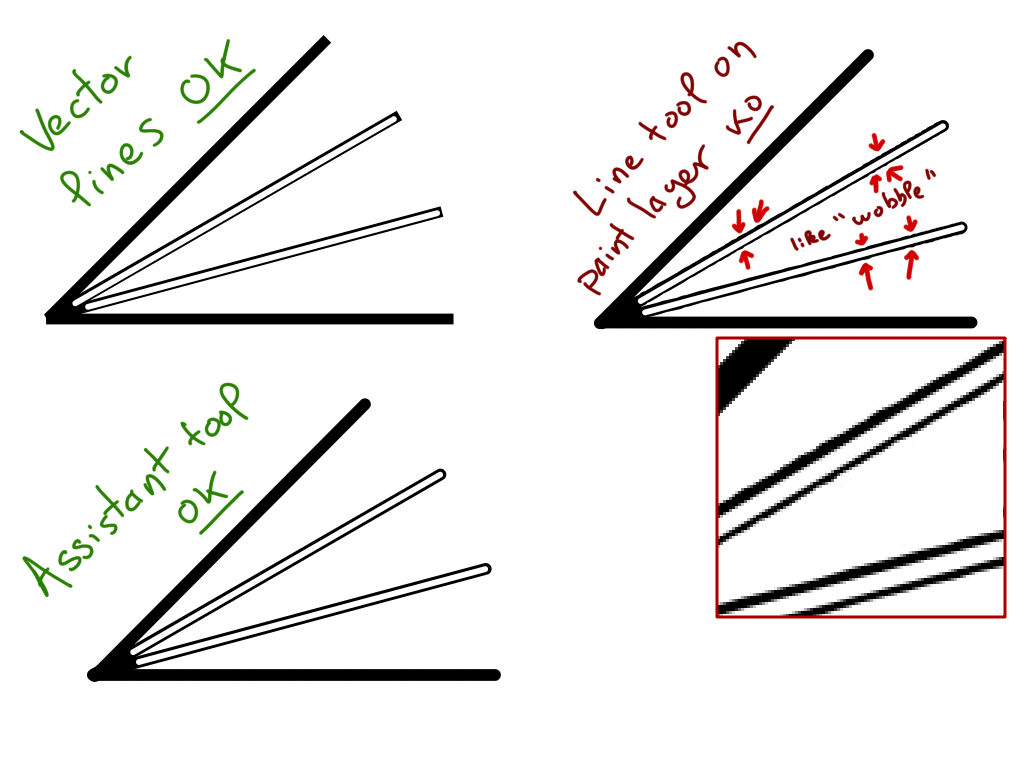
On paint layer, line are “wobbled” (not sure about term in english… but the lines are not straight)
- Line tool on vector layer, lines are perfect
- Use of assistant tool (ruler, parallel ruler, infinite ruler) on paint layer, drawn lines are perfect
- Use of line tool on paint layer, lines are wobbled
Example (need be looked at full size)
White lines inside black lines allows easier comparison of result:
- on left side, width of black line is constant
- on right side, width vary
I’m using Krita 4.2.9 Appimage
Not yet tested on 4.1.7, 4.28, 4.3.0 and 5.0.0 to compare (will try tomorrow)
Grum999
This is a known bug that fill be fixed in the next version. You can either go back to Krita 4.2.8, or try the “Krita Plus” download from the website.
1 Like
Ooh yes, that’s this one 
Thanks.
I’ve to take the reflex to search on bugtracking system.
Grum999
 You also have to remember to include closed bugs in the search because bugs that are fixed for the next release are already set to closed. I sometimes forget that it defaults to open bugs only and then I’m confused that I don’t find a bug that I know exists.
2 Likes
I’ve made a search on bugtracking system, it took me time to understand how to define advanced search to find the bug, but I finally found it (yes I just have to click on link you’ve provided, but my goal was to be able to find it by myself in bugtracking system to understand how to do a search :))
And I tested the lastest 4.3.0 build, the problem doesn’t appear anymore 
Grum999
2 Likes