Hey folks,
I’ve been using a 13.3 pro tablet since Christmas 2019, and my first year using the device was pretty smooth, but then issues started to pop up.
These days, whenever I plug the device in, I encounter issues after a short while of use, the device stops responding, so I unplug the USB from the computer and reconnect and it will work once again. Give it another short while and the same scenario will happen, or the device this time will loose it’s pressure sensitivity and the button configuration becomes messed up, or finally the device won’t work at all and I’ll have to restart the computer to get things working again.
Initially I thought this was a hardware issue with my cords (and perhaps they do still play a role in the issue where the device becomes unresponsive) but now I’m pretty certain this is mostly a driver and computer issue, the device will become unresponsive even if I just let it sit there without touching any cords. I’ve tried uninstalling and reinstalling the driver and the issue still continues.
Anyone have similar issues? And what did you do to fix it, or at least mend it?
I would say check what background apps is running on your pc with task manger, if it hardware though depending on the pc/laptop you might have to dust it.
Try also installing an older driver since newer drivers can be flawed sometimes or check if your windows ink is on.
It been a while since I last touch an xp pen tablet so my advice might be bit outdated/flawed.
though drawing tablet wise life span should be least 5 years granted.
I feel you could be right about other drivers needing updating, so I’m gonna find out what I can do. Dusting is a good idea too, but I’m pretty sure this is software more than hardware… Though I do hear that the quality of Xp-Pen tablet cords are rather poor.
I sent Xp-Pen service an email about my problem, and they got back with me, they sent me a zip with an .exe code tool to fix the problem, I’m a little scared to use it just yet as I don’t want to make the problem worse.
No worries, I’ll use it after I try a few other things, when I find a fix, I’ll let you all know.
Alright, before this thread gets closed let me give an update on the issue.
So I tried the code tool provided to me by the XP-Pen service team, I was a little scared to use it at first, but it was actually very easy to use and had good instructions. This is what the instructions describe:
Code Tool Operation Manual
Notes: To solve the pen pressure turning off suddenly; express key being unresponsive temporarily; the cursor jumping to primary monitor without reason etc. caused by USB auto-reconnecting using UG901 chipset, we will send special command to make sure the device permanently stay at the 02 Channel until resending the reverting-back command.
So I followed the rest of the instructions, went fine. I reset my computer and hoped for the best.
Well, it didn’t fix my problem, not exactly anyway, the tablet still become unresponsive for a period, it may have helped a little? The tablet has stayed responsive for what feels like longer than before… So this leads me to believe that the problem is either: Software on my computer causing the issue, or, Hardware such as the cords or even my computer USB slot malfunctioning.
While my issue may not be fixed, I hope this thread is useful for someone else with a similar issue, try contacting the XP-Pen and they should provide you with the same tool and it may work for you.
If you are using Windows, it is possible that windows is trying to force its touch screen software on your drawing device, often breaking it.
replugging it back in like you do, is telling Windows " a new device is here, lets use its requested drivers" So it works again briefly, until the cortana ‘mess’ decides, " hey wait, this isn’t a windows product, force that on the device" thus, breaking it again.
I often would disable the windows touchscreen things and my device woudl be fine until Windows ran an update, then everything woudl break again.
Just a guess, but it seems to happen more than not.
See if disabling the touch screen stuff in Windows helps.
I used to love Windows, but… that changed with all the non stop forced updates and forced cortana issues with windows 8, 10 and 11.
So here’s the thing, the Xp-Pen cord is a multi-cable, with a Usb and Hdmi plug that need to connect with the computer. My laptop on the left side has 1 usb slot and an HDMI port, the right side has an additional two usb slots, I can only plug the tablet in on the left as that is the only place with both the Usb and HDMI port, so no, as of now I’ve been unable to try a different Usb slot.
I checked my device manager, there is no “HID-compliant touch screen” on my computer to disable. I assume this is what your talking about?
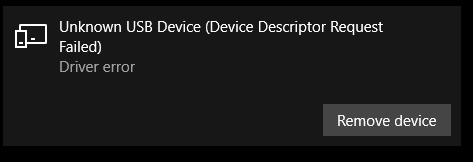
I did realize that my problem still seems more likely software related, whenever my device looses connection I can see in my settings-devices the tablet is under Device Descriptor request failed.
yes I cannot recall what I was doing, to be honest something with surface pen in windows 10 ( I dont even have a surface device but it kept turing on and trying to take over drawing monitor, which breaks the pen ) I havent been on Windows 10 in a year more or less, and stopped using windows for art. ) on linux now )
Sorry I cannot give you much more than a direction of this. I Have some memory problems with my diabetes and other problems these days.