Type of device* : Display Tablet
Brand and version of the device: XP Pen 15.6 pro
System** : Linux
Description of the issue (you can include screenshots): Originaly after changing to linux I found Krita did not register my tablet. I found that I could get it to work by using an older version of the tablet’s driver.
My operating system has updated to a new version and the issue has returned, but the old driver is’nt helping anymore (I have also tried using the updated driver as well).
A more visusal description being that it registers no form of touch and seemingly “replaces the cursor” with a static form of whatever the system last displayed. The moment I no longer have Krita as the active window it works normally.
If it’s not another issue with the xwayland package, have you tried using OpenTabletDriver?
Yes, and I have not been able to get it to function either, in any capacity. When I tried it my tablet simply didnt function at all.
Well, you could then try to check what version is xorg-x11-server-Xwaylandof your distro is, if it’s 24.1.10-1 then it’s pretty much the culprit, either try downgrading or upgrading it
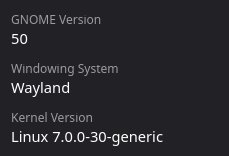
it’s on Wayland but my version numbers are completly different
Version: 50.1-0ubuntu2.2
oh no no no
I’m talking about the package, not the OS/kernel version
Try running Xwayland -version in your terminal, should give the proper output
ok how do I go about downgradeing or upgrading my wayland version?
im on Xwayland Version 24.1.10
yup, there is our culprit; I need to refresh my memory cuz, iirc, someone else had this issue before, and Ubuntu makes downgrading stuff a bit bothersome
It’s weird cuz it has been a while; the newer versions should be available atp
Maybe try apt-get update && apt-get upgrade to see if your system somehow missed it
EDIT: nvm, apparently that’s the most recent on Ubuntu stable
Thank you very much! It works again.