Hello! I’m a bit new here, sorry if I’m a bit lost :,) Is it possible to make the bundle downloadable? I’d really like to use them 
1 Like
Hello @Classicin, and welcome to the forum!
It is downloadable without issues from Google Drive, at least if you have access to the linked Google Drive pages from the opening post.
Here you can see where you have to click in order to download it:
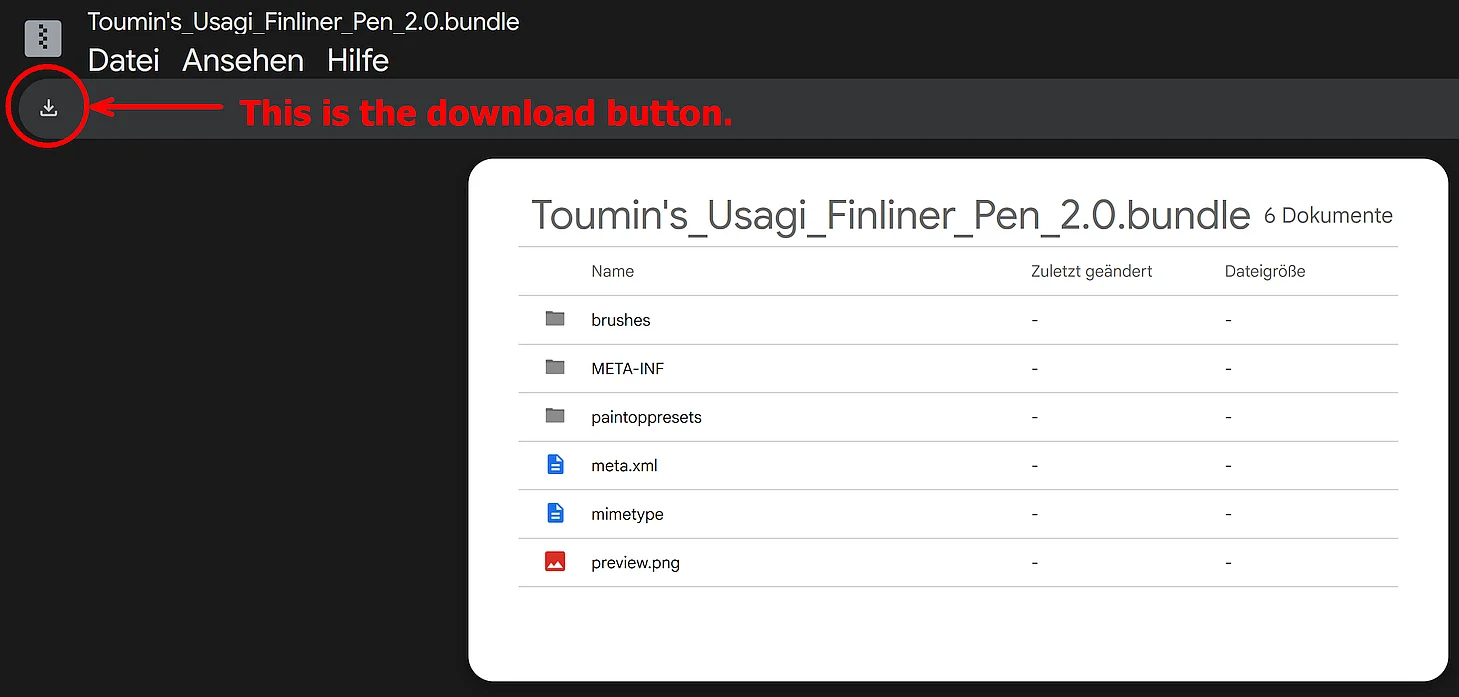
Every few years Google changes the look and feel of its download page, but the view of the download button was never fundamentally changed, only its position.
If you can not access Google Drive at all then please drop a line and I’ll make it available to you via other cloud space providers.
Michelist
1 Like
Hello Michelist, thank you so much for the speedy reply!
I found out what kind of problem I had. turns out my google drive wouldn’t read the file and made me use an other web viewer. I just needed to go directly on my drive and downloaded the file thanks your help! Time to draw some landscapes :))
2 Likes
I hope you like them and find them useful
I had some trouble downloading from google before too, before finding that download button. The first instinct is to click the file..
Thanks @Michelist for helping out!
1 Like
I can believe one of the “big tech corp in the world ever” pass this screen as usable.
1 Like
Im unsure if this is something I can easily fix myself, but I’m somewhat knew to krita and I’ve just started using it. I successfully downloaded the brush bundle, however, the only issue is that everytime I use of of your brushes, the color do sent to all the way to the color I have selected. For example, the color I have selected with be pitch black but the color that is drawn is grey. Ive tried to use pressure and even go over the same spot multiple times but the color do sent change. I don’t know if this is something I can fix in the brush setting or what.
One of the pencils are set to multiply but that gives a darker color.
Is it one of the smudge brushes? Does it become darker if you press harder or paint over a dark color?
It was pretty much all of the brushes other than the blending brush, but I think it might be something with krita itself. The color did get darker but it never got to the color I had selected, I will probably figure it out in a minute or two
Ok, because those brushes blend from the color below, so you might need to press hard (or change the pressure curve). They’re supposed to be more painterly as if painting a la prima.
But they get to the right color eventually for me…
I’m afraid I’m not really an expert either though. You could show how it looks when you use them and someone might see what’s wrong.
Just to make sure, you have full opacity on the layer?