For some reasons, the themes are not working for me even though I did the process you recommended :c
Hi, could you elaborate? Also, did you restart Krita after putting the files in the color-scheme folder?
For some reason, the themes don’t show up when following the process in your previous post, but I fixed it! And sorry if it reads a bit off, English is not my first language.
It’s alright, english isn’t my first language either 
I’m glad it worked out, but could you tell me what did you do to fix it? Maybe I need to update the guide
I think the mistake was more mine, since I’m a newbie using the program. However, thank you very much for the themes, they are beautiful! 
1 Like
I love the dark CSP color theme! Thanks for making it!
1 Like


There is a way to colour scrollbars. I found a python script that goes into the Ten Scripts area. Maybe not part of the themes presented here, but I find it quite a bonus.
copy the text into a *.py file and save it somewhere. In Krita, Tools->Scripts->Ten Scripts, and point to the file.
from krita import *
stylesheet =
“”"
QScrollBar {
background: #2cd2ee;
}
QScrollBar::handle {
background: #0000ff;
}
“”"
qApp.setStyleSheet(stylesheet)
1 Like
Hi. I just downloaded the themes and wanna apply it in my krita. You said go to manage resource and open scheme color. But I don’t find the option. So how to fix it? Please someone help cz I really wanna change the color of my krita
1 Like
Hi 
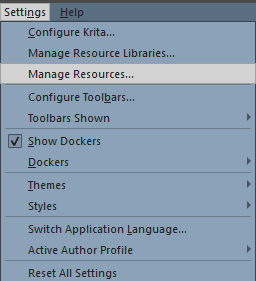
From Krita menu (at the top) > Settings > Manage Resources
And at the bottom of the Manage Resources window > Open Resource Folder
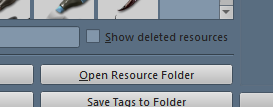
It will open the Krita resource folder in your system and you’ll have to open from there the color-schemes folder.
2 Likes
I opened it and the folder is empty. Should I put the themes there first?
Yes, you have to copy the *.colors files into the folder color-schemes after you got there via @Skess01 description, so via ‘‘Settings’’ >> ‘‘Manage Resources...’’ >> ‘‘Open Resource Folder’’.
But, you have to unpack them before from the ZIP archive they are in. Did you do that, or do you need help how to unzip such a ZIP archive? Because this ZIP archive is only a container to transport them in one package, for instance over the WWW.
Michelist
1 Like
Yeah I did it. Thn wht should I do?
You did what? Open the resource folder and then, in the resource folder, open the folder color-schemes?
Or unzipping the archive before dropping the colors-files it holds can be dropped into the color-schemes-folder?
Always think about that we can not see what you are doing, and we can’t read minds either, so it is very helpful to give more precise answers if there is more than one possible answer.
Michelist
Ah right I didn’t tell. Sorry my bad, I forgot. I did all what u said. Unzip the files then copy it, open manage resource and open resource folder.
Okay, after copying the files into the color-schemes folder, you have to close possible open dialogs and must then restart Krita. After restarting Krita, you will find the themes in Krita under ‘‘Settings’’ >> ‘‘Themes’’.
Michelist
Okay I did it and almost got shocked cz it’s very much  okaaayyy 10q very much friend!
1 Like
If you need more themes, there are ~ 250 in total from that I know - and I’m a resource addict.

Michelist
Ohh dangg.. 250?? I’d like to explore then. Oh one more question. If I wanna delete the theme, I just delete them from the color schemes folder and restart krita?
For the themes, you can search our Brushes and Bundles category in the forum, most of them can be found there, but if I remember it correctly, I’ve got a few from other places. And to tell the truth, there are over 10,000 themes you can use for Krita, because most themes for the KDE desktop are compatible with Krita, and if you are “desperate” enough to sift through them, you can find them on KDE - pling.com.
To delete a theme, deleting its *.colors file is the only way.
Michelist
1 Like