Dear Krita devs and Krita Community.
I am writing this to request about making the simple ruler tool or Line Tool,
“more advanced”.
Right now, the Line Tool flashes as you first drag and create it, and leaves
a rendered line based on the input of your pen.
If not the line tool, you may have to use the “Drawing Assistant > Ruler or > Parallel Ruler”
tool to draw.
-
Using the Line tool, you always have to drag and drop using pen for absolutely each line.
The use case of drawing perfectly parallel lines is impossible/uncovered with the
Line Tool. -
Using the “Drawing Assistant > Parallel Ruler” tool, you can finally draw perfectly parallel
lines. And then press Shift + A, then change the configuration of the assistant if you suddenly
wanted to changed the direction of the line, switch back to the brush tool, and continue
drawing parallel lines.
The workflow with these is nice, but the approach feels a bit rigid or limited.
Why?
- with the Line Tool, no need to explain that we can not draw perfectly parallel lines.
This tool is not made for that use case. - with the drawing assistant, you always have to press buttons to get into the assistant
setup first and switch back again to brush mode with another button before continuing to
draw.
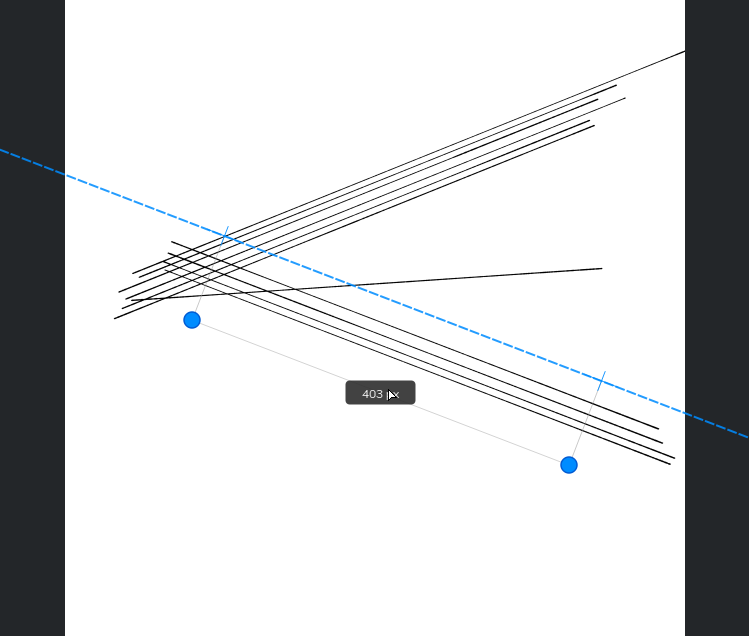
We could improve further the ergonomics of this by introducing a ruler tool, or “Enhanced Line tool”, inspired from **Leonardo’**s ruler tool.
For reference, please check this post : Ruler tool - UX Inspiration / Reference
Basically, we could handle all the use cases for
a “line + parallel line tool” with the least amount of operations possible by, sort of, “merging the Line Tool with the parallel ruler tool”. And fuse them into an “Enhanced Line tool” which functions
as described in the referenced post above( UX Inspiration / Reference from Leonardo; link
provided above ).
Example of usage :
- the UX shows a ruler guide with 3 manipulable anchor points( center, and 2 endpoints );
- you first click and drag to activate the ruler;
- after activation, you manipulate one of the two end points to modify the ruler’s orientation;
- the distance between the two end points can be modified but there is a minimal distance of about a few pixels( 82 pixels; that distance is purely suggestive and doesn’t constrain how long you can draw your line )
- once you have activated the ruler, you can click outside of the 3 anchor points to
trace on the line matching the orientation of the two anchor points, that line passes through
the crosses attached to the 2 endpoints of the ruler tool; - to draw parallel lines, you simply trace - move the middle anchor - trace - move the middle
anchor - trace - move the middle anchor - trace…; - once satisfied, you simply press ESC to exit ruler mode drawing.
So what do you think? Is this a good enough feature request?