Type of device: wacom table
Brand and version of the device: Wacom One by Wacom M Pe
System : Ubuntu 26.04.1
I have a similar problem like Krita 5.3 on ubuntu 26.04 wacom not working - #14 by wonkypolygons , but downgrading Xwayland to 24.1.9 did not fix the issue.
Krita runs without issue but the table acts as a mouse that cannot paint (I see it as a second mouse pointer).
I tested that the table works in Inkscape and GIMP.
I am running Krita 5.3.3 from flatpak. In general:
$ flatpak run org.kde.krita
Warning: Ignoring XDG_SESSION_TYPE=wayland on Gnome. Use QT_QPA_PLATFORM=wayland to run on Wayland anyway.
Gtk-Message: 14:46:21.239: Failed to load module "canberra-gtk-module"
Gtk-Message: 14:46:21.240: Failed to load module "canberra-gtk-module"
Warning: Ignoring XDG_SESSION_TYPE=wayland on Gnome. Use QT_QPA_PLATFORM=wayland to run on Wayland anyway.
Warning: Ignoring XDG_SESSION_TYPE=wayland on Gnome. Use QT_QPA_PLATFORM=wayland to run on Wayland anyway.
Warning: Ignoring XDG_SESSION_TYPE=wayland on Gnome. Use QT_QPA_PLATFORM=wayland to run on Wayland anyway.
and it runs with the issue, the only thing I see when using the table is:
qrc:/OpenTypeFeatureDelegate.qml:113:5: QML ToolTipBase: cannot find any window to open popup in.
qrc:/OpenTypeFeatureDelegate.qml:113:5: QML ToolTipBase: cannot find any window to open popup in.
The imageRectInWidgetPixels topLeft() does not match the documentOffsetF!
imageRectInWidgetPixels: QRectF(-0.6,-0.6 0x0)
documentOffsetF: QPointF(1,1)
qt.qpa.xkeyboard: QXcbKeyboard::handleKeyEvent: key pressed, but it is already present in the registry code 133 qtcode 16777299 registered qtcode 16777299
qt.qpa.xkeyboard: QXcbKeyboard::handleKeyEvent: key pressed, but it is already present in the registry code 133 qtcode 16777299 registered qtcode 16777299
When I try forcing wayland I get qt.qpa errros, e.g.:
$ flatpak run  --socket=wayland --env=QT_QPA_PLATFORM=wayland --env=XDG_SESSION_TYPE=wayland org.kde.krita
Warning: Ignoring XDG_SESSION_TYPE=wayland on Gnome. Use QT_QPA_PLATFORM=wayland to run on Wayland anyway.
qt.qpa.plugin: Could not find the Qt platform plugin "wayland" in ""
This application failed to start because no Qt platform plugin could be initialized. Reinstalling the application may fix this problem.

Available platform plugins are: eglfs, minimal, minimalegl, offscreen, vnc, xcb.
though I have installed (qt6-wayland and qtwayland5). If I use flatseal with this option:
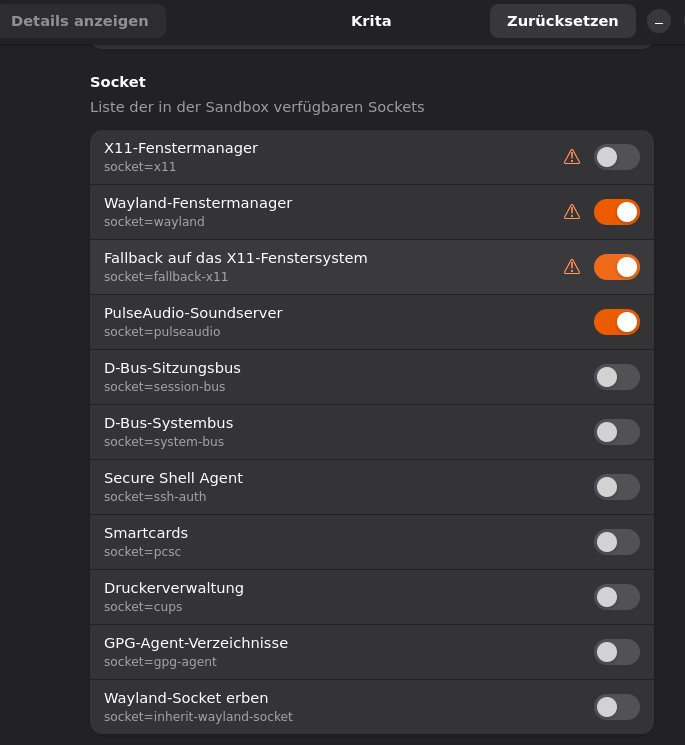
I get a similar error:
$ flatpak run org.kde.krita
Warning: Ignoring XDG_SESSION_TYPE=wayland on Gnome. Use QT_QPA_PLATFORM=wayland to run on Wayland anyway.
qt.qpa.xcb: could not connect to display
qt.qpa.plugin: Could not load the Qt platform plugin "xcb" in "" even though it was found.
This application failed to start because no Qt platform plugin could be initialized. Reinstalling the application may fix this problem.

Available platform plugins are: eglfs, minimal, minimalegl, offscreen, vnc, xcb.
Activating the last switch “Inheriting wayland socket” does not change anything.
I also trying running the AppImage, but get the same results (and it takes ages to start!)
Any help is highly appreciated.
 Hello
Hello  (lynx3d told me the same in the pepper&carrot chat).