Hi guys !
Hey, @wolthera, I understand that asking for a new feature should bases on clear and robust arguments. I’m also a software maintainer of a scientific computational library (for applied maths, ot for drawing!), so I understand well your request.
Here, I try to explain clearly the situation, with pictures and not too much maths, just the minimal geometry needed. I start by the motivations, the actual situation of krita
1] The importance of geometric shapes
Cézanne said (in French): “Les enfants, tout le problème consiste à rammener la forme des
objets à celle d’un cube, d’un cylindre ou d’une sphère !”
and I propose here an English translation: “My childrens, all the staff is to reduce the shape of
objects to those of a cube, a cylinder or a sphere!”
Squares and cubes, represented in perspective, play a fundamental part in compositions.
Then come circles, that become ellipses, and finally, details and light are added.
2] Krita assistant tool is insufficient for perspective
Krita assistant tool provides “perspective”, “vanishing point” and “ellipse”. But these tools are insufficient and painters/users are perhaps too much confident and could do some mistakes. As I will show here, the correct computation of exact squares and cubes in perspective require some long and repetitive geometric computations. Since this is boring for most painters, they prefer to eyeball it: some times it appears wright, some times its clearly wrong. A computer could easily perform these repetitive computations: here is my suggestion, since actually krita do not provide an assistant for obtaining the square and cube shapes in perspective.
3] Perspectives: 1, 2 and 3 points
Here come some technical materials: maths, and especially geometry. For an excellent introduction, I suggest to read chapter 1 of:
Chelsea, D. , Perspective in action, Watson-Guptill, 2017
See also the wikipedia page Perspective (graphical) - Wikipedia
For simplicity, I consider here only the linear perspectives: nonlinear 3D->2D projections, such as fisheyes, share at least the same difficulties, plus others.

The main difficulties are:
- reporting lengths from one direction to the other
- reducing lengths in depth
The edges of a square or a cube should have correct length, and an alignment of squares or cubes should decrease in the right way. For instance, bricks in the wall and windows in the building should have correct aspect ratio and reduce in the right way.
4] 1-point perspective with krita
For 1-point perspective, krita assistant tool could be used with a reasonable amount of complexity.
A tutorial about this can be founded at Krita Assistant Tool [Part 2] : Spline, Ellipse , Concentric Ellipse and Perspective, - YouTube starting at time 3’26’’ for the perspective, and here is a krita screenshot:

Of course, things could be improved in krita, some repetitive operations, such as the adjustment of the vanishing point for the vertical panel with those for the horizontal could be automated, simplified, but the assistant tool is already fully operational for the 1-point perspective.
5] 2-point perspective with krita
For 2-point perspective, things are more contrasted with krita, as we already observed with the church demo. Moreover, the krita video tutorial on a 2-point perspective Perfect square in perspective - How to draw it in Krita (tutorial) - YouTube introduced a controversed method, as pointed out in the discussion after the video, and the result is finally inacurate. The right way to do that has been explained in many textbooks, e.g. again:
Chelsea, D., Perspective in action,Watson-Guptill, 2017
or on the web at How To Draw A Perfect Cube In Perspective – Architecture Revived. Here is a visual explanation of the method:
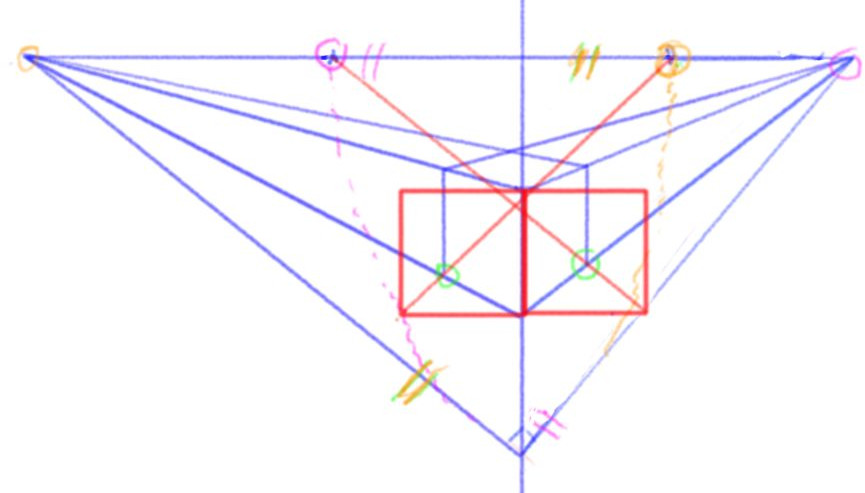
Clearly, things are quite complex and many non-trivial operations should be repeated each time we need to report lengths from one direction to the other. Moreover, it’s not easy with krita to report lengths from one direction to the other, as with a compass.
- We could use the “measure tool”, but the guide and its value are removed when we start to draw…
- We could draw a circle, for reporting lengths, but circle cannot be specified by center and radius in krita. The “concentic ellipse” assistant tool do not allow to fix the radius ratio to 1.
Ideally, Krita could do all these repetitive operations automatically: it is the main interest of using a computer aid drawing tool. Actually, painters prefer to eyeball it, at the risk to be wrong.
The 3-point perspective case is similar, with some few additional complexities. So are also more complex nonlinear perspectives, such as fisheyes. Nevertheless, in all cases, things could be automated, in a way for the painter/user to draw easily correct perspectives.
Note on image credit: all images are produced by @pirogh