I don’t think I’m the qualified person to do this, but if there’s not anyone else who’s planning to set something up, I might try to write a quick partial draft, because I do actually think a migration page is a tiny thing that might have an outsized impact on the accessibility for CSP users.
Google Docs is somewhat inconvenient for me to use, would I be stepping on anyone’s toes or keeping anyone from getting involved if I wrote something up in Markdown and posted it as a file, or if I just went through the actual pull-request process? I don’t want to duplicate effort, and if anyone else is planning on writing a migration page they’re very likely more qualified than I am to do it, so I also don’t want to get in the way of or make things more inconvenient for anyone who is planning to write a page or who would like to contribute.
1 Like
@danShumway If you would like to make a start, you can start with a plain text file, those are very interchangeable with other people and can be reviewed and edited by anybody.
I suggest that you make it in sections with a section header saying what will be included and described in that section. Then flesh out the content of each section with any link notes given as a text link.
At the top, the file should have the review date and edit date and the name of who did the review and edit.
At the same time, invite any CSP user to collaborate with you, via a DM here, using any kind of file sharing service for the text file interchange.
You can pass the text document around within the DM group for review and corrections and additions, asking each person in turn to do a review edit.
When you think it’s at least 50% ready, ask @raghukamath to look at it and give any further advice.
It may not be a perfect start or a high tech start but it would be a start 
2 Likes
I am okay with anything, markdown google docs, I you want to add a merge request that is welcome too. Or I can help you with the merge request and you rake care of gathering information from csp user. Any way is okay. Just ping me whenever you need help.
It is better to star than waiting, start with what you are comfortable and share it.
1 Like
While trying out Clip studio paint, I found out that it has something akin to our file layer. it is called file object in it. While there is file layers in CSP there are no transform masks like krita.
1 Like
CSP doesn’t have a Transform Mask as transformations are inherently stored in the File layer. So you can always adjust the transformation settings later or reset them if you want to. It’s similar to Photoshop and actually better as you can access much more options than in Photoshop. For example I can pick the downsampling algorithm at any time. Something that I can’t do in Photoshop and which bothered me for a long time.
So overall I prefer the method of CSP because I don’t need to create an extra layer for the transformation. What I don’t like in CSP is, that I always have to save a file for that layer and I can’t have it embedded in the file itself.
You mean the file object? Can you non-destructively add remove transformation from a normal layer?
1 Like
For a normal layer - I don’t think so. You would have to convert it to a File layer first. My comment only applies to the combination File layer + Transformation.
Hmm, I need to test, I didn’t find an option to continue the transformation for the file object. For normal layer it is destructive. And with this I find krita’s transformation mask really better than what clip studio offers. I don’t need to create a file layer.
2 Likes
@danShumway were you able to create any document for this page? Let me know if you need any help.
1 Like
You can find the File layer options in the Operations panel. It’s always worth to take a look there - for other tools as well.
And I agree that the Transform mask gives you more options by also being able to be applied to a normal layer. But this basically boils down to how you prefer to work or how you are used to a certain process. Coming from Photoshop I am used to convert a layer to a Smart Object/File layer before transforming it non-destructively. By doing so I also have just one layer instead of two which keeps the layer stack cleaner and easier to read. They can get rather confusing much too fast anway.
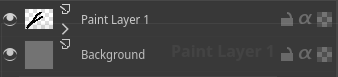
Yeah I have seen this. Although this also lacks the position option. In krita the transform tool option have ability to input precise position for x and y coordinates too. Plus I can copy paste the mask to several other layers to get same transformation in the layout I can’t do that in this. Krita can also the file layer conversion of layers and groups. And if I find the additional mask layer to be messy I can always collapse the mask, like in the image below paint layer 1 has transform mask applied but is in collapsed state.
1 Like
In CSP I also did not find any option to create a 16 bit or higher bit depth images. There is also no option to work in CMYK document, although there is option for soft-proofing and saving a cmyk file, which should be the recommended workflow anyway. But opening an CMYK image will result in it being converted to RGB.
1 Like
I have a little bit of a layout started, but nothing worth sharing.
Huge apologies, life + ADHD came up as soon as I was about to start. Still keeping an eye on this thread and will likely start to put together a page once I get some free time, but definitely don’t feel like you need to wait for me to finish with anything if you want to start compiling stuff together.
2 Likes
