Allow to put a toolbar or a docker into Pop-Up Palette

For users drawing on a standalone tablet PUP, in canvas-only mode, it is much more important than for computer users in a normal mode.
Therefore for convenience on a tablet it would be very useful if PUP could be more deeply customized, allowing to put extra toolbars or dockers on the PUP.
Currently there is a PUP customization in the settings, but it is very limited.

Gestures and PUP, as they are now are already very good for productivity, but for example, if I want to switch a layer, or add new layer, I have to go out of canvas-only mode, just for that. If I can customize PUP by putting a tablet-bar button on it, or a docker, then I can stay inside canvas-only mode and use PUP for whatever I need.
Extra items added to PUP could be expandable, as now it is for a brush size in PUP, then canvas-only mode will get really powerful, and actually closer to a traditional painting experience, where you are always in canvas-only mode.

Thank you for developing this amazing software!

1 Like

The 5.3 (still in alpha) update contains a feature to switch between dockers via the PUP, tho, I’m just unsure about the toolbar part
There’s this plugin, Kamvas Buddy iirc, I’m almost sure it can be added as a docker, and therefore, onto the PUP

Thanks for info. Plugins as far as I know are not working on Android version of Krita.
This is a great news that progress towards making PUP more feature rich is already ongoing!

Oh, missed the tablet part, mb
But yeah! It’s pretty much halfway done!

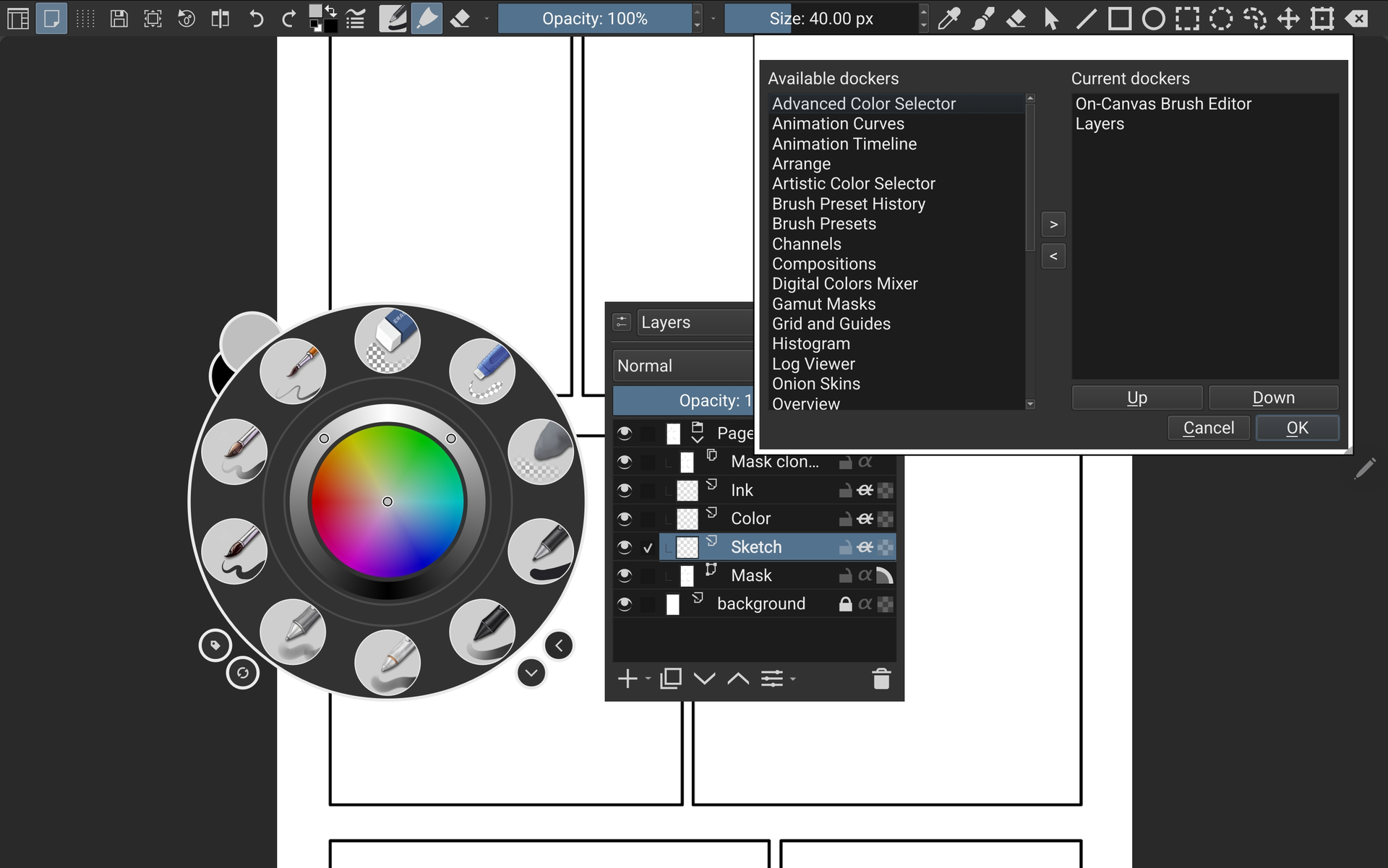
i can confirm it, in Krita 5.3 Alpha, if you pop up the brush palette, and go to right side (which is normally a brush options,) you can change that into showing “Layer” instead of “Brush Options”.
which is a no brainer, my productivity jump to 10x just from this “Layer pop up” alone.

(not to mention Krita 5.3 got ton of other killer feature, like fill close gap, Text that you finally able to write on canvas, ton of “Configure pop up palette dockers”)

so far, using Krita 5.3, it’s quite stable, it felt faster than 5.2.9 somehow,
you can try it yourself, but of course, do backup your project first.

i wish they allow every Docker to be Pop up-able, standalone from the Brush Palette.
this alone will ensure that i’ll never leave canvas ever again.
(but i’m pretty sure this will come in the near future because the backbone is already there)

my problem with Layer is already solved,
layers with Kinetic Scrolling in Krita is very Overpowered.

but, now, my last issue is the “Tool Options”.
which i can’t pop it up as standalone,
and it’s slower for me to constantly change between “Layer” & “Tool Options” in the Brush Palette,
but the good thing is i can switch it fast using mouse scroll, and with tablet, i can do One drag up or drag down to switch the mode, instead of clicking the dropdown then click the options, which took 2 click.
(idk if the devs actually designed this, but that was a very smooth way to navigate the dropdown options really fast with tablet)

i almost jumped from happiness when i saw there was a “show Tool Options” shortcut,
(especially when all other standalone pop up options had the prefix “Show”)
but, it didn’t work like pop up, it only show the tool options if you specifically put it in the top Menu bar (like if you click on the brush icon on the menu bar).

in the end, I think Krita 5.3 Release will be very Big, it streamlined the workflow a lot,
and they managed to deliver a lot of Killer Features.

like can you believe they actually managed to finish the Canvas Text, and Close Gap Fill,
two of the most Requested and Technically challenged features.

Deepest Respect for the Devs
3 Likes

I know it doesn’t solve the feature request, but if you don’t use Android, you can get the Tool Options on the screen with the Redesign plugin or with the Touchify plugin. And the Touchify plugin, which offers much more than the Redesign plugin, is without exaggeration definitely a killer plugin.

Michelist

1 Like

That’s a wonderful news!
I almost jumped from happiness reading your post that and seeing that Krita devs are actively improving canvas-only UX.

Deepest Respect for the Devs

+100

Can’t wait to use next Krita version!

If I only knew C++ I would be there to read PRs, learn, and then contribute myself!

I thought about writing a guide (put it on git[hub] for easier maintenance accessibility etc) on configuring Krita for tablet users, but as far as I read, from Krita 6 there will be tablet UI, so then my guide would become obsolete on the next major release…

@Jensen_Raylight as you seem to be using canvas-only mode you may find another FR of mine interesting: Composable physical devices as dockers to enhance canvas-only

2 Likes

Thanks for the Information, i appreciate it!

both Redisign & Touchify have interesting feature description on github,
it definitely got what i’m looking for

i’m going to try both.

Then go for Touchify, because the Redesign plugin is implemented in Touchify.

Michelist

1 Like

Go for it, there is still plenty of time before Krita 6.

2 Likes

Thank you for pointing this out. I’ve been messing with 5.3 on Android for the last week and didn’t even notice that. You can now see any docker in the PUP