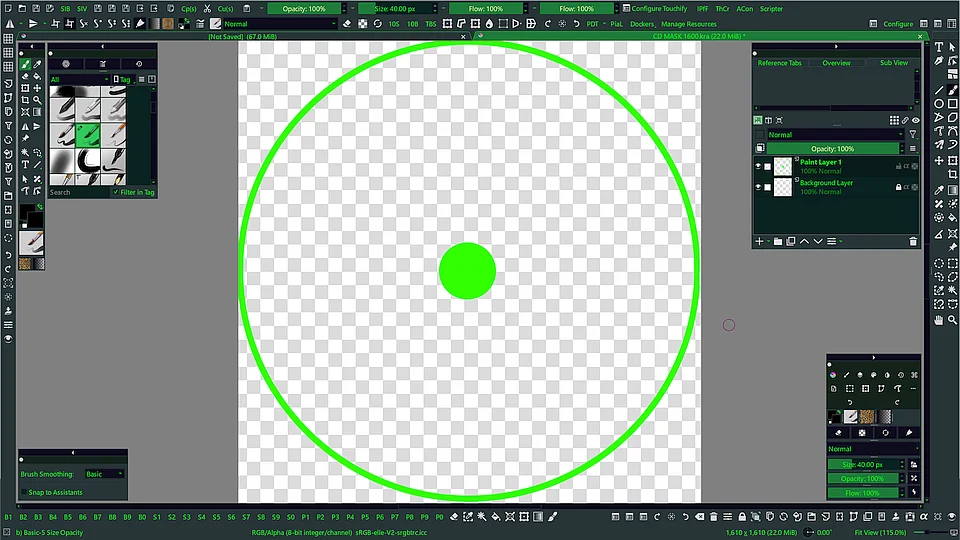
Since switching to Krita ~1 month ago, one of my biggest complaints with the app has been the UI. The problem that most often gets in my way is telling apart which file is currently selected, because the two colors have almost no contrast. I’m currently on the theme Breeze Dark, but I looked through the other themes and it seems to be a problem in all the dark themes, and to a lesser extent in the light themes. The theme it seems to be the worst in is “Krita Dark Orange“ which I’m not even sure has a different color for what is selected.
Is there any way other than switching to a light theme to fix this? This issue has caused me issues several times and I’ve only been using the app for a couple weeks, I’d dread to have this be a long term issue. Thanks!
Would this be okay:
If so, here I’m using the theme cyber green together with an adapted script which was originally written by @AkiR .
The theme is from @PeacockGolden found here:
If you are interested in more themes, here I once listed anything available at that time:
@Max_a_donde_vas and welcome to the forum!
There are several ways to more color-schemes/themes for Krita, here I’ll present those known to me:
You have the possibility to create your own themes with the help of this plugin:
This plugin allows even more extensive changes to the user interface, use it in combination with the plugin above:
You can of course also search through the ready-made color schemes of the following posts for themes that you like:
…
Michelist
AkiR
May 1, 2026, 7:09pm
3
And here is a updated version of that tab styling script, script shoulöd now work with Krita 6 (Qt6).css / qss for styling.
from krita import Krita, Qt, QTabBar, QMdiArea


tab_bar_style = """\
.QTabBar::tab {
    background: qlineargradient(x1: 0.06, y1: 0, x2: 1, y2: 0,
        stop: 0   #6d006c,
        stop: 0.05 palette(window),
        stop: 1.0 palette(window));
    color: palette(windowText);
    padding: 2px;
    border: 1px solid palette(base);
    border-bottom-color: transparent;
    border-top-left-radius: 4px;
    border-top-right-radius: 4px;
    min-width: 8ex;
}

.QTabBar::tab:selected, QTabBar::tab:hover {
    background: qlineargradient(x1: 0.06, y1: 0, x2: 1, y2: 0,
        stop: 0   #00b6b7,
        stop: 0.05 palette(highlight),
        stop: 1.0 palette(highlight));
    color: palette(highlightedText)
}

.QTabBar::tab:selected {
    border-color: palette(highlightedText);
    border-bottom-color: transparent;
}

.QTabBar::tab:!selected {
    margin-top: 2px; /* make non-selected tabs look smaller */
}
"""

def highlight_tabs():
    app = Krita.instance()
    for win in app.windows():
        qwin = win.qwindow()
        mdi_area = qwin.centralWidget().findChild(QMdiArea)
        if not mdi_area:
            continue  # skip
        for child in mdi_area.findChildren(QTabBar, None, Qt.FindChildOption.FindDirectChildrenOnly):
            child.setStyleSheet(tab_bar_style)

highlight_tabs()
Have fun coloring tabs.
edit: unused module imports removed.
/AkiR
Thanks for all the help! I’m still kinda new to krita plugins, how do I install this script?
AkiR
May 2, 2026, 8:54am
5
That script can be run in Krita’s Scripter (Tools → Scripts → Scripter), copy & paste script to scripter and press play to run script. Script is executed, but it’s effect not persistent (it only affects current Krita session, restarting will remove the effect)
To make change permanent, a plugin is needed, I can turn that script to plugin, but for that I need more cafe…
plugin ETA ~1h
/AkiR
AkiR
May 2, 2026, 10:01am
6
And here is tiny plugin that makes active document tab more visible.
copy & paste script to Krita’s scripter (Tools → Scripts → Scripter)
run script
install was success if highlight_active_tab_plugin added Successfully (Krita restart required.)is printed to Scripter’s output, else there is a error text telling what did go wrong.
plugin follows theme/palette changes in Krita.
tested on Kubuntu Krita 5.2.11, (maybe works on Krita 6.0+)
from pathlib import Path
from krita import Krita

app = Krita.instance()
user_pykrita_path = Path(app.getAppDataLocation()) / 'pykrita'
plugin_desktop_path = user_pykrita_path / 'highlight_active_tab_plugin.desktop'
plugin_dir = user_pykrita_path / 'highlight_active_tab_plugin'
plugin_init_path = plugin_dir / '__init__.py'
highlight_active_tab_extension_path = plugin_dir / 'highlight_active_tab_extension.py'

plugin_dir.mkdir(parents=True)

plugin_desktop_path.write_text("""\
[Desktop Entry]
Type=Service
ServiceTypes=Krita/PythonPlugin
X-KDE-Library=highlight_active_tab_plugin
X-Python-2-Compatible=false
X-Krita-Manual=readme.md
Name=Highlight Active Tab Plugin
Comment=Highlight Active Tab Plugin.
""")

plugin_init_path.write_text("""\
PLUGIN_NAME = __name__
PLUGIN_NAME_SHORT = 'HATP'  # (H)ighlight (A)ctive (T)ab (P)lugin
PLUGIN_VERSION = __version__ = '0.1.0'

def register_plugin():
    from .highlight_active_tab_extension import HighlightActiveTabExtension
    HighlightActiveTabExtension.register()

register_plugin()
""")

highlight_active_tab_extension_path.write_text("""\
from krita import (
        Krita,
        Extension,
        Qt,
        QTabBar,
        QMdiArea,
        QTimer)

from highlight_active_tab_plugin import (
        PLUGIN_NAME,
        PLUGIN_NAME_SHORT,
        PLUGIN_VERSION)


_app = Krita.instance()

_default_tab_bar_style = (
'.QTabBar::tab {'
'    background: qlineargradient(x1: 0.06, y1: 0, x2: 1, y2: 0,'
'        stop: 0   #6d006c,'
'        stop: 0.05 palette(window),'
'        stop: 1.0 palette(window));'
'    color: palette(windowText);'
'    padding: 2px;'
'    border: 1px solid palette(base);'
'    border-bottom-color: transparent;'
'    border-top-left-radius: 4px;'
'    border-top-right-radius: 4px;'
'    min-width: 8ex;'
'}'
'.QTabBar::tab:selected, QTabBar::tab:hover {'
'    background: qlineargradient(x1: 0.06, y1: 0, x2: 1, y2: 0,'
'        stop: 0   #00b6b7,'
'        stop: 0.05 palette(highlight),'
'        stop: 1.0 palette(highlight));'
'    color: palette(highlightedText)'
'}'
'.QTabBar::tab:selected {'
'    border-color: palette(highlightedText);'
'    border-bottom-color: transparent;'
'}'
'.QTabBar::tab:!selected {'
'    margin-top: 2px; /* make non-selected tabs look smaller */'
'}')


class HighlightActiveTabExtension(Extension):
    @classmethod
    def register(cls):
        extension = cls(_app)
        extension.setObjectName(f'{PLUGIN_NAME}:highlight_active_tab_extension')
        _app.addExtension(extension)

    def setup(self):
        pass

    def createActions(self, window):
        q_window = window.qwindow()
        q_window.themeChanged.connect(self._on_window_theme_changed)
        # delay call just a little bit
        QTimer.singleShot(0, lambda : self.highlight_tabs(q_window))

    def _on_window_theme_changed(self):
        self.highlight_tabs(self.sender())

    def highlight_tabs(self, q_window):
        mdi_area = q_window.centralWidget().findChild(QMdiArea)
        if not mdi_area:
            return  # nothing to do, missing QMdiArea?
        for child in mdi_area.findChildren(QTabBar, None, Qt.FindChildOption.FindDirectChildrenOnly):
            child.setStyleSheet(_default_tab_bar_style)
""")

app.writeSetting('python', 'enable_highlight_active_tab_plugin', 'true')
print('highlight_active_tab_plugin added Successfully (Krita restart required.)')
/AkiR