Hello everyone! I am a beginner user in Krita and overall a newbie in digital art with a… very specific issue qwq.
I use a Samsung Chromebook and I don’t really have other choices for digital art outside my outdated Android phone; so I can’t download and set up a driver for my tablet because it’s not available for Chromebooks since it’s just a simple “plug and play” functionality for those devices.
Because of this, I can’t edit the settings of my tablet or use pen pressure sensitivity in Krita. I have been exploring which brushes to use for the best looking line art possible without the advantage of pen pressure.
Are there any line art brushes that could help make this easier for me? Or any techniques and cheats I can use to make better line art despite this disadvantage? Any and all suggestions are appreciated. Thank you!
You can manipulate your strokes via variation in the time and speed settings of a brush, if that is what you want to achieve, variations in the thickness of your strokes for instance.
After such an adjustment, the width of a stroke is controlled via the speed you draw a stroke or, if you want to achieve tapered strokes you can address it with a stroke that gets thicker for a certain time and paints then in that thickness, or it varies the thickness over the time of the whole stroke.
Are these things you want to achieve?
When your pen simply doesn’t have pressure sensors we could get working somehow it’s really tricky. Most brush presets use pressure for size or opacity (or both). Even when substituting them it will change how you have to draw. Michelist already wrote brush presets can also use time or speed to control, that’s actually not too far away from certain real life drawing techniques (for example watercoloring) but takes a lot of practice to get used to. Easier to handle is Distance and Fade but they limit the length of the lines you effectively can draw, which is a downer in most scenarios and you would need to constantly adjust it or have multiple copies of the same brush preset just with the distance changed.
What you can also do is ignore sensors altogether and make a double pass. This means you first draw your line, then switch to eraser mode and adjust the line (make it tapered, make it thinner in the middle or at the end) by simply erasing the parts you don’t want and shape the stroke that way, this is something I still do even with pressure. This also works with opacity, you can quickly change the opacity with keyboard shortcuts or the slider at the top, next to the size slider.
Unfortunately krita isn’t really made for mouse drawing, which is what a Stylus without any sensors essentially is. These are the options I know.
When I used krita on a Chromebook (last year), my Wacom tablet worked with no problems.
It seems that a Wacom compatible driver is included in ChromeOS.
You could use any brush, make it small, and there you have a fine liner brush! I saw some artists draw their line art with a fine pressureless line, and it can look really great!
You could also use vector to make your lineart.
Or you can do pixel art. No need for pressure there
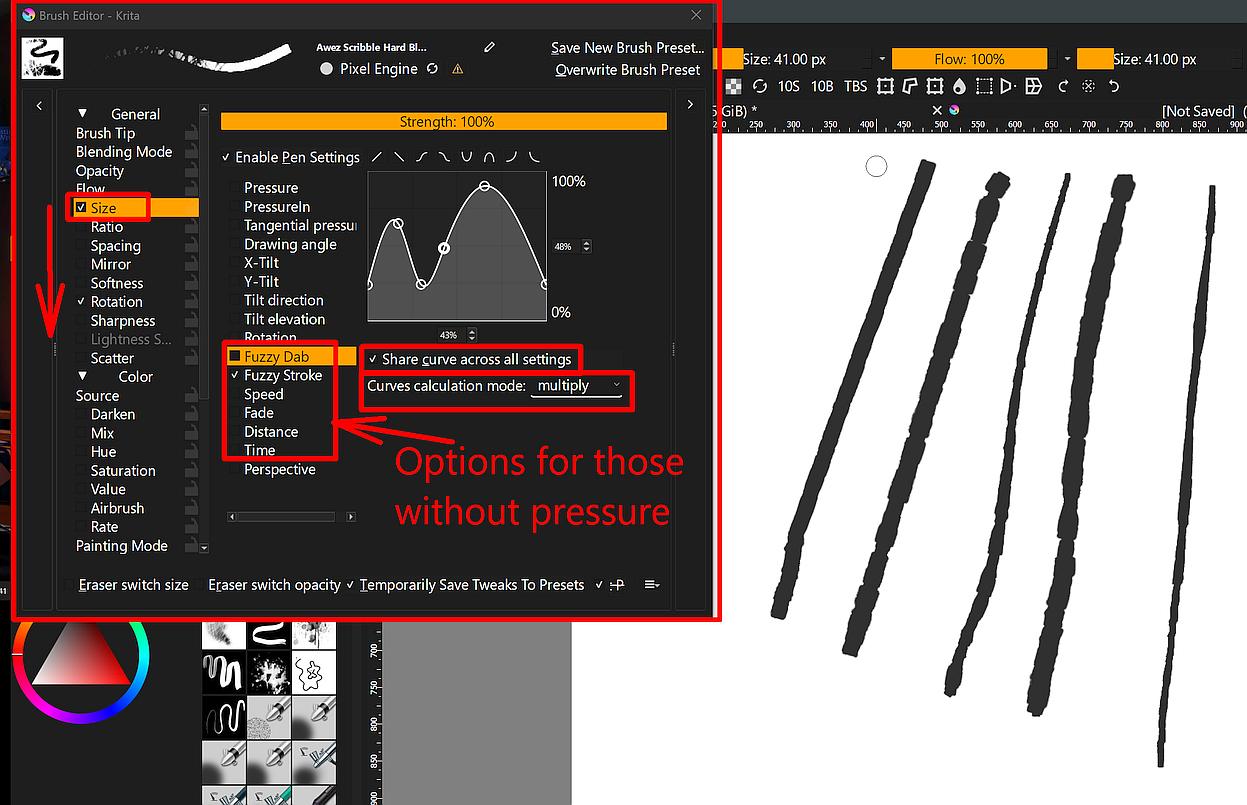
In the screenshot below, you can see the options, in Krita’s Brush Editor, users have using pressureless devices. You can call the brush editor via F5 or its toolbar-icon.
You have to play with these options to find out what they can do for you, the strokes you can see in that screenshot were made using the same curve but different options or “switches”, if you like that definition better. Share curve across all settings allows you to use the same curve for any ticked option, or different curves to achieve different results. Curves calculation mode too is to achieve different results.
The downward pointing arrow on the far left side should indicate that you should look through these options and also try if you can exert influence through these options on the way your strokes will look, this is a never ending game of trial and error and the fun to play it.
I forgot to add that, if you really like Krita and digital painting, and you want to have more options to create your works, then you should think about buying a pressure sensitive graphics tablet. So, maybe you think about saving for a PC and such a tablet in the long run.
It does not have to be a pen display, even if it is a “modern” habit to have one, one can create wonderful works with screenless pen tablets too. Also, using pressureless devices one can create beautiful works, but many things are much easier to achieve using “the right gear” for a task. The question will be is this hobby a thing you want to dive in deeply, or do you only want to scribble something from time to time?
I don’t know if your way to live and work makes a laptop the preferable hardware, what can be. So, if you only want to paint at home, you’ll get usually more powerful stationary PCs for the same price as mobile hardware. And a regular PC can be far better and easier extended/upgraded than the usual laptop.
You could use ink-Fineliner or ink-Precision brush which has very little variable thickness based on pressure. Then to create the illusion of variety of Lineweight, I usually just do multiple strokes to make some area of the lines thicker, or erase part of it if I want to create the tapered lines looks. I called this “line carving” technique, mostly used when I am not feeling too well to do some high finesse brush strokes.
Some tips, you might want to use a larger size brush coupled with larger size canvas to make it easier to carve the lines but overall still maintain the looks of typical thin lineart (Because of the larger canvas size compared to the brush size).
 Hello
Hello 
 just not now