I’d just like to check if this is the behaviour others also have or not.
When I use the assistant tool the line starts appearing after I make a stroke of several pixels which is not such a big thing on larger pictures but since I’ve been working on icons now I have to sayy sometimes I have to draw across half of the icon just to get the line out and then erase the extra part.
Is this how it should work, or is it a bug for me, please?
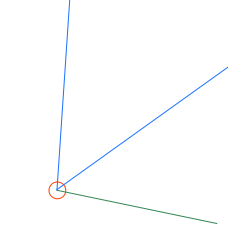
When you have many assistants tools, to be able to determinate which one to use, a small move distance is needed.
Example:
With 3 assistant tools like these one, if you move from 1 or 2 pixels, it’s not really possible to determinate in which direction the mouse cursor goes and then, on which assistant to snap.
A minimal distance move (red circle here) allows to get enough information to determinate in which direction we are moving and on which assistant to snap.
The problem with current assistant tool is:
It’s dpi dependent and on some document like the one I usually work on (A4 600dpi) the minimal distance calculated is large (~20px)
– A solution could be to use 4pixels move by cursor on screen
It’s not configurable
– Having the possibility to define the minimal distance (from 0 to 20pixels for example) could be helpful in some case
I see. Well if the dpi down changes it and since I don’t need to worry about physical prints I guess I can keep the dpi down to 1 it won’t affect me in digital but still it could be nice to have some sort of control in tool options one day maybe
It can affect you if you want to work with texts (dpi dependent) for example
The best thing to do it to rescale image to 1dpi (without changing pixel size) when you need to not be bored by the minimal distance, and then once you don’t need assistant tools anymore, rollback to usual dpi value