Small problem.
I’m using krita on an android tsblet.
I configured my shortcuts on the bluetooth keyboard.
But I have a problem that I can’t solve.
When I use the bezier curves tool.
When I was on the computer, if I misplaced a point, I just clicked with the right mouse button and it returned to the previous point.
On the tablet as I don’t have a mouse, I can’t get this action.
Either pressing CTRL+Z or BACKSPACE deletes the entire path.
Does anyone know how to fix this problem??
Thanks!
Sorry, but I have no working Android device, but would this be an idea: Draw the path to its end and then remove the point afterward, that would at least be a possibility.
Unfortunately, Krita’s vector tools are not the most sophisticated, they are okay for simple, basic tasks, but the usual advice is to use Inkscape for the advanced tasks and to import the result into Krita for further refining of your work. We got even a plugin connecting both, Inkscape and Krita, and do not let you think it is only for text, the name is a little bit misleading:
In the world of FOSS, it is very usual to choose the app that does a task best, similar to the Adobe suite or Corel’s tool set. But here you do not jump from PS to AI to AE, here it is Inkscape, darktable, GIMP, or Scribus, etc. A workflow and a way of doing my work for over 25 years now.
Michelist
Thanks Crazycatbird.
Yes I knew that one.
But I meant while a vector element is being constructed and maybe I make a mistake in one point, how to go back to the previous point??
From the desktop with the mouse, just right click. bl
But in the tablet not having the mouse it is not so how to perform this action.
Too bad, on the desktop with the mouse I could.
I’m going to waste all afternoon trying to find a solution to this. 
You would just need to figure out how to set a shortcut for that action.
Thanks Michelist.
what is the plugin that connects inkscape to krita?
By the way, now that you talked about plug-ins, I never understood how they work, where to find them and how to install them. If you could explain to me in broad terms I would be very grateful.
Don’t waste all afternoon  …Have you tried a two-finger screen tap (undo) and a 3-finger screen tap (redo)?
Already done.
But deletes all the path created up to that moment.
It doesn’t go back to the previous point.

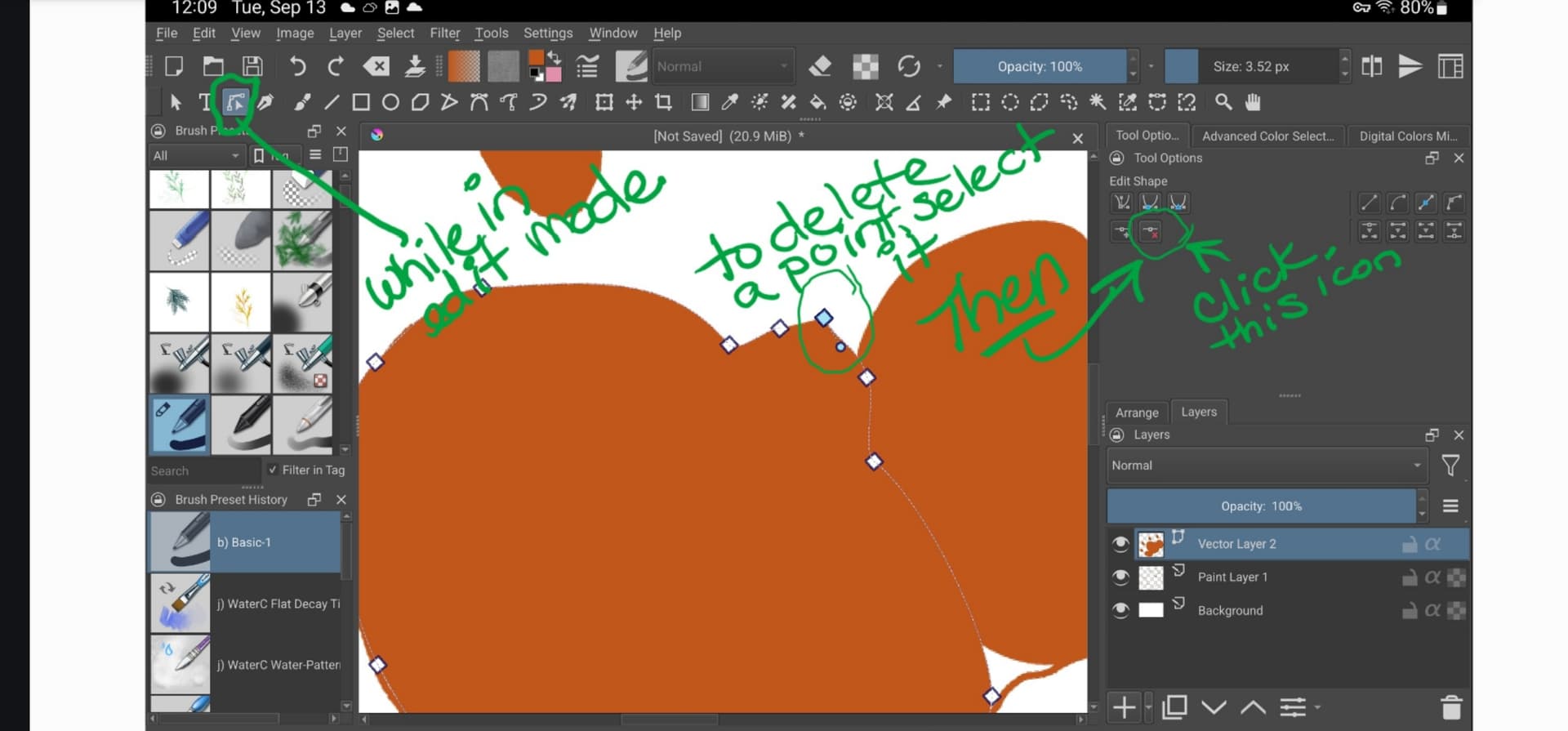
So, while in Edit mode, from the tool options, it won’t let you tap on the point you want to delete then, hit that button to delete (as in the screenshot?) 
Then here’s another thought…
Presumably you’re using some kind of stylus on your tablet? If so, have you explored the assignments that can be made under the Configure Krita options in Settings?
At least on my Android tablet (Samsung) there are a slew of “Gestures” that can be customized. If you can assign one of these to trigger the “mouse right-click” perhaps this could give you the functionality you seek?
Plugins only work on desktop Krita, not on Android, thanks Google.
The easiest way to install plugins in Krita is to go to “Tools” >> “Scripts” >> “Import Python Plugin from File…”, then in the dialog that opens, specify the path to the plugin (the ZIP file you just downloaded) and confirm it, confirm the next dialog box as well, then restart Krita and then, depending on the plugin, set up the plugin to your liking.
By the way, it can happen that you have forgotten to click the button to activate it, if so:
Then you have to search in Krita under ‘‘Settings’’ >> ‘‘Configure Krita’’ >> ‘‘Python Plugin Manager’’ for the plugin you just installed and activate it by checking the box in front of it. Then confirm with “OK” and restart Krita to be able to use the plugin.
Michelist
yes I can do that when I have completed the shape.
But I meant while I was using the Béziers curve tool.
while I’m making the shape and I haven’t closed it yet.
with the laptop and the mouse, all I had to do was click the right mouse button to go back to the previous point.
While on the android tablet without the mouse, I don’t know what to do. i
If I press with two fingers it erases everything. and CTRl+Z always deletes everything for me anyway.
As I show in the video.
Unfortunately it looks bad because I had to compress it since you can upload files with a maximum size of 3mb.
I also have a Samsung Galaxy Tab S9FE tablet
but I can’t create a shortcut that simulates the right mouse button.
At least I can’t find it.
Here is the video:
Even if it’s difficult to see because I had to compress it due to the 3 MB upload limits in the forum.
When I tap with two fingers it deletes everything. Even when I press CTRL+Z. instead it should return to the previous point
This might be something you fully understand, but FWIW, the particular tool you’re using does not create a complete vector shape until you “close the loop” by clicking on the initial starting point.
Once you do, you can then use the vector Bezier edit tool (3rd down on your first column in your tool area) to edit the various points. From there, you can use the undo (Ctl-Z, or 2-finger tap) to reverse the latest edit you’ve made without erasing the entire vector array.
Put differently, perhaps you may be reaching for the wrong tool for the workflow you are trying to achieve?
I know it doesn’t close the shape until you click at the starting point.
But On the laptop, with the same bezier tool
while I’m making the shape and I make a mistake in a point, just click the right mouse button to go back to the previous point.
It doesn’t matter if you finish the shape first.
And it’s that action I’m trying to recreate by recording a shortcut, since I can’t use the mouse with the tablet.
Thanks Michelist
Later I’ll try to install a plug-in on the laptop following your instructions and see if I can install it.
Perhaps not what you hoped for as a solution, but here are two follow-ups:
1 - I was able to confirm the specific behaviors you’ve described using that particular tool on desktop vs tablet. (FWIW, it’s not a unique problem to your particular hardware or config.)
2 - For under US$10 you could get a bluetooth mouse for Samsung Android. Not sure, but perhaps this might enable you to replicate the desktop experience you seek on your tablet?

I’m not sure, because my Android experience was made years ago, but I think that Android does not know the concept of a right mouse button click RMB, and therefore you probably won’t be able to create one. 
Michelist
I use the bezier tool a few times.
But when you use it, that feature is very useful while you’re building a shape.
And I was trying to record a shortcut that exclusively simulated the right mouse button. But I think it can’t be done at this point. Thanks for the possible alternatives.
But I would only use the mouse for that one thing, there’s no point in me buying the mouse.
So it will mean that I won’t use the Béziers tool when I’m on the tablet.
Thank you very much 
You are absolutely right Michelist.
however, if you insert the bezier tool on the app on the tablet, you must be able to give the possibility in the shortcuts configuration to recreate the right mouse button.
Because on the laptop it can be done.
If you have to complete the shape first to be able to modify it, the bezier tool becomes a bit useless.
Because it can happen that during the construction phase you make a mistake on a curve or place a point in the wrong place, being able to immediately return to the previous point without first closing the shape is the advantage.
anyway thanks everyone.
You have been very kind
Looked here:
For me, holding a single finger down (anywhere on the screen) achieved the mouse right-click action in the context of your Bezier tool issue.
Hopefully it works for you.