The Brush Size Docker plugin allows you to quickly and easily adjust the size of your brush in Krita using predefined size presets or by manually setting the size.
Demo:
Features
Preset Selector: Choose from Small, Medium, Large, or Current Brush presets.
Current Brush preset: It will use the current brush size to calculate Size 1 (1/5), Size 2 (1/2) and Size 4 (5/3).
Manual Size Input: Input box to type the exact size.
Size Slider: Slider to adjust the preset.
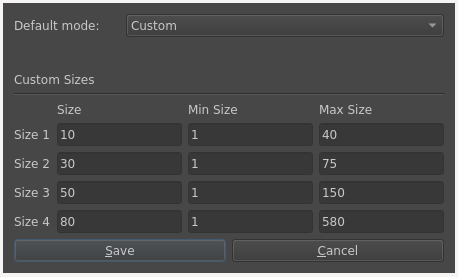
User Defined Mode: Allows the user to define sizes and ranges in the dialog at the top-right of the docker.
Shortcut: Cycle through the sizes using a user-configurable shortcut, default: Ctrl+Alt+Shift+S.
Installation
Method 1 (easiest)
Open Krita go to Tools > Scripts > Import Python Plugin From Web and paste the following URL.
New update: Now at the top left of the docker, there is a settings button that will open a configuration dialog. Here, you can choose the default preset mode you want the docker to start with and define both the sizes and ranges for a new custom mode.
I love this, thanks for making it! it’s something I hope finding in more painting programs. I wish there was a way to add a single shortcut to cycle through the saved presets so you don’t have to click the button or memorize multiple shortcuts for each preset. or maybe having one single slider where the presets are stored, so when you reach closer to the preset the slider will snap to that size like what they did on procreate.
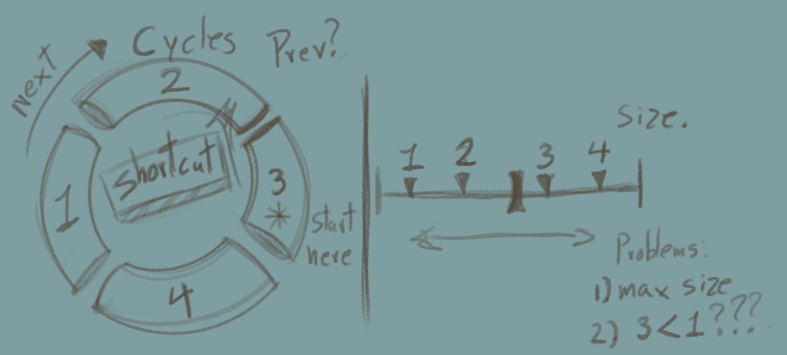
Glad you find it useful. I’m sure adding a shortcut to cycle through sizes 1-4 is feasible. I don’t know if I understand correctly, you mean having a slider with ticks where the current size 1-4 is set? if not I would appreciate a video demo of that procreate feature to understand the use case. If it is, I think that is a whole different use case that is not really compatible with this docker because:
the slider will be hard to use for wide ranges, so each size has its own range.
size 1 can be larger than the others, there would need to be extra constraints to guarantee that size 1 < 2 < 3 < 4 always, which is against the main purpose of the docker.
yes, you sketched exactly how procreate feature works, it’s just the regular size slider but you can ~tick~ to save the current size as a preset, a line marking the position in the slider will appear and every time you slide those line will be more sticky, I don’t know if I`m wording it correctly but I understood the issue you said. The shortcut to cycle through the presets are better, no need for anything fancy or it would also defeat the purpose of just needing one key to change it: like you hit S key repeatedly and it will cycle through all your saved preset… this could also be great fro brush presets, or even tools. I’m terrible with keyboard keys, sometimes I have to look what I’m typing (the shame) so having one key that can work for mutiple purposes is amazing.
This looks great, I have a couple suggestions though.
Is it possible to add an option to select how many smaller / bigger sizes you want whe using the “current brush” setting?
like, now the brush size is saved as “size 3” so there would be 2 smaller and 1 larger size, you could make it so there is a checkbox so you can choose which size (1,2,3,4) the brush size gets stored in, and calculate the others accordingly
is it possible to automatically recalc the size if the user changes the brush size in krita without having to press the “recalculate” button? I use the shift+click drag shortcut to change my brush size because it’s more convenient than dragging a slider
Its possible for sure there are many ways I could implement it, but I would like more input on how you use the docker especially that mode to help me develop the features better.
The main problem is what scale factors to use, because they need to be different depending on the pivot slot. As I see it there are drawing brushes and painting brushes drawing brushes are often below 100px size and the painting ones above 200px. So I can understand the need for both, I’m thinking that calculating the size exponentially would help to reflect this nature. But how people use this will give me better ideas.
This is a tricky one, I’m sure it can be done, although there is no “official way” to do it, the Krita way would be to have a shortcut. I think its better with a shortcut because it leads to a better experience. Increasing size by dragging is more micro-adjusting than anything else (at least thats how I see it), so recalculating every time a size is changed feels unreliable.
Tell me what you think either way. I will be able to work on this in about 2 weeks.
THANK YOU!!! now I can use the button on my stylus for something else like the popup palete instead of the brush resizer because a shortcut that cycles through brush sizes is way faster an more precise on the keyboard ___
another tip–> I just found out about strokesplus, I installed the program and assigned a mouse gesture for the cycle shortcut and now I can cycle through the size pressets just by hover gesture, the diference is that now I can have as many shortcuts i want on the pen buttons and they will be defined by gestures. If done right you can have all krita main shortcuts with just the pen, and using the dockunbdercursor plugin you can work entirely on fullscreen without any docker.
Thank you so much for this plugin, really useful and user friendly.
I’m sorry to ask, as this is not intended, but do you think you could make something similar to opacity?
Sure there is Quick Settings Docker, but this doesn’t work as well as your plugin : configurable and shortlist of settings.
But this only work for brush sizes
Anyway, my deepest thanks, it is definitely a great help ^^
Indeed, it should be an independent docker. I’m sure I could spin this project as an opacity docker relatively fast, but I feel that wouldn’t be the best approach. So many questions:
Should it handle flow too?
What are the most common opacity values (10, 25, 73, 100)?
Should it provide access to switch to a greater blending mode on the brush?
Thank you for replying and giving a positive answer
Indeed, they are the kind of questions it raises.
But to me , as I don’t want to bother you too much, and keep it as a simple use case (mine for now, but other might ask for more )
I use your docker as lightweight version of the quick settings docker, but more user friendly
it has a drop down menu for different scenario (small, medium, large, custom)
it has a custom slider for each
That’s pretty neat, and I just have to keep clicking to switch…precise, for repetitive changes with the exact same params (like having your favorite brushes all the time in real life).
In my scenario, that’s :
easy to access buttons (I don’t use the shortcuts for cycling through, only the buttons are enough)
as I’m left handed, it is a lot more resting for my fingers and wrist (really, using lots of shortcuts can be tough for left hand users )
Sorry, english is not my mother tongue, so I might be vague.
I just find your docker super easy and small, but with flexibility (sliders)
I might set up some quick scenarios (4 are enough) and repeat changing to the same sizes and opacity all the time…
For sure, I don’t use flow for now, but to be exhaustive, surely it might be also a use case for those who use that a lot.


 )
)