I’m not completely sure what causes this problem but sometimes when pasting something from the clipboard into the current document using Ctrl+V the entire program will crash (basically quit without an error message). I’d like to report this as a bug but the online guidelines said to post here first, so here’s hoping someone has experienced the same thing and might have a solution.
Unfortunately I can’t predict when this happens, because it’s sporadic.
I noticed another user reported the same thing Krita crashing when pasting anything using Ctrl+V and it was closed due to lack of responses. They are also using Linux XFCE so I wonder if the problem could be unique to that desktop environment since we’re using different distros.
OS Info
Linux (Debian 13 XFCE)
Krita Version: 5.2.9
Does it also happen with the current release version 5.2.13?
If you don’t use the AppImage, did you try to replicate this behavior with the AppImage to rule out issues introduced by the maintainers of non-official versions of Krita? Since ~⅔ of all Krita issues using Linux as platform can be solved using the AppImage, this should always be the first check when encountering issues with repo or other versions.
The idea it could be the DE is also a possibility, here it is best to check it with KDE since Krita is originally a development out of the KDE “area”, and it is said to be the most compatible to Krita.
I’m on Win10, 5.2.9 and Krita crashes when pasting .kra file that was copied to clipboard in explorer. Dragging and dropping it from explorer does not cause a crash and gives options for how to handle the file. Perhaps try different file types and see if that explains it being sporadic? I forget after a while and copy/paste one then I realize what happened.
I actually just had this happen to me when trying to copy and paste a folder containing a .kra file as well as just copying things from the clipboard into a Krita document. It quit out of Thunar (the file manager for XFCE) for some reason.
I found the section with the crash. What I was trying to do was copy a rectangle selection from a different Krita document (called Rocks) to the current document (Week 1 sketches).
I noticed that when loading Krita it seems to be finding a CMYK ICC profile file in a really deep folder structure (Alucard fanart folder where I was testing some ICC profiles) and not the /usr/share/color/icc where I keep all my ICC profiles (that’s what it looks like it’s doing, anyway). Could that be related that it’s having a problem with maybe a colour profile conversion between different files?
The error is happening in /run/build/krita/libs/ui/kis_clipboard.cc, line 320.
SESSION: 12 Dec 2025 20:51:29 +1000. Executing krita /home/travis/Desktop/refs/Week-01.kra

Krita Version: 5.2.9, Qt version compiled: 5.15.7, loaded: 5.15.7. Process ID: 2

-- -- -- -- -- -- -- --

12 Dec 2025 20:51:29 +1000: Style: fusion. Available styles: Windows, Fusion

12 Dec 2025 20:51:29 +1000: Database is up to date. Version: 0.0.17, created by Krita 5.2.9, at Sat May 17 18:33:20 2025

12 Dec 2025 20:51:31 +1000: Importing image/tiff to application/x-krita. Location: /home/travis/Pictures/07_META/Printing/Input/Alucard-Mid/Alucard_Half_Body_CMYK_USWebCoatedSWOP.tif. Real location: /home/travis/Pictures/07_META/Printing/Input/Alucard-Mid/Alucard_Half_Body_CMYK_USWebCoatedSWOP.tif. Batchmode: 1

12 Dec 2025 20:51:31 +1000: Loaded image from image/tiff. Size: 2000 * 2000 pixels, 4.16667 dpi. Color model: 8-bit integer/channel CMYK/Alpha (U.S. Web Coated (SWOP) v2). Layers: 2

12 Dec 2025 20:51:31 +1000: Importing application/x-krita to application/x-krita. Location: /home/travis/Desktop/refs/Week-01.kra. Real location: /home/travis/Desktop/refs/Week-01.kra. Batchmode: 0

12 Dec 2025 20:51:31 +1000: Loaded image from application/x-krita. Size: 3508 * 2480 pixels, 4.16667 dpi. Color model: 8-bit integer/channel RGB/Alpha (sRGB-elle-V2-srgbtrc.icc). Layers: 11

12 Dec 2025 20:51:39 +1000: SAFE ASSERT (krita): "mimedata" in file /run/build/krita/libs/ui/kis_clipboard.cc, line 320

KRITA DID NOT CLOSE CORRECTLY

================================================================================
I can’t remember exactly why I swapped to the flatpak version. I think I read that the AppImage is more stable but the flatpak is faster.
I’ll download the AppImage in case you need any more information from me about the flatpak version I’m using. As I said, this bug seems to be sporadic and doesn’t seem to happen all the time. It might take awhile for me to be certain it’s “fixed” the issue or not.
Is it possible to somehow get the Krita .config information to be used by the AppImage. I just opened it and it’s not using the same settings, which means most of my modifications are missing. Maybe I should update the flatpak instead and use that version?
The AppImage is a measure to rule out that there are issues in the official Krita, or in other words, to check if the issues you experience are implemented “gifts” by the maintainers of the unofficial builds …
But, in case you are satisfied with your Flatpak installation, and don’t miss something/anything, you can of course stay with it.
For your settings, and depending on how deeply you adapted your Krita to your needs:
An AppImage creates a “home folder structure” for itself in the folder you started it, there, in its .config folder, you have to copy your old kritarc which will bring you most of the settings of your “old” Krita, and additionally you have to copy the krita5.xmlgui from your Flatpak installation to your AppImage installation if you manipulated menus and toolbars.
So, with other words, you have to put your Flatpak config into that structure.
BTW, using symbolic links should do too (that would be the easy way for your whole resource folder), but if you only want your settings and the changes to your UI, you just need the kritarc that should be found in $HOME/.config/kritarc and the krita5.xmlgui that will be in the resource folder of your Flatpak installation, so if you copy them or use symlinks is up to you, both are tiny files.
I updated the flatkpak version to 5.2.14 and I am still getting this bug where the program will crash. I’ve noticed a few things:
More likely to crash if a transform is currently active.
Can be avoided by going Paste > To Active Layer
The log file is less informative than in the previous version. I can’t tell what’s wrong. Is there a way to get a more detailed log that includes the currently selected tool, keybindings, etc?
An Error Session
SESSION: 15 Dec 2025 19:16:10 +1000. Executing krita

Krita Version: 5.2.14, Qt version compiled: 5.15.7, loaded: 5.15.7. Process ID: 2
-- -- -- -- -- -- -- --
15 Dec 2025 19:16:10 +1000: Style: fusion. Available styles: Windows, Fusion
15 Dec 2025 19:16:10 +1000: Database is up to date. Version: 0.0.17, created by Krita 5.2.9, at Sat May 17 18:33:20 2025
15 Dec 2025 19:16:12 +1000: Importing image/tiff to application/x-krita. Location: /home/travis/Pictures/07_META/Printing/Input/Alucard-Mid/Alucard_Half_Body_CMYK_USWebCoatedSWOP.tif. Real location: /home/travis/Pictures/07_META/Printing/Input/Alucard-Mid/Alucard_Half_Body_CMYK_USWebCoatedSWOP.tif. Batchmode: 1
15 Dec 2025 19:16:12 +1000: Loaded image from image/tiff. Size: 2000 * 2000 pixels, 4.16667 dpi. Color model: 8-bit integer/channel CMYK/Alpha (U.S. Web Coated (SWOP) v2). Layers: 2
15 Dec 2025 19:16:14 +1000: Importing application/x-krita to application/x-krita. Location: /home/travis/Desktop/refs/Sketch-page.kra. Real location: /home/travis/Desktop/refs/Sketch-page.kra. Batchmode: 0
15 Dec 2025 19:16:15 +1000: Loaded image from application/x-krita. Size: 3508 * 2480 pixels, 4.16667 dpi. Color model: 8-bit integer/channel RGB/Alpha (sRGB-elle-V2-srgbtrc.icc). Layers: 4

KRITA DID NOT CLOSE CORRECTLY
================================================================================
I haven’t had a chance to try the AppImage yet because I’ve been having trouble finding this “home” structure in the same location as the AppImage. Is it inside the AppImage itself and I need to extract a copy to get it out?
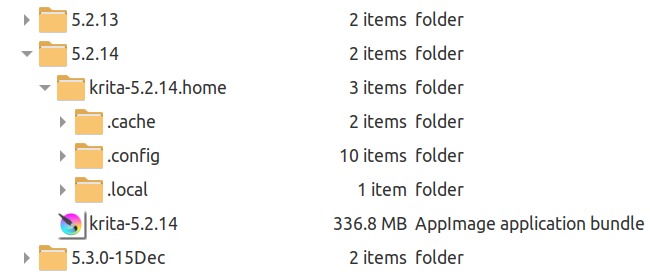
The ‘home folder’ must be created by you, initially, or the default locations will be used.
In the folder where you’ve decided to put it, place the appimage file and give it execution permissions. Rename the appimage to krita-x.y.z for convenience (you don’t need the appimage extension).
Then create a folder called krita-x.y.z.home
When krita starts, it will see that folder and use it as a ‘home folder’ and then create the required subfolder structures when it first runs.
After that is the best time to replace any of those ‘local home’ config files and resources with existing ones you may have.
It is essential that any copied in kritarc file is then edited to change the file pointers ResourceCacheDbDirectory and ResourceDirectory values to point to the current local home location which will be -/krita-x.y.z.home/.local/share/krita
Hey, I encountered this issue this afternoon after a month of using xfce (it took me this long to finally use copy paste feature lol) it seems like this is in fact xfce specific issue, after looking around reddit and any other forums, I found a workaround from kde forum which is this one https://bugs.kde.org/show_bug.cgi?id=502266#c14, since no one ever mentioned it in this forum so I decided to leave this here
TLDR, for workaround just downgrade xfce4-settings to 4.18.6
Just wanted to update that I tested copy and pasting layers to new files on the AppImage version and I did have a crash happen, though it didn’t seem to happen as often. I tried pasting the same file / layer again after reloading and it didn’t happen again so it’s not file-specific either.
Here’s the start of the bug log for that session:
SESSION: 16 Jan 2026 11:16:11 +1000. Executing /tmp/.mount_krita-iMgnco/usr/bin/krita

Krita Version: 5.2.14 (git 31056c6), Qt version compiled: 5.15.7, loaded: 5.15.7. Process ID: 19591
Here’s the end of the bug log:
16 Jan 2026 11:18:44 +1000: Loaded image from application/x-krita. Size: 1118 * 1422 pixels, 4.16667 dpi. Color model: 8-bit integer/channel RGB/Alpha (sRGB-elle-V2-srgbtrc.icc). Layers: 5

KRITA DID NOT CLOSE CORRECTLY
I hope this helps. And I appreciate the advice about changing the key binding for “Paste as Active Layer” so it’s possible to dodge this from happening. As @nyalice mentioned it does seem to be XFCE specific. For example, I notice I have had other windows crash when pasting (like copy-pasting folders in the file manager Thunar). I will try look into downgrading the xfce-settings version.