Problem totally fixed, saving method is now systematically and properly called when Krita is about to close.
Grum999
Problem totally fixed, saving method is now systematically and properly called when Krita is about to close.
Grum999
Thanks for the plugin. Neither TenBrushes nor ThreeSlots were perfect brush-switching solutions to me (With TenBrushes, brushes have to be predefined, and ThreeSlots had technical issues like not loading slots on startup and also timing issues with eraser mode) so I’ll state my desired usecase as context for my initial thoughts here:
I don’t want to keep track of various shortcuts for various different brushes, like with TenBrushes. At most I would want to keep track of only two (or one as a toggle): an eraser and non-eraser. However, I do use a variety of brushes between sketching and inking, so ideally both shortcuts would keep track of what particular brush they’re holding and what they last used, like with ThreeSlots.
However, I do not see that sort of functionality here. It seems any particular brush has to be predefined/chosen within a menu, and there doesn’t seem to be functionality where a particular brush shortcut defined on the menu list can be dynamic with the brush it corresponds to.
Also compared to ThreeSlots, the defined brushes in this plugin aren’t “isolated” with their modified settings. For example, in your plugin, I can define a pencil with custom settings as an eraser and set it to the E key. However, when I select that pencil later without using the shortcut, it will still use the custom eraser settings, so I would have to manually reload the preset.
Bug: It seems like item shortcuts are forgotten when selecting a new tool like the freehand select tool, at least within the same session.
Yes, that’s how the plugin works, you define one or more brushes you want to access through shortcuts or interface.
This requirement is not clear for me 
That’s a bug 
Normally, a brush activated from plugin maintains is own properties and do not modify brushes properties selected outside plugin.
I take note of it, I’ll be on my smartphone only for the week-end, so can’t fix this problem easily
After, even by fixing this bug, I’m not sure the plugin will fit your needs.
Your need sound to different of what the plugin is aimed for.
Basically, the plugin is more to define a list of brushes, and when selected from plugin, the brushes keeps their own properties.
When selected outside plugin (from Krita preset brushes usually) the properties are the one kept by Krita.
Also, as the plugin is able to memorize different properties for the same brush, I have some difficulties to see how it could be adapted to fit your needs 
Grum999
You’re right
Bug added to bug list
Thanks for your these feedback
Grum999
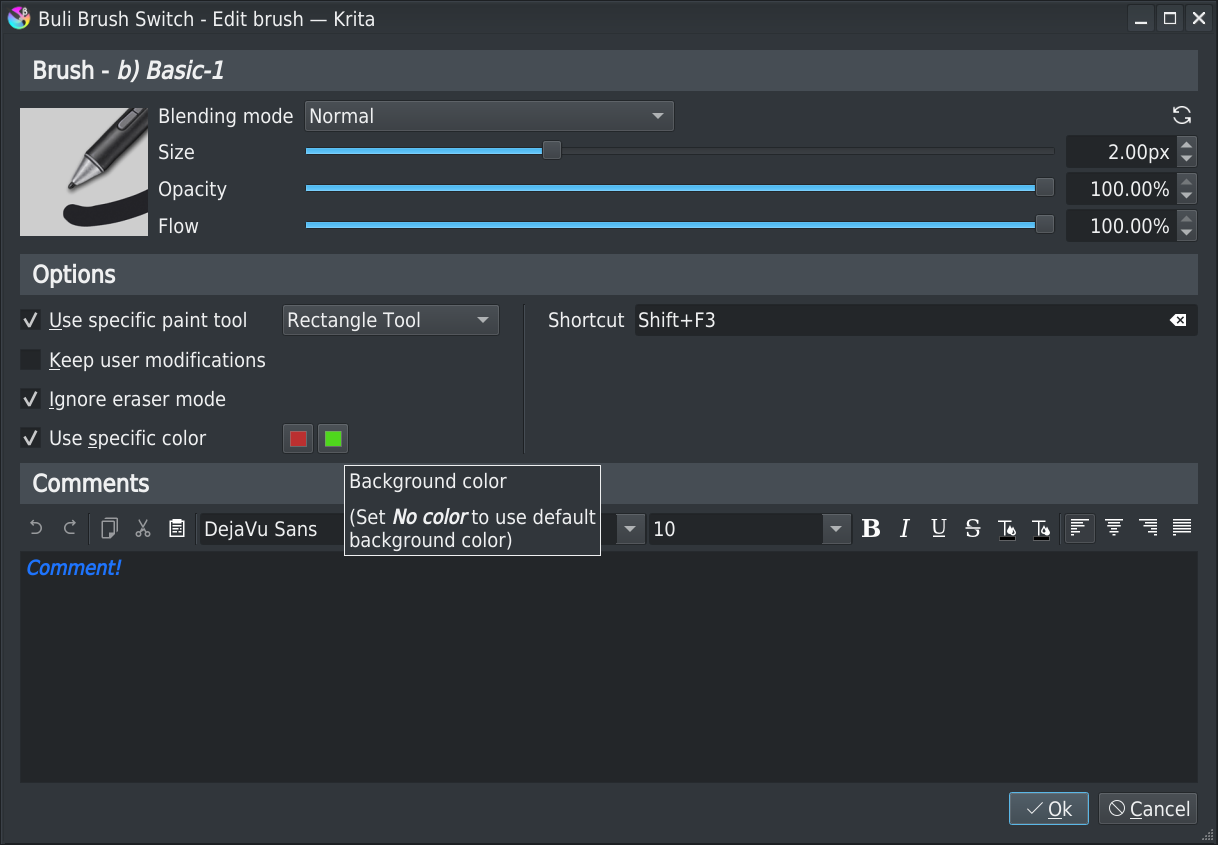
I found a problem: when I manually select a brush, it exits the plug-in state, but the particular colour does not change back.
If I switch back via the plug-in shortcut, the brush and colour change together
E1: For brushes with no colour set, I don’t think it is necessary to return their colour.
For brushes with a specified colour, if the colour has not been modified, the previous colour is returned when the plug-in state is exited
Hi
Thanks for feedback! 
I’ll check that, normally whatever the method used to exit the plugin state, the result should be the same
I agree there’s something to improve in the current workflow and your proposal is interesting
This can be implemented:
| Actions | Plugin brush settings → Color is not fixed |
Plugin brush settings → Color is fixed (Green) |
|---|---|---|
| Krita’s current brush color | Red | Red |
| Select brush plugin → Applied brush color |
Red (unchanged) | Green (from settings) |
| Exit brush plugin state | Red (keep color) | Red (restore original color) |
| Actions | Plugin brush settings → Color is not fixed |
Plugin brush settings → Color is fixed (Green) |
|---|---|---|
| Krita’s current brush color | Red | Red |
| Select brush plugin → Applied brush color |
Red (unchanged) | Green (from settings) |
| Change Krita’s brush color | Blue | Blue |
| Exit brush plugin state | Blue (keep color) | Red (restore initial color) |
Note:
For brushes with a specified colour, I’ve ignored the “if the colour has not been modified” proposition in my case 2I think it’s simple for the rule:
- Fixed color: always return to initial color
- No fixed color: keep last used color
It seems more natural -and simple- to me and I think a brush for which a specific color has been defined is used for really specific things, but here’s a Case 2b taking in account your proposal:
Actions Plugin brush settings
→ Color is not fixedPlugin brush settings
→ Color is fixed (Green)Krita’s current brush color Red Red Select brush plugin
→ Applied brush colorRed (unchanged) Green (from settings) Change Krita’s brush color Blue Blue Exit brush plugin state Blue (keep color) Blue (keep color)
Grum999
Yes, specific colors are used to do specific things. But once people change the color, this is actually something other than “specific”. Therefore, I think the rules in “specific” should not be applied.
I like the specific brush color option. Are there plans to add specific brush colors for foreground and background/gradient? It will be useful for brushes with the mix option turned on.
Hi
Adding background color as an option is possible, I add this idea in the To do list
Concerning gradient, I’m not sure…
I might miss something.
We can use gradient for brushes?
Grum999
But in this case, once size or opacity are modified, they should be kept when brush is switched back to initial used brush?
I know that size&opacity are different things than color, but in the idea, that’s identical things for me.
I can add another option to let the choice when a specific color is defined to determinate what to do, but with another option the settings window will start to be confusing
Edit: I’ll start to work on that tomorrow; in a first time I’ll implement the workflow that feel most natural too me, keeping in mind your proposal to be able to quickly and easily switch to the workflow you’re expecting with a minimal additional workload - probably in a first time I’ll set a hardcoded internal flag for that)
Grum999
you can choose the “source” for the brush color in the editor. there is plain color, gradient, uniform random,total random, pattern, and locked pattern. thank you for considering the option for background color.
I’m not able to understand to see how it works.
If you can provide me an example of brush like this (with a screenshot) it could help me to understand what is it and determinate if it can be taken in account or not
That’s not a big thing to take in account 
Edit: finished to implement it
Grum999
@Gremriel I didn’t forgot you
Can you open a scripter (menu Tools > Scripts > Scripter), copy/paste following code, and execute it?
from krita import *

pdict=Krita.instance().resources("preset")
for k in pdict:
    img=pdict[k].image()

    if img:
        imgTxt=f"OK({img.width()}x{img.height()})"
    else:
        imgTxt=f">>> None >>> {img.filename()}"

    print(k, '==>', pdict[k].name(), imgTxt)
When executed, copy/paste here the print list
As problem seems related to missing image for brushes, I need to check from the source what’s returned for you 
Also, you can open file C:\Users\Gremr\AppData\Roaming\krita\pykrita\bulibrushswitch\bbs\bbswbrushes.py in an editor (notepad++ or any editor that gives you line number; in worst case, Microsoft notepad, but NOT something like word that will broke everything)
Go line 777, and modify:
if column==BBSBrushesModel.COLNUM_ICON:
by
if column==BBSBrushesModel.COLNUM_ICON and brush.image():
Doing it will ensure that it will not crash if no image is available; I don’t have any idea which result you’ll get:
Grum999
The size and opacity should be preserved. Especially the size, when the canvas area is uncertain, it is difficult to have a “specific” situation, it always needs to be changed
Another point is that they will not affect the original brush
Print List
z)_Stamp_Shoujo_Bubbles ==> z)_Stamp_Shoujo_Bubbles OK(200x200)
z)_Stamp_Sparkles ==> z)_Stamp_Sparkles OK(200x200)
z)_Stamp_Stylised_Tree ==> z)_Stamp_Stylised_Tree OK(200x200)
z)_Stamp_Vegetal ==> z)_Stamp_Vegetal OK(200x200)
z)_Stamp_Water ==> z)_Stamp_Water OK(200x200)
After modifying line 777:
I get this error at startup of Krita:
> NameError
> Python 3.8.1: C:\Program Files\Krita (x64)\bin\krita.exe
> Fri Dec 10 09:03:20 2021
>
> A problem occurred in a Python script.  Here is the sequence of
> function calls leading up to the error, in the order they occurred.
>
>  C:\Users\Gremr\AppData\Roaming\krita\pykrita\bulibrushswitch\bbs\bbswbrushes.py in data(self=<bulibrushswitch.bbs.bbswbrushes.BBSBrushesModel object>, index=<PyQt5.QtCore.QModelIndex object>, role=1)
>   775
>   776             if item:
>   777                 if column==BBSBrushesModel.COLNUM_ICON and brush.image():
>   778                     # QIcon
>   779                     return QIcon(QPixmap.fromImage(item.image()))
> column = 0
> global BBSBrushesModel = <class 'bulibrushswitch.bbs.bbswbrushes.BBSBrushesModel'>
> BBSBrushesModel.COLNUM_ICON = 0
> brush undefined
> NameError: name 'brush' is not defined
>     __cause__ = None
>     __class__ = <class 'NameError'>
>     __context__ = None
>     __delattr__ = <method-wrapper '__delattr__' of NameError object>
>     __dict__ = {}
>     __dir__ = <built-in method __dir__ of NameError object>
>     __doc__ = 'Name not found globally.'
>     __eq__ = <method-wrapper '__eq__' of NameError object>
>     __format__ = <built-in method __format__ of NameError object>
>     __ge__ = <method-wrapper '__ge__' of NameError object>
>     __getattribute__ = <method-wrapper '__getattribute__' of NameError object>
>     __gt__ = <method-wrapper '__gt__' of NameError object>
>     __hash__ = <method-wrapper '__hash__' of NameError object>
>     __init__ = <method-wrapper '__init__' of NameError object>
>     __init_subclass__ = <built-in method __init_subclass__ of type object>
>     __le__ = <method-wrapper '__le__' of NameError object>
>     __lt__ = <method-wrapper '__lt__' of NameError object>
>     __ne__ = <method-wrapper '__ne__' of NameError object>
>     __new__ = <built-in method __new__ of type object>
>     __reduce__ = <built-in method __reduce__ of NameError object>
>     __reduce_ex__ = <built-in method __reduce_ex__ of NameError object>
>     __repr__ = <method-wrapper '__repr__' of NameError object>
>     __setattr__ = <method-wrapper '__setattr__' of NameError object>
>     __setstate__ = <built-in method __setstate__ of NameError object>
>     __sizeof__ = <built-in method __sizeof__ of NameError object>
>     __str__ = <method-wrapper '__str__' of NameError object>
>     __subclasshook__ = <built-in method __subclasshook__ of type object>
>     __suppress_context__ = False
>     __traceback__ = <traceback object>
>     args = ("name 'brush' is not defined",)
>     with_traceback = <built-in method with_traceback of NameError object>
>
> The above is a description of an error in a Python program.  Here is
> the original traceback:
>
> Traceback (most recent call last):
>   File "C:\Users\Gremr\AppData\Roaming\krita\pykrita\bulibrushswitch\bbs\bbswbrushes.py", line 777, in data
>     if column==BBSBrushesModel.COLNUM_ICON and brush.image():
> NameError: name 'brush' is not defined
https://i.imgur.com/eZnFEZA.png
*edit: I just noticed the spelling error in the column line. Will try again.
wow!
That’s really the complete list returned by script!?
If yes, it means that you only have 5 brushes active… or at least available through API…
Sorry, my fault, it was late and I made a mistake in line code 
Please replace ‘brush’ by ‘item’:
if column==BBSBrushesModel.COLNUM_ICON and item.image():
It will be better
Grum999
My bad, I didn’t see the output was in a scroll area (lack of coffee in the morning, I suppose)
The ouput of the scripter is way too long for the forum to post, but I have many brushes installed.
Still, I get a slew of error messages as soon as I try to add a brush, and after closing the last one, krita closes.
I will try a fresh install later today, so I only have the default resources.
Ok, no problem
What I’m interested in this list is eventual brushes for which output like >>> None >>>
If any, I need them
If there’s no brushes with this case, that’s really strange 
Probably because there’s access to brush image in some other part of code…
Doing a “fresh install” probably might not change anything as configuration&resource are not reset by installation.
What you can do is to go in directory c:\Users\Gremr\AppData\Roaming\krita
And rename file resourcecache.sqlite to resourcecache.sqlite-backup
This will force Krita to rebuild resource database.
=> but before that, please check for resources for which output like to >>> None >>>
(If nothing change, you can restore backup file to not loose your current resources settings)
Grum999
Hi,
Yes, I know about the configuration/resource folder. I was planning to do a fresh install with the resource folder backed up and removed. I will go through the output again first, though, to see if there are >>> None >>> lines.
Hi,
I renamed the resourcecache.sqlite file, launched Krita, and now the plugin works.
There were no >>> None >>> items in the print list prior to the rebuilding of the database, btw.