In terms of creating art with the lasso tool, a lasso tool with an “insta fill” mode/option would be nice. That is present both in PS and PSS. Just draw with the lasso tool and the inside of the selection be filled with the main color (without reverting to fill tool, pressing any hotkeys).
There is the alchemy brush 
2 Likes
I don’t know about it. The function must be in the lasso tool itself instead of a user made brush.
1 Like
Yeah, like the rectangle, ellipse and polygon tool. That would be cool  I don’t know if someone already proposed the idea.
As @Katamaheen pointed out, there is the alchemy brush preset, which is like the freehand selection tool and it automatically closes and fills the shape drawn. But I can see where the selection tools would be handy with this feature as well.
2 Likes
I couldn’t find the brush in resources. And if it is something that uses the shapes fill brush somehow, my proposal will fill all selection tools (lasso, rectangle, ellipse, polygon etc.)
You can find it in Deevad’s bundle but I don’t remember if it was already there or if I downloaded it… I do know there are also other bundles with a very similar brush inside.
1 Like
You need to activate the “Krita 3 Default Resources.bundle” to find more of these brushes, that bundle is usually deactivated by default in Krita versions above 5.0.x, it can be done under ‘‘Settings’’ >> ‘‘Manage Resources…’’. But also in the “Krita 4 Default Resources.bundle” are shape/fill-brushes
There are a few bundles offering such brushes, Artmessiah, Cazu (Pablo Cazorla), deevad-bundle_23-01.bundle, fullerhill_art - Crunchy Brushes.bundle, The EO Pencil Case, EZSaeger - Mojo Tools 1.0.bundle (license CC-BY-SY from our member saeger but not in the bundles he shares here) & Mojo Moo for comics in the Mojo-Moo-Draw.bundle, Nylnook, Rakurry, GDQuest, Iruhas 6 main brushes, Raghukamath, Version 6.0 of wojtryb’s “Wont teach you to draw” brushpack . I hope that is enough for you? Keywords to find thesebrushes are shape & alchemy but Cazu has also “Concept Shader Flat” & “Draw Mask Vector”, fullerhill_art has “CB Snap”, saeger has “Eraser-Trimmer” & “moo-draw-oknife”, raghukamath has “pack01 fill”, Rakurry “rxd) Fillbrush” & “rfi) Magicfill”.
Another good way to identify and find installed shape brushes is to hit F5 and open the preset view on the left (the little leftward pointing arrow below the preset-thumbnail), then select the shape-engine from the available brush-engines via the drop-down menu.
Michelist
6 Likes
I moved your post and its replies as this is off topic where you originally posted it (the Feb. monthly art challenge submissions thread).
3 Likes
I came to Krita from Clip Studio Paint where we had a lasso fill tool. There is a way to get a lasso tool like the one in clip studio paint using the Enclose and Fill Tool in Krita. I actually have it mapped as a temporary tool using wojtryb shortcut composer plugin. It activates on hold down ( you can also toggle it) so i can insta fill and once i release it goes back to brush. TOOL OPTION Settings for ENCLOSE and FILL TOOL BELOW
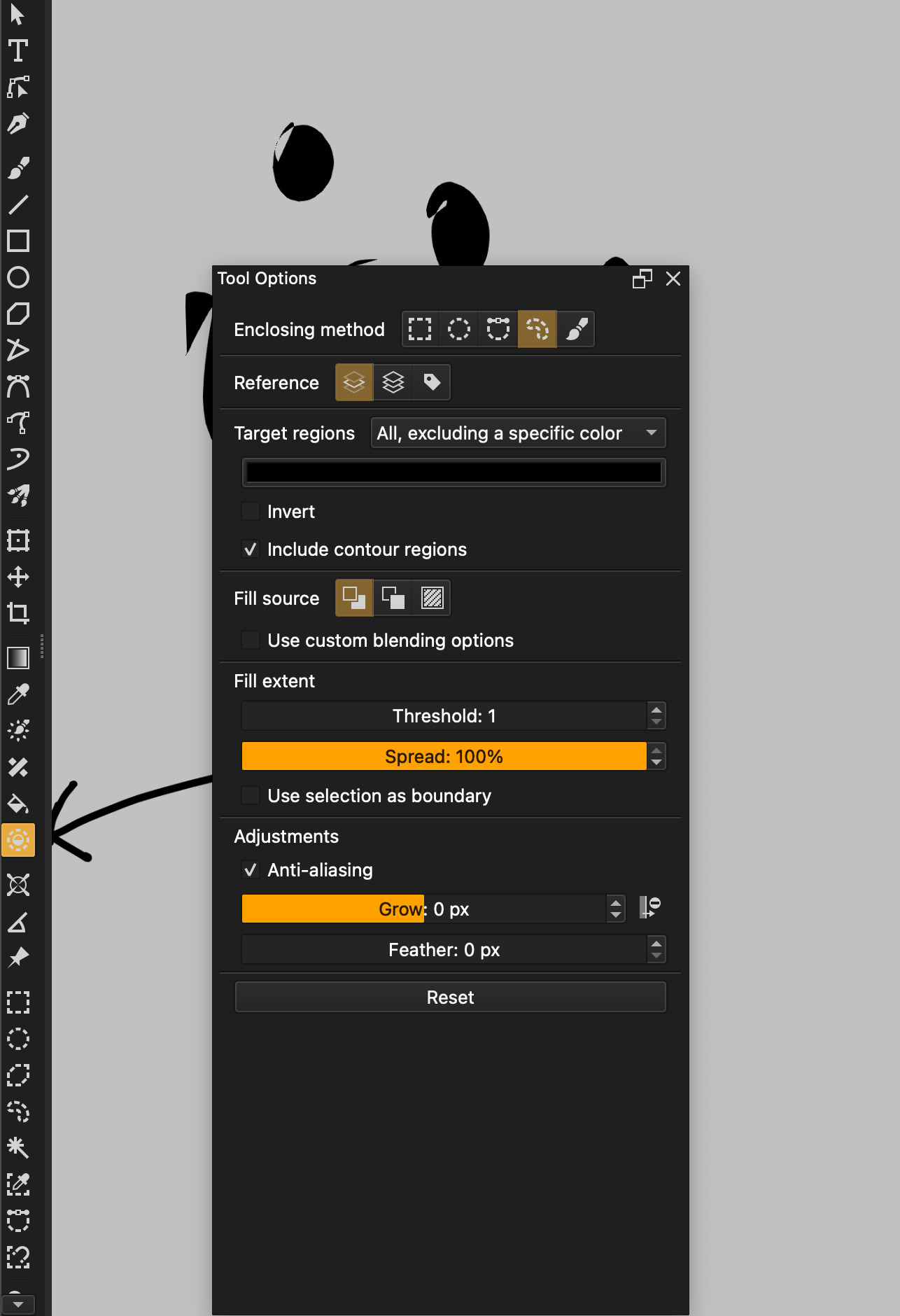
i was trying to include a video but could’t figure out how. 
4 Likes
Actully i just notice that when having the black color selected in the tool option settings it would not color over it. Try these settings instead. Now i am able to use the tool over any color.
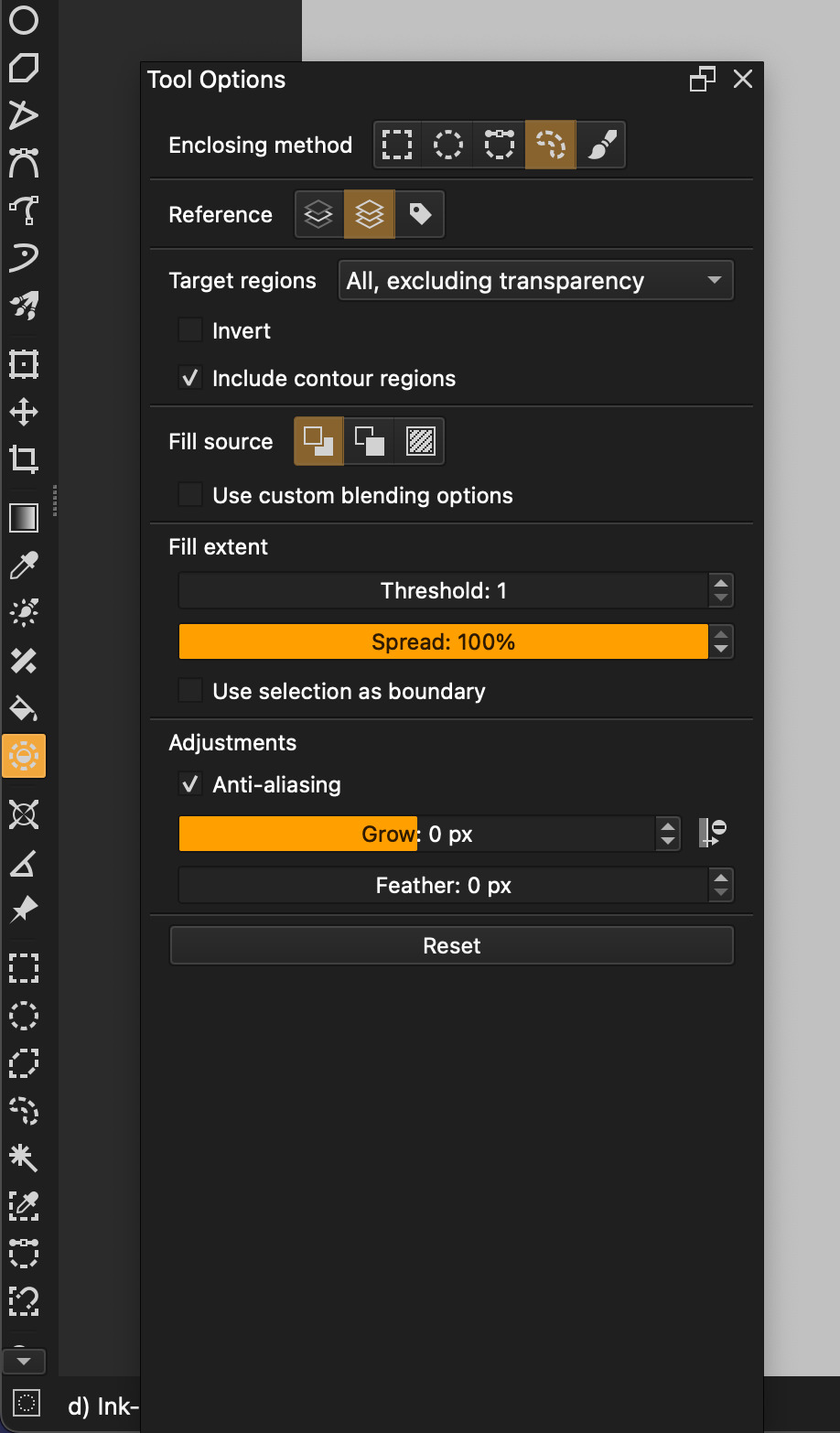
1 Like
It fills already existing areas, doesn’t insta fill a newly made selection (for me at least). Since what I mean by insta fill is “make a -blank- lasso tool selection and the color is filled “instantly” in the selection area”.
I see that I alrady had one. The name seemed unfamiliar at first. However, this is not the same thing. This type of brush produces not so controlled shapes, has its own charm, which is another thing. Whereas what I mean by insta fill is making a selection with the lasso and having it filled with the foreground color without choosing and using the fill tool after the selection.
Here, I must add this: Using the freehand path tool together with shapes fill gives more or less the result I talk about here. However, the fill options are absent there (like smoothing, feathering etc.). This is theclosest thing I’ve got but still not the same.
Photoshop does not have this tool to my knowledge. There is a recent plugin by kyle t webster that does it (it’s funny because he works for adobe and they won’t implement it). Is that where you got the idea from?
The options you have in krita are:
- Use the fill shapes brush. One upside is that you have realtime feedback of how the filled region will look. One downside is that it does not work in vector layers.
- Use the freehand path tool with fill and no stroke. The upside is that you can create vector shapes with it and the downside is that it does not have preview of the filled result. I don’t know why people always forget about this tool. It is the shape tool counterpart of the freehand selection tool, it even almost have the same name.
- Use the enclose and fill as @Maverick pointed out. It was not really intended for this use when implemented and should be slower. Also it does not have preview of filled result and does not work on vector layers. But it can benefit from the grow/feather options. Differently as the options suggested, I would select “all, except specific color” and would choose a color to exclude that does not appear in your image.
Selection tools should select, not fill. One clear disadvantage of using the lasso tool directly for this is that it interferes with the current selection. Using the presented methods you can have a selection and only paint inside of it.
3 Likes
As @Deif_Lou said you can use the freehand path tool with fill and no stroke option for instant fill.
A co-incidence is that @denmanrooke was talking about this same tool on mastodon here
4 Likes
The idea is from Paintstorm Studio. I never used Photoshop. I thought it was also in PS since I saw some people doing that but they might have udes shortcuts.
So, what is exactly that you want that the options I wrote don’t provide? For the freehand path tool the only difference is the grow/feather options. Are those something that you use that much?
1 Like
Actually, they are but it’s just me.
In PSS, you give the smoothing, feathering, grow numbers before the selection in the fill options. So yes, those “fill” options are missing. Since it’s not a fill tool feature in Krita, it is not the same. I know all the alternatives to it. It’s not that they are inherently bad, just not the same.
As said, you can have grow/feather if you use the enclose and fill tool, it’s not an optimal solution but gets the job done:
https://www.dropbox.com/scl/fi/h2xgxpleg663udstmrwd1/SVID_20240308_095146_1.mp4?rlkey=sl0bubqvxb6z4u1evqsbp60f3&dl=0
1 Like
And what Krita has and PSS doesn’t is the fill with brush properties, PSS fill only has a single type (classic fill) and doesn’t change according to the selected brush (doesn’t make the fill as if painted with a brush but just fills an area with a certain color).