Hi, everyone! First off, I’m going to link yclept’s post, because they seem to have encountered the same hurdle in Linux.
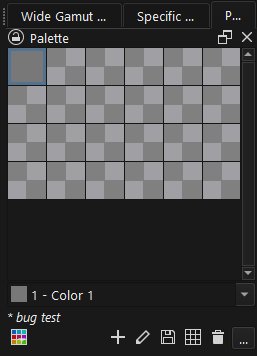
I think I found a bug:
Whenever I try to add a swatch group to an existing palette, it doesn’t register. I can access the palette editor, create the swatch group and save the changes, but then I exit the editor and nothing new shows in the docker.
Notice how the palette title appears in italics? I press the save button and nothing moves. I go to the editor again --no new swatch groups to be found. I repeat the process, go to the editor before pressing save --nothing.
It’s been happening since I updated to v5.2 and I’ve been working around it with the tagging system. Hasn’t really been an issue until today, when I tried again and Krita crashed on me for the first time.
Important detail to note: it happens with existing palettes and with this palette I created just for bug testing purposes.
Also, it’s got nothing to do with the new lock function. Already checked.
Also also, I did try deinstalling and reinstalling, just in case. Even wiped the resources folder. It’s still there.
Does anyone else have this problem? Is it an official bug? Do I report it? If so, how?
I just learned about swatch groups and thought that I was stunned since I couldn’t get it to work. I went into my older linux VM and it had krita 5.1 on it and was able to see that yes I wasn’t stunned. I copied my newly made palette with the grouping to google docs and transferred it to krita 5.2.1 on to my Win 10 pc and again it wasn’t working.
I also thought maybe my install was corrupted and uninstalled and reinstalled it after I deleted all remnants of krita. I couldn’t find anything about this function being removed in the release notes so I’m also thinking it’s a bug. I wish I knew about the grouping years ago I would think it would be so handy.
On the menu you can click help and then report a bug it has instructions there an what you need to include.
I just did a bit of testing and was able to create a palette with swatch groups and added the colours in 5.1 on my linux virtual machine. Then transfer the palette to my google drive. Then imported it back into Krita 5.2.1 on Win 10 and it did keep the groupings. For some reason I couldn’t get the shared folder working between my VM and Host but whatever so that’s a work around. I’m going to try to install a previous version of Krita on the Win 10 PC just for the palette creation.
Installing the previous version it wouldn’t allow it however you can download the zip. Go to the Krita.exe file in the bin folder and it can run from there. You can only run one at a time I did try to get both running it didn’t work but they do both access the same palettes folders so in that way it would be easier than running a VM if you want to create palette swatch groups.
I’ll double check. Ya permissions are correct. It’s set to auto mount and just won’t do it. However I’m more concerned about getting the OP issue fixed. I haven’t even touched the VM in over a year when I was trying to figure out how to get my drawing tablet to work with my old laptop and it’s gone now.
Thanks for the suggestion it was wort the try.
Nadine