Challenge Prompt Maker

For a while now I’ve been struggling to think of what to draw in the short period of time im able to [due to work busyness]. In a way the online generators does not work for me well, they become to repetitive or does not contain the kind of things i would draw. So three weeks ago I started coding a challenge prompt generator - working on it little by little when i have time. I added things I wish those online generators to have.
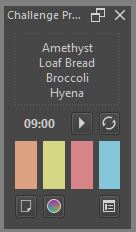
Video of Challenge Prompt Maker

Challenge Prompt Maker allows you to customize the list and categories at which the challenge prompt will be generated from.

Want to limit the prompt to be a fruit themed folklore creature in a random setting, well you can customize the list to include those. Want it to randomly select between your OC, or fave characters, or celebrity - you can customize the list and category to include those.

The downside, well you need to populate the list and categories - which the plugin provided a UI for.

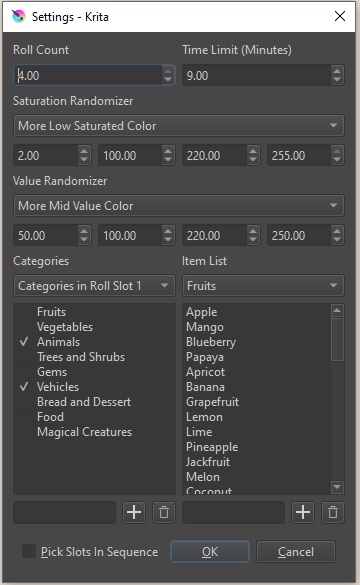
You can customize/ limit what category of items will be use in each randomization roll.
You can set it up to only pull from Animals and Plant at first roll,
Then on characters at second roll,
Then on scenes for third roll
provided you have all this category set.

You can also make the rolls to happen in sequence, slot 1 then 2 then 3, or make it pick which slot will go first. You can also set how many rolls to happen , the limit is 4.
Once a category is pick for a roll, it is remove from subsequent roll. So in case that animal category is both in slot 1 and 3 and its chosen in slot 1 - then it can’t be chosen again in slot 3.

To add additional flavor to the challenge, there is also a suggested color palette that get generated with the prompt as well as a countdown timer. The 4 slot Color palette can be regenerated any time.

Anyway, if anyone is struggling to do warmup drawing , need push over some mental block, want to do drawing challenge for stream - you can try this.

BTW;
The default included list of items is not the best, so i suggest you set up one of your own - either by UI or by opening the category.json.
The default one just has fruits, plants, some food, some mythical creature.


DOWNLOAD LINKS

For KRITA 5.2x [Download]

For KRITA 6.0.x [Download]

32 Likes

excellent, when I have time I will try it!

1 Like

I created V.0.1.1 today.
Minor update - I made the item box switch if you click a category in the category box.

Also a quick demo.

5 Likes

I think this may be my first, comment/post on here heh but I just genuinely wanted to thank you for this. I struggle with idea issues all the time. I have a list of probably 150+ ideas but never seem to be inspired by them in the moment. Maybe if I populated a list with my ideas already, then I’d be more productive hah.

1 Like

this is really cool!! thank you for this

Good Day,

I have updated this plugin to pyqt6 and can now be used in Krita 6.

Download

WARNING : ONLY FOR KRITA 6. Krita 5 version is available on the top of the thread.

2 Likes

Be aware Krita 5+ doesn’t load it.

there are two version.

one is for Krita 5.

and another for Krita 6. The one for Krita 6 wont load on Krita 5 - you need the one for Krita 5.xx

I tested both version on my PC and one on my laptop.

The one in the post above, my last post is specifically for Krita 6.

the link to download the one for Krita 5 is in at the start of this thread.

this is the link for krita 5 dl → https://github.com/kaichi1342/ChallengePromptMaker/archive/refs/heads/v.0.1.3.zip

On all of my plugin, the Krita 5 version is link in the thread above. Dont use the one for Krita 6. its a different PyQt version .

2 Likes

edit: The post below by Takiro explains how to put double quotations around many lines of text & add a comma all at once. I was looking for a way to do this, as someone who doesn’t code, and that solution is better than what I could figure out on my own.

I don’t seem to be able to edit that post anymore,

That is because of your user status as a basic user, you have not enough participated in the forum so far.

Michelist

You can add double quotes + comma on all lines with one single regex-replace using
find: ^(.*)$
replace: "$1",

Assuming the editor uses Perl compatible regex engine and doesn’t include new lines in ..

For replacement some editors use different placeholders to put the extracted text (what is between ()) back in. $n (where n is the number of the group) is common but I have seen \1 or &1 in some cases (assuming group 1), and some editors are unable to do it at all but I would be surprised if notepad++ cant do it when even MS Word can.

1 Like

Excellent. I figured there was an easier way to create these lists for the category.json file. Thank you.

I learned a lot just trying to figure out how to make these lists, and enjoyed learning about what perl is.

Overall I think this is a great plugin & if we could get one more category line it could make some really interesting statements to work with. I’ve already rolled many hilarious & interesting word combinations though, so it’s been fun.

1 Like