ClipStudioPaint Artists: What features does CSP have that you wish were in Krita?

I apologize for any errors in the text, I do not know English, and I use a translator

In Clip Studio Paint I like the interface more, it looks more minimalistic, unobtrusive.

1

In Krita I don’t like the way sliders are made. For example, adjusting Opacity and Size for brushes. These sliders look too massive, cumbersome. I’d like to see them smaller. Photoshop and Clip Studio Paint are good examples of a minimalistic and unobtrusive interface.
For comparison I can attach only screenshot from Photoshop, because I already deleted Clip Studio Paint, but sliders there are more minimalistic than in Krita.

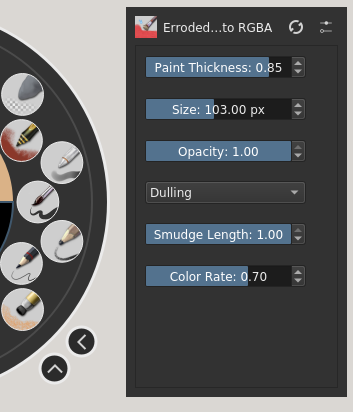
Krita Sliders:

Screenshot_2

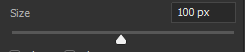
Photoshop Sliders:
Screenshot_1

2

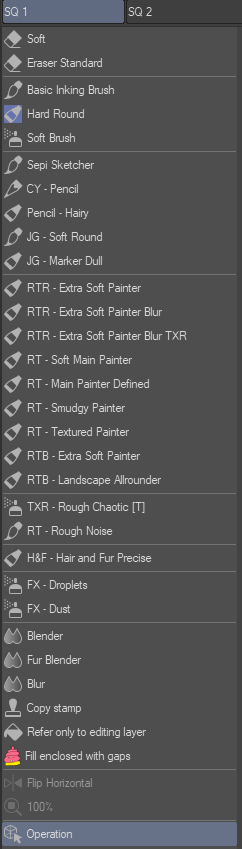
I also don’t like brush icons in Krita. I only switched to Krita yesterday, and I’m still adjusting the program to my liking, but at the moment I haven’t found a way to turn them off, only to reduce them to the minimum size I can.
Personally, I don’t understand why these icons are needed at all. What information about the tool do they report? For example, my workflow only uses 2 brushes, one for drawing and one for painting. I call them “Drawing” and “Painting,” and these names already tell me what characteristics each tool has. But the icons don’t give me any information.
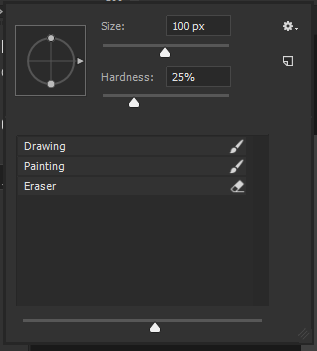
Again, I can’t give you a screenshot from Clip Studio Paint as an example, but only from Photoshop, but in both of these programs the brush selection menus are done in a minimalist style.

Krita Brushes Panel:

Photoshop Brushes Panel (I really like the tool icons in Photoshop that are to the right of the title, but some of the rendered brush settings at the top of the panel are completely unnecessary to me here…):
3

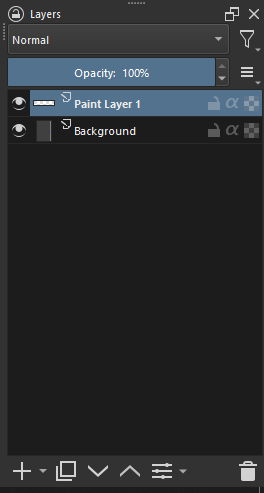
Also, the menus are confusingly Thumbnails of layers. I keep track of the order of my layers, and give them appropriate names so that I can easily navigate them. Thumbnail, on the other hand, doesn’t give any information about the layer because it is so small (I know it is customizable, but it will still be small) that seeing something in it to navigate my layers is no easy task.
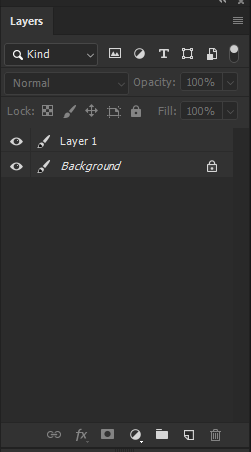
In Clip Studio Paint and Photoshop, the Layers panel is also more minimalist, and you can turn off unnecessary elements like “Thumbnail” that don’t report any information, and leave only the information that really matters.
What I like about the Krita layer panel is that it doesn’t have any unnecessary features at the top of the layer panel. In Photoshop, on the other hand, there are too many unnecessary features that I don’t even use.
But in Photoshop, the icons at the bottom of the layer panel are less big and bulky than in Krita, and I like them better.

Krita Layer Panel:
Photoshop Layer Panel:
Afterword

I would like to attach screenshots from Clip Studio Paint instead of Photoshop screenshots to make my post more in line with the topic of this thread, but, as I said, it just so happens that Clip Studio Paint has already been removed… However, in spite of this, the essence of this message doesn’t change, the subjective flaws are the same as they were, no matter what program I’m attaching the screenshots from.

And so, in general, I like Krita. It has a few flaws, but none of them are critical. I think Krita is as good as Photoshop or Clip Studio Paint, and even better, because it’s free and open source. The desire of developers to provide a tool available to everyone, I appreciate much more than some minor features in other programs, which are made differently in Krita.

3 Likes

There are a few minor things, I havent found yet, but Krita has a lot of options I wasn’t fully aware of.
CSP had bought out Manga Studio, which is where the art engine is from.
It was an excellent program, and I used it for years before CSP bought it out. The direction of Clip Studio, honestly at this point, started moving away from the artist, and more, into monetization of the program with microtransactions. ( Fine, for some folks, I was okay with ti, my base program was still usable ) about 4 or 5 years later, or so, they push past the mircotransactions for a subscription fee to use ‘new features’ . Also, They locked the program, to a Microsoft key system, which means it will not run on Linux, and this is by design, it will work on Chromebook, and Samsung phones etc. but has specifically been locked out of Linux.
I think, for the main people, seeing this garbage happening, they want to move on, but fall into that “this is not my interface I am used to.” situation. (I still have those moments )

I think, there will be more documentaion between the two, that will help folks leaving csp to krita, that transition will ne easier.
There are a few brush features ( which I think are in the works here on Krita ) that are the only thing slightly missing. ( the hard edge, with soft blend, I have sort of got but, I’m not there yet on one brush ) That said, the brush creation tools of Krita, are vastly superior to csp.
Some times, ( like for me ) the answer, is asking for a feature, then learning it is already here.
Some things in the UI could be adjustable for ease of use, but otherwise most is already here.

3 Likes

I think you are on the wrong topic, this is about CSP features, not about PS features and more so when you ask for Krita to be a PS clone.

Just putting this here for everybody, just for information.

All the feedback is good to have, but Krita is a free and open source software and it takes some time to develop and implement features in it. It is ofcourse developing in good speed but considering all the request here I think krita won’t have all these features implemented as quickly as everyone expects.

So if your goal is to switch from CSP to krita because of Cellsys’s recent monetary decision then you would be disappointed to see that your favorite feature is not in krita and it not being implemented on priority for you.

It might or might not take a long time to get all these features and have Krita exactly like the way you want. Some of the features mentioned here might not be compatible with how krita is made and might not come to it.

I am just setting everyone’s expectations straight. If you need a free CSP right now for your production work, you are better off using csp itself. And seems like CSP is not that bad. You just have to buy and subscribe to it only when you want updates. Krita will surely improve in this direction but it will take time. So keep all the feedback coming post it in this thread only.

Just be on topic and don’t try to discuss minute details here so that the thread will be on point

Disclaimer : I am not the one who decides things in Krita and I am not the dev. I am just saying things from experience of using free software and having seen how it develops.

16 Likes


I’m not asking for Krita to be a Photoshop clone. I’m only pointing out things that Photoshop and Clip Studio Paint, in my subjective opinion, are better implemented than Krita.
But I show it using Photoshop as an example, because I have removed Clip Studio Paint. As I wrote before, if I attach screenshots from Clip Studio Paint instead of Photoshop, it won’t change the essence of my message.
I went from Photoshop to Clip Studio Paint, and then from Clip Studio Paint to Krita. And whatever I use, my preferences remain the same everywhere, the flaws I see are what I pointed out.

If you think it’s a request for Krita to become a Photoshop clone, then by that logic, any other request in this thread is a request for Krita to become a Clip Studio Paint clone.

Anyway, I believe that Krita, Clip Studio Paint, and Photoshop are all “clones” of each other anyway-these programs are very similar, and there are no cardinal differences in them.

4 Likes

I say this because I see that it mostly asks for aesthetic changes, that although it is true that they can be improved, instead of showing at least a mock-up I only see that it says “in Photoshop it looks like this”

1 Like

Sorry but I have to disagree. Your stance here is at least an ‘itsy-bit’ rude.
Asking for a more minimalist look, that in this case boils down to: Hiding the thumbnails (from layers and brushes), it is not unreasonable.

This thread is a straight-up comparison of Krita and CSP. We can leave the mock-up and in depth analysis to a feature request.
@seasidesuicide post was real clear, and I appreciate the PS (or CSP) screenshots to illustrate what is different from Krita. Especially when it comes to UI.

2 Likes

I tried to search how well abr file format is supported in other apps like artstudio, csp and procreate. Seems like while these app have better support than krita they do have their issues. It is not without any issue and easy like you think. For example a forum thread mentioned csp not having support for dual brushes in the abr. It also doesn’t support tpl files. Procreate has issues too, what I found interesting is that the representative from procreate team telling how hard it is to reverse engineer abr files.

Here you can read it here - https://folio.procreate.art/discussions/4/10/34697

To quote them about abr

ABR is an unholy format that should probably be shot into the sun.

I am saying this to tell you that it is not easy as you think it is. Other software having it implemented doesn’t mean it is easy.

9 Likes

I’m sorry, I really didn’t mean to sound rude, but since the topic is about features, it sounds more like functions, maybe I misunderstood everything when reading, but well, an apology then.

I partly agree with you, I think that ideally, it would be a good idea to collect references, and try to find a suitable, in my opinion, slider design for Krita.

I don’t know how much of a waste of time that would be justified on my part, though. I’m not a UI designer and I don’t use in my work the tools used in graphic design, including UI design. So it would take me much more time than the person who is responsible for Krita UI design, who knows these tools better than me anyway.

So I’ve just attached as an example the design I had at hand, which I think is a pretty good illustration of the direction of my thinking. Just to show what I roughly mean when I write “minimalist” and “unobtrusive”.

To be able to disable the display of brush icons in the Brushes panel and thumbnails in the Layers panel, it’s hardly necessary to create a mock-up, just remove them and leave the text.

4 Likes

I never said that it’s easy to implement a proper Photoshop brush import. I’ve been a programmer long enough to know that. And if taking information from a 3-year-old rant on a Procreate forum is of more value to you than me telling you in real time that it worked really well for me, then there’s nothing else I can do about it.

It seems that quite often when somebody suggest something or shares experiences they have with other programs, there are sworn in Krita users who immediately switch into defense mode instead of just taking the valuable parts out of those comments and move on. That’s not directed towards you specifically, it’s just a general observation that I’ve made over the last few years and led to several discussions going into a completely wrong direction.

6 Likes

I still want ‘texture per stroke’ in brush engine.

1 Like

If you mean what I think, Krita already has that. You can watch Ramon Miranda’s videos on YouTube about brush making.

Unnecessary take from my part

:weary:
Yeah. Let’s me just:

Now for the meat and bones of my comment. I meant to ask yesterday about the ‘minor’ things about your first post. I just forgot and remember now.
Just writing the name of features don’t help much. Explaining in detail is helpful as can spark volunteers to start working, either on Krita’s code or in plugins to implement those.

Honorable mention
Krita liquify is cumbersome to activate. Having to always make the action: Transform Tool → Liquify Option
It is slow in a laughable manner. The quality of the resulting ‘liquified’ portion is lack-luster.
Liquify’s performance issue
Maybe we can make an overall to the UI/UX and code of the Transform Tool. Creating a feature request and discussing what is viable, and how to be done is the first step.

This is a CSP ‘docker’ with favorite actions and tools right? Then you can make different sets of favorites, is that right?

Not sure what you meant, especially when you said this is compared to PS. How is this compared to Krita?
Is Dual Brushes the same of Krita’s mask brushes?
There are options on CSP that Krita don’t have?
Does CSP work in a different way than PS and Krita Masked Brushes?

This one is the brush options in a ‘quick menu’ right? If yes. How does it work?

  • Is the list of options general or per brush?
  • If per brush what happen to a ‘newly created’ brush? There is a global set of ‘exposed’ properties in the window?
  • It is similar to Krita’s Popup Palette, that appears on command and disappear when painting, or is more akin to a docker (always on screen)?
1 Like

Even writing it out in more detail will not suffice. In the end this has to be tested by somebody of the Krita team. Then a decision can be made if it’s worth implementing. And if the description was too short, I can always provide a bit more information if needed.

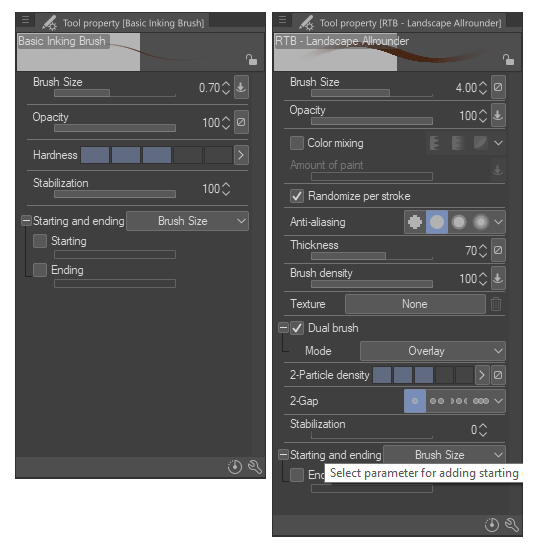
It’s a “docker” where you can throw all kind of things into. Brushes, erasers, other tools, commands, actions … Maybe there’s already something like that in Krita.
Mine looks like this …

It’s about the same as the masked brush option in Krita. There might be more options in CSP or maybe they are just different. One thing that I like in CSP is, that I can assign multiple brush tips to the “masked brush” at the same time. In doing so I can make those pattern more dense, lighter or different looking quite creatively. But that’s not the most important thing. The masked brush in Krita is fine as well. Should easily cover the options that Photoshop has got, which are very basic.

It’s a “docker” which contains brush-specific options. Which options are in there is up to you and you can show or hide them via the brush settings dialog. So it’s not a popup - it’s there all the time. This makes very usable. No extra clicking.

Here’s a example for two brushes (same docker - just different active brushes). On the left is an inking brush, on the right a rough concept brush. For each of those brushes I defined which settings I want to see in that docker. At any time I can add even more or remove some of them.

I hope this makes a few of the things clearer.

1 Like

Nope. You’'re ‘semantically’ wrong here.

  • Writing in more detail can suffice more than you think. Like I said it can spark the interest of others to implement the idea as a plugin, per example. Another benefit is that others users can like the idea enough to start a proper feature request (I might do one based on the tool options ‘docker’)

  • About testing a feature request, there is two interpretation of your sentence:

    • Looking how to integrate the idea onto Krita, deciding behaviours and UI. How the idea should work inside Krita’s paradigm. If something should or could be expanded, changed or cut. All this can and often is made by the community, even creating the code is made by volunteers ‘half’ the time. No Krita Team needed here.
    • Speaking of adding code to Krita: It don’t need to be tested by the Krita Team. One volunteer can code, and others volunteers test if works as intended.
  • About being worth implementing. There are two interpretation here too:

    • If the feature is worth be given time, energy and resources being coded and added to Krita. Again, this can be done by volunteers. However, this doesn’t excuse the Krita Dev Team ‘waving away’ features request just waiting to be implemented. It just is the reality of a small team with low resources, is not a secret in Krita case.
    • Maybe is not worth because the code trying to be added to krita has license issues, or just go against the program vision. A feature that drastically changes the program can be refused to be added. (But you can create a fork of the program with this idea implemented, because you are free to do so)

It can be added (at least partially) as a Plugin. I know it can be done to brushes and tools, some actions too but not sure every action can be accessed by a plugin. Sub-tools maybe can’t be accessed, like going directly to the Liquify Tool, you would only be able to add the Transform Toll button. Not sure.

Yep, it is pretty much what I was thinking of. The irony of your first post is that you said:

However it probably it isn’t really that hard. Krita’s Popup Palette already has the Brush HUD

Firstly: Every option here is per brush. So the order would be to make this changes persistent over session (this is a separate feature request actually)

Second: The displayed properties currently are per brush engine. It should be changed to different brushes displaying different properties.

Thirdly: Expand the available properties to be added to the “property HUD”. Maybe make possible every option in the Brush Editor available.

Lastly: Make this HUD also into a docker, so it can be always visible in the screen.

2 Likes

I think this is really hard. That Brush HUD is just a predefined collection of the important settings. And even if it changes with the brush engine, when there are only a decent amount of them, this can still be hard-coded.

The version that CSP uses is very dynamic and every brush has to store the visibility settings alongside the other brush settings. Or at least it needs to have a lookup table to do that. So this goes all the way down to resource management. It would also be a massive task for the brush settings UI.

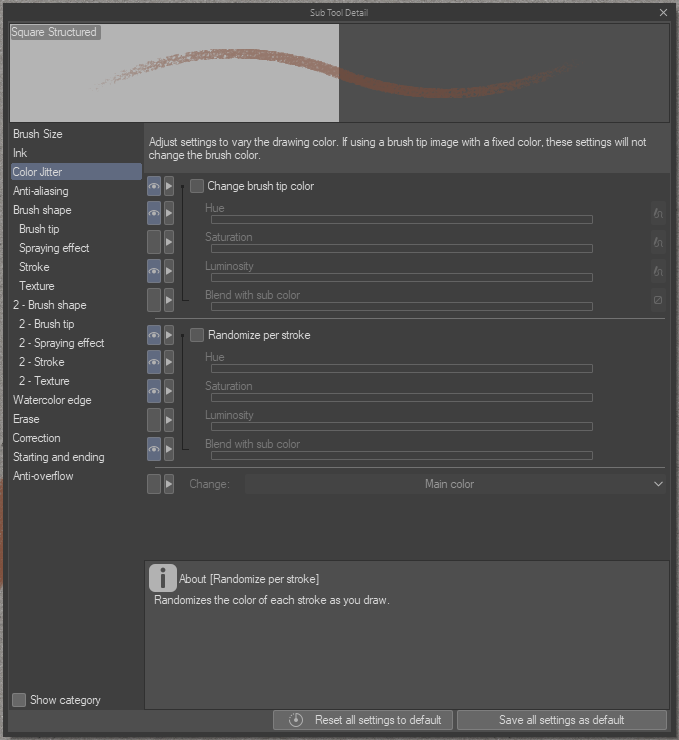
As you can see here pretty much every option in the brush settings of CSP has an eye icon in from of them where you can expose the settings to the Tool properties window. This would also have to be added to the brush settings window of Krita. And I know how the brush settings window of Krita looks now. This would make it even more chaotic, if you don’t clean up that window before.

So I think that dynamic brush options feature is the least likely to be added.

You sure? I watched the video through but I’m not sure I found it.
by ‘texture per stroke’- I’m referring to this, which I believe is yet to be implemented in krita.

This is something I personally want myself a more concise always available docker with the important feature of the brush available , a concise one, so probably avoiding to put everything the actual brush editor has but putting the one user most likely to toggle and change.

3 Likes

I don’t know if this has been said, but I really wish we had CSP’s panel tool in Krita… currently setting up panels is a weird task but a panel tool would make it so so so easy. Krita is already decent for comic work imo but a panel tool would make stuff way better

2 Likes