Some early performance numbers for the distance map calculation (which should be the main bottleneck compared to a regular fill).
For the most naive implementation, computed in one thread just before the fill operation:
A lineart picture at 3000x2700 pixels, rather low line density (a basic character rough):
gap size 1 px = 123 milliseconds
gap size 5 px = 142 milliseconds
gap size 10 px = 208 milliseconds
However, this is a rather favorable situation. The computation time will rise sharply with the combination of: 1) resolution, 2) gap size, 3) lineart (opaque pixels) density. For a 7000x10000 image at 40 px gap size and a spray brush all over the canvas it could even take 32 seconds. So yeah, that’s a no go
My test system is Ryzen 9 5950X @ 4.6 GHz (boosted when the calculation is ongoing), but I’ll eventually check with a lower spec system, or a downclocked CPU.
Anyway, I’ll probably first complete the feature, then focus on making it faster.
I made some basic optimizations which got it from 208 ms to 70 ms, so it should be good for initial testing. For really large images/gaps I will have to implement multithreading.
However, I did encounter a problem with the fill algorithm itself. In the prototype app (and in MyPaint) the gap closing fill is using a classic flood fill, whereas in Krita we have a more optimized scanline fill. To properly find the gaps, it’s important to go from pixel to pixel and keep track of the distance changes and other contextual information, which becomes a bit problematic with the scanline approach.
I think I’ll have to take a detour and port the scanline fill to the prototype and better understand it to see how it should be changed. Or if it’s feasible at all (e.g. if gap detection changes would nullify the benefits of scanline method, for example).
Lastly, I can always go with the basic stack/queue based flood fill, although I’m not sure how big of a performance hit it will be (on top of the gap map calculation overhead).
I saw that back in the day on a message of the author of mypaint’s gap closing fill code in one of the forums. They basically said something similar, that they had to implement the classic floodfill for that to work. That was one of the reasons that lead me to stop researching mypaint’s code when I looked at it.
I would first make it work in patches, small rectangular regions. In mypaint I think it works on a per tile basis, which is kind of the same. This has the benefit for my approach of limiting the computed region to a suitable size, instead of the whole layer. In your case I’m not sure that it would be a benefit per se, but I guess it will be if you want to use multithreading, maybe you can distribute the work between those patches. I made a multithreaded version of the fill algorithm in the past as a test to see if it was an improvement, there is a mr if you are curious, but there was issues with it and wasn’t merged. It worked also on a tile basis, in hope that cache locality was better that way, but one of the things that was suggested to me was using larger patches, but i didn’t test that.
One issue I see is that the scanline flood fill works in horizontal scanlines, so it easily can propagate far away only one px line, say to the right, and maybe pass some gap. In that process, you would not have yet computed gap info on the top/bottom rows. Not sure if that’s a problem though, since I don’t know how mypaint’s algorithm works.
It seems that was the approach that the author of mypaint’s gap closing fill took, but it was not clear to me when I read that if it was because of the imposibility of making the algorithm work with the scanline fill, or they just didn’t want to spend time adapting the scanline fill to it. One thing is clear though, the scanline fill is way faster than the clasdic flood fill. But I also have to say that mypaint’s gap aware fill doesn’t feel slow.
Another difference in krita is that it computes color differences in lab space, so pixel colors have to be converted to lab (this makes it generic since krita allows different color spaces). This is a bit optimized for flat regions: differences for new colors are cached, so differences have not to be computed for large flat areas’ pixels.
In January I’ll have more time and i’ll try implementing my ideas on a test app, and see if they are worth it (one thing is thinking of something and another making it work…). Maybe they can help you in some way.
Thanks @Deif_Lou , your input is very helpful Hmm… in this case, I think I’ll just go ahead and implement the flood fill as in the prototype and see how it performs. If it’s good enough maybe we just go with it. If not, it will be back to the drawing board to research the scanline algorithm properly.
Regarding the patches optimization – I’m pretty sure the primary reason for it in MyPaint is that they have an infinite canvas comprised of these patches, and they have no other choice but to work with them.
My hope is that I can make the whole gap map computation fast enough that it makes no sense to do it incrementally. Actually, if we compute the patches on demand, we are working with a smaller set of data and lose the opportunity to parallelize the computation. Conversely, if we pre-compute the whole map, we have a lot of data to distribute to workers and hopefully finish the processing in the similar time that it would take to compute one or two patches.
I have an idea how to do it and I expect the results to scale well.
I’m not sure yet where this will become relevant. I see that the fill class has a lot of functions, but the one I’m working with is a selection fill (pixel selected or not), so probably colors come to play later. I hope I can avoid too much plumbing if I have to create a new fill algorithm class. I’ll explore how to make it tidy and maintainable once I have something working.
Regarding the MyPaint / prototype algorithm. I will describe it properly by the time I put the MR out, but in case you and others want to have a basic understanding, here’s a quick version.
The algorithm is two-step:
Gap map (distance map) computation.
Flood fill with gap detection.
Step (1) involves scanning the image (or tiles/patches) for opaque pixels (where the lineart is) and then for each such pixel checking its surroundings (radius based on the gap size) for some specific conditions. Some nearby pixels must be fillable (non-opaque) and at least one more pixel must be opaque. Then the map is updated in this area with the distances relative to that initial opaque pixel. The distance is updated only if it’s smaller than before at any given pixel (the map starts initialized with an arbitrary high “max” value).
As this procedure is repeated for every pixel of the image, the areas overlap significantly and progressively more precise distance values are found. Eventually, the whole map is updated and we are done.
Step (2) is a slight variation of a queue-based flood fill. Initially, we add the starting (seed) point to the queue and keep looping until the queue is empty. On the first iteration we take out the starting point from the queue and determine if this pixel should be filled or not. If it should, then we fill it and queue its four neighbors (up, down, left, right). If a pixel should not be filled, then we just skip it and go to the next in the queue. With each filled pixel adding four more, as you can imagine, this creates an explosive growth of the queue. The algorithm ends once the queue is empty.
To detect the gaps while filling, we store some additional information with the pixel coordinates. At minimum, we need to keep track of the gap distance in the previous pixel (the one which queued the current pixel). This is where I changed things a bit from MyPaint, and in the prototype I’m keeping track of distance, max distance, and whether we’re allowed to “expand” the fill from inside the gap. With these rules, I can detect if we’re “descending” from an open area into a gap and then “ascending” out. Essentially, we want to stop when the gap is “opening up” (new distance is larger than the old distance). That way, we don’t spill from outside the gap.
I know this is a bit hand-wavy, but I hope it makes things just a bit clearer
My approach is almost identical to yours. It also works in 2 steps: 1) generate a distance map and 2) fill. But instead of computing step 1 for the whole image it is computed for the current patch. Then the patch is filled starting from the seed point and using the gap map as guide. And if the fill needs to go to other neighbor patches then the gap map has to be computed for those and then the fill can continue there.
My idea was this: the relevant patches are identified on demand as the fill needs to enter the neighbor patches. If you start with 1 patch, then the fill can potentially propagate to the 4 neighbor patches. The current number of patches to analyze for gaps can grow more than that as the fill expands. So, if the computation for gaps can be somehow patch-local, then more than 1 patch could be computed in parallel. I mean 1 patch per thread, not multiple threads to compute 1 patch. My intuition tells me that working in patches would become an improvement as the image size grows, because the recuced number of pixels to compute would win over the necessary bookkeeping work inherent to working in patches as you go, but not for small sizes.
(This is all in theory, it would need to be tested to see if it would actually be an improvement).
That is the same for krita, the layers are in principle infinite. But the current fill tool stops at image boundaries, even if the layer has content that lies outside the image. So yeah, you can think of it as if the layer was the same size as the image.
That was just a comment, just some thing that makes krita’s fill slower in contrast to just computting rgb differences or something.
Step 1 on your description sounds like some kind of distance transform. Step 2 sounds like the classic flood fill. Then the “descending/ascending” part sounds similar to what I suggested in some other comment. I also think those should be the points where the fill stops. In a classic distance transform those limits are around the saddle points. Overall your approach is pretty much what I had in mind but with different gap map computation. Mine consists in summary on identifying those saddle points and then marking some limit there, like tracing an stop line with the suitable orientation, and then fill until those marks, but I have to implement it yet to see how well it works/performs.
Edit: by the way, if the fill part needs to only check the gap map, but not compute new info from surrounding pixels then the scanline fill may be still an option.
If it works well with flood fill, it might make sense to add some tool options so people can use/ test the flood fill while you prototype on the scanline fill?
Anyways, these are promising posts to end the year with, keep up the good work, both of you!
Okay. I had to commit some coding atrocities to get here, but here’s the gap closing fill, running in Krita master:
This is the usual low-res test, starting with 0 px (no gap closing), then progressively bigger gap detection. As you can see, it is working the same as in the prototype!
Next, a bit higher resolution image. Here I’m making use of threshold and grow + stop growing at color. It all is working as expected. However, grow causes the gaps to “leak” more and more, which is noticeable in this video:
And one more test, a rough sketch with really big gaps and some threshold. You can see some timing information on the left this time.
And yes, sadly, the stack-based fill is not performing all too well
vs
OK, I hope you liked this sneak-peek!
In summary, I have some things to deal with now:
The currently required stack-based flood fill is roughly performing 5x-10x slower than the scanline fill. Meaning, on a really big image if a scanline fill would take 300 ms, expect 2000 ms. Ouch. But naturally this is the first attempt, so I’m sure there’s room for optimization.
I realized that the PixelAccessPolicy used for the selection fill doesn’t take into the account the ongoing fill, leading to infinite loops. It may be one of the reasons why I couldn’t get the scanline fill to work properly, so I’ll definitely play with it some more.
Although the gap closing fill doesn’t need to query surrounding pixel’s information, it does require “previous” pixel’s information (we need to know if we’re going in or out of a gap).
I don’t want to get too deep into the technicalities, but I’ll need to check when the other fill methods are being used, and how to solve the problem of accessing the ongoing fill/selection without breaking that other code. Also on the UI side there are some combinations of options which won’t make sense with the gap closing fill, so I need to hide or disable the gap slider in these cases.
So yeah, I don’t think I’ll open a MR until most of the above is solved and the code cleaned up properly.
After giving it some thought, I pushed out the current WIP and clunky code to my branch. Just in case anyone is really curious, or if I get ran over by a bus or something so that not everything is lost, lol. Cheers.
This is looking really good already. I can’t believe the day we might get the close gap feature is drawing near! Thank you for putting in the effort into this.
I realized that the scanline fill is indeed stable if it can only query the distance map at a single pixel without any contextual information. This lets me implement a very strict rule – only fill the pixels with gap distance == “very far”. This way the fast scanline fill algorithm can cover the bulk of the area.
A reminder picture, red areas is where the gaps are located. Blank/gray areas is where the distance is “very far”. Green is lineart.
Now in order to properly fill the gaps and to stop the fill before spilling into the next open area, the scanline fill can push a gap closing seed point onto the gap closing stack. The expectation is that there will be much, much less of these points compared to the regular scanline fill points.
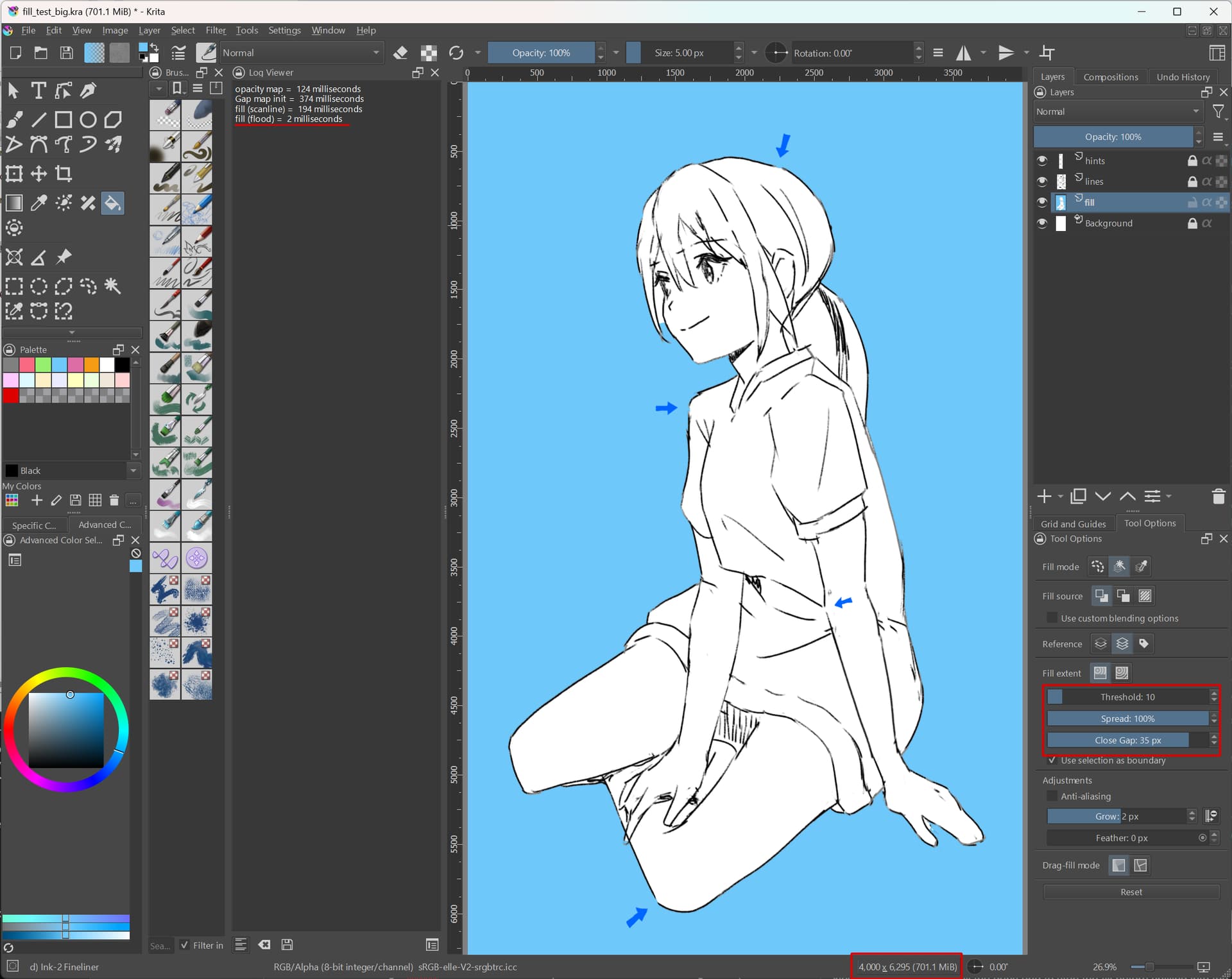
Once the scanline pass is done, we start the flood fill gap closing pass, which will now have much less work. I tested it on the girl lineart scaled to 4000x6300 pixels and the fill of the background (without seeping into the character) is almost instantaneous (2 milliseconds!). The bottleneck now becomes the gap map itself.
Note that this is a particularly bad case, because the gap size is very large, which is exceptionally slow, too. I hope that real-life usages will be more up to 20 pixels gap, which is much faster.
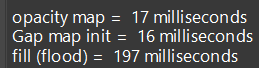
opacity map 124 ms - is a preprocess step where we create a map of opaque/non-opaque pixels. In initial testing this proved to speed up the distance map generation, but I’ll be evaluating if we still need it in the final version. This is a typical memory vs speed trade-off.
gap map init 374 ms - this is the actual gap map calculation, determine the distance from a gap at each pixel for the whole image. I will still be optimizing this part
fill (scanline) 194 ms - is the scanline fill of the bulk of the image area, essentially everywhere where there are no corners or gaps in the lineart.
fill (flood) 2 ms - is the slow flood fill of the leftover gap pixels, this completes the fill
For reference: if I make the same fill without the gap detection, it would spill into the lineart and take 280 ms with only the scanline algorithm.
As usual, this new approach has some challenges too…
If the gap size is big compared to image size, a lot of the area will be covered in gaps (distance != “very far”), which means we need to use the slow fill. But the real problem is the next one:
There are cases where the gap fill should queue a scanline fill – especially the case of “expanding” the fill from a corner. Currently this doesn’t work, but it should be possible if the scanline fill will take into account the currently filled selection mask (same as the gap closing flood fill has to).
I added several bug fixes, improvements, and tweaks to the implementation (branch). It’s approaching the best what I can do for now without additional input, especially on the architectural level. I still need to do some clean ups and sanity checks, but it’s looking pretty good already functionality-wise. Over the next days, I’ll continue polishing the code and start preparing a draft MR to gather actionable feedback (for sure there will be review comments to fix).
I think the code should be in good enough state for testing, assuming you can build it yourself. Otherwise, please hang in there a bit until the MR is up.
The two biggest achievements for this update are:
improved gap map performance with multithreading
fixed the corner expansion case (unfortunately at a cost)
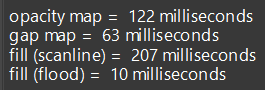
Here’s the performance for the big image again, after implementing multithreading optimizations (same parameters as before):
So that’s a huge speed up! 374 ms → 63 ms. Obviously, it’s much faster for any smaller image and gap size.
The fill itself got slower: 2 ms → 10 ms. This was required to fix the fill expansion case, which requires a sorted queue container that is slower than a plain stack.
At this point the opacity map generation is the primary bottleneck. I think the only way to improve this part is to have a persistent cache (between the fill strokes), so that we can only recompute a part of the map that “got dirty” due to a previous fill or a modification to the lineart. Unfortunately, this part can’t (?) be parallelized because the paint device iterators are not thread safe. The access patterns are very erratic, too, so without this intermediate opacity map the distance map calculation becomes prohibitively slow.
As for the quality of the algorithm itself, I think it’s now on par with MyPaint, or maybe even CSP. In general, if the gap size is “mismatched” for the lineart and image resolution, the results may be a bit weird – some empty areas may suddenly appear, or the fill may spill along the edges. For best results, the gap size should be set as closely as possible to the actual gaps in the lineart. All in all, I think it’s difficult to make it better and some compromise is unavoidable. But I’m confident this works rather well, and I think y’all will be satisfied!
The worst usability problem I noticed so far is with drag-fill on a large image. Unfortunately, every “dab” will incur the overhead of opacity map calculation and may lead to the canvas becoming unresponsive (stuck with a progress bar in the layer docker). This will eventually complete, but it will look bad from the UX perspective. The best way to avoid it is to fill by clicking once at a time (even quickly, it’s the drag that “kills it”).
Overall, it’s been a productive few weeks and I’m happy I got to this point
The cache approach may sound good, but may spread the code in multiple levels of abstraction (tool, painter, fill, etc.).
The more localized you can make the solution, the better, in my opinion. For example, if the solution to this issue is contained in the fill class, it will work automatically in the contiguous selection tool and the enclose and fill tool. If you have to implement the cache system every time something uses the flood fill then it can be a mess.
I really think that the solution is a patch based approach. That would reduce the opacity and gap map computations to a bit more than the filled region. I mean, if the final filled region is, say, around 100x100px in a very large image, it should still feel fast, in other words, it should avoid computing things for the whole image. Since we don’t know the final size of the filled area until we fill it, the patch approach is the only way I see at the moment to reduce the computations, as it computes in small chunks as needed. Something like this would be also beneficial for the drag&fill feature.
If I were you I would make the mr without the cache, so that people can see the idea, and then maybe find a way of making it faster with more input from others.
I think you are right. Caching would also require patches, so it’s where we should start either way. This means the gap calculation must also become patched, which could reduce the multi-threading benefit, but maybe won’t be a problem in the grand scheme of things.
Doing patches sounds really like what the paint device does already, but I’m not sure if it will be a good fit, or if it can be adapted for this use case. They seem to do a ton of other things, which we won’t need here, but as long as it doesn’t cause an overhead then maybe it’s fine.
I’ll see if I can do a quick experiment with patches, and otherwise will continue working on the MR.
The multithreaded “whole image” vs patch based computation stuff has to be measured to be sure of the benefits of one of another. In my head the patch based approach would be faster if the filled regions are small, since the number of pixels to process is smaller even than in the mt “whole image” approach, but the general mt approach would win if the regions filled are large. But that’s speculation, I actually don’t know. Also, if for some iteration of the patch based approach more than 1 new patches “to be processed” are added (because the fill reaches the boundaries of the current patch), then those pstches could be processed in parallel. Again, not sure how much of an improvement that would be, but that’s another option to keep in mind.
The next week i’ll have some time and i’ll explain my “saddle point” approach to the gap map in detail, and also my ideas on how it can be made “patch based”.
Since the overall algorithm works similar to yours (opacity map → gap map → fill) it may be of some help.
I have a feeling both approaches will work well together. I’m already working on it and hope to run some tests tonight
I think you can hold on with any coding examples until the MR is ready, at least I can complete this first version with what I know already. Then we can keep refining in the review.
No, I don’t think GPU fits the bill here. The bottleneck is a slow, sequential access to paint device’s (image’s) data. It can’t even be parallelized on the CPU. The gap map computation has very erratic memory access patterns. And the fill algorithm is inherently single-threaded (especially the flood fill, it needs to look at the already filled pixels). But I think we can make it fast enough with what was already discussed.
EDIT: It just occurred to me, that opacity access maybe could be made parallel if I used multiple iterators… I mean, the data is not modified, so it shouldn’t be a problem to read it. I will keep this in mind.
GPU acceleration works best if the same computation can be applied to multiple data, and without too many dependencies (synchronization). An example of an ideal workload is a filter kernel.
Meanwhile I made headway in tiled/patched loading implementation, but it’s really tricky because the distance at each pixel depends on that pixel’s surroundings which may cross into a neighboring tile.
I was able to finally get the patched/tiled fill to work. It’s been a lot of tedious debugging, but all in all was a stimulating experience
As expected, the benefits of multithreading are greatly diminished with this implementation, because we are loading one tile at a time. Depending on the gap size, the workload can even degrade to a single thread. However, I just scratched the surface and I can try a few more ways to handle this.
I haven’t measured the performance yet, but based on the early observations (all for a very large image, as this is where the problems start to show):
if filling the background around the character, the performance is degraded, but still acceptable
if filling smaller areas, there’s a very noticeable improvement due to tiled approach
likewise, if a selection is active, filling that selected area is very fast
even drag-fill is passable now (although still slower than without gap closing)
the results can really differ a lot depending on settings and the image
In summary, although not without issues, I think this is a net improvement. I will keep this implementation and will try to claw back some performance here and there.
I’ll put together a demonstration video in a few days.
Regrettably, I was unable to make multithreading perform reliably. A tile size that works well for lazy loading is too small to overtake the threading overhead. It performs very well for full-image processing, but it’s not what we want here. Even if some cases get ahead of single-threading, another case can be much worse
I will rip that part out (save it for posterity) and optimize the tiled approach the best I can. Another benefit is having simpler code, so that helps lower the maintenance and cognitive burden.
And sigh… I also tried these “difficult” cases in CSP (like filling area covered with spray, and with dragging), and wow, it performs SO FAST They must have a much better algorithm for this…
Anyway… Let’s not get discouraged now I’m proceeding with the cleanup and final touches. Hopefully, you’ll be able to try it out soon.
Can you share your test images? That spray one for example. So that i can test in my algo as well.
Csp is fast. But there are already things in krita that make it slower apart for the gap algorithm. For example having to convert to lab to compute the differences. Also, when i made the multithreaded flood fill that worked tile by tile (similar to the patch based but aligning to tile boundaries) i noticed that it worked faster in the cases were the reference and target device were aligned because then i didn’t use iterators but accessed the tile memory directly, improving cache locality and misses. But the small size of the tile didn’t make it good for multithreading. I don’t know if that is useful. The code is there if you are interested.

 Hmm… in this case, I think I’ll just go ahead and implement the flood fill as in the prototype and see how it performs. If it’s good enough maybe we just go with it. If not, it will be back to the drawing board to research the scanline algorithm properly.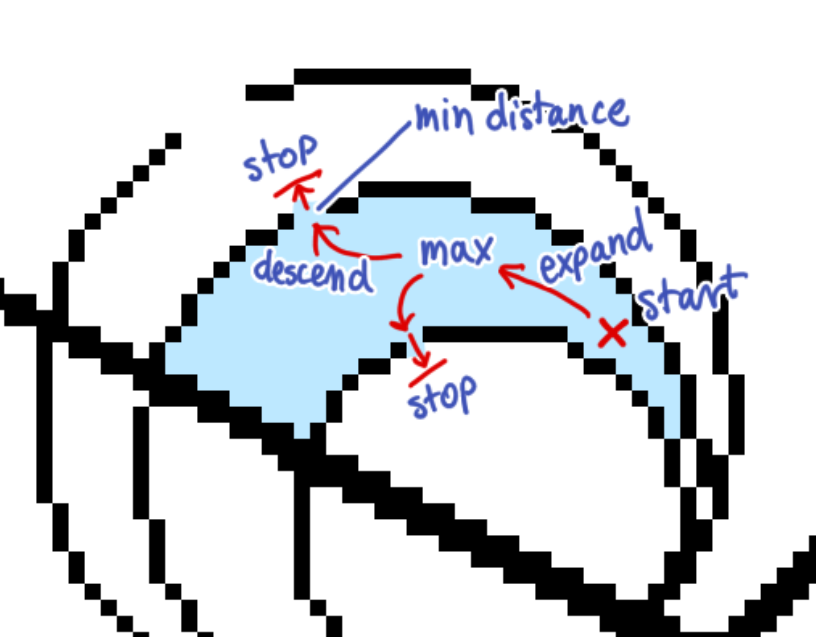



 so that not everything is lost, lol. Cheers.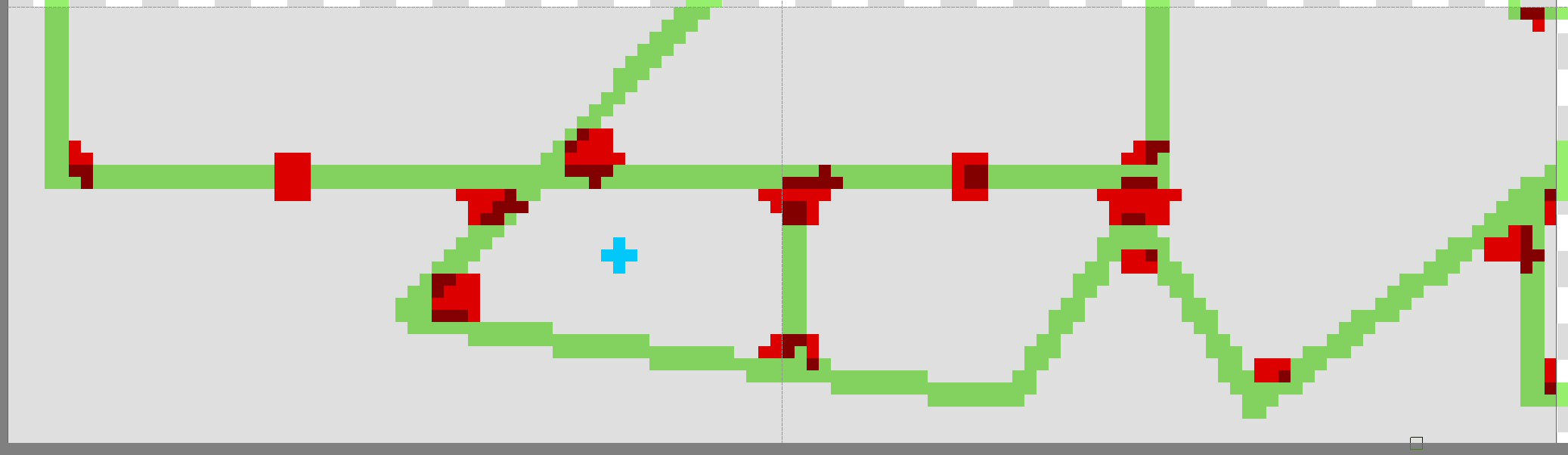


 They must have a much better algorithm for this…
 I’m proceeding with the cleanup and final touches. Hopefully, you’ll be able to try it out soon.