I have the reference photo on a layer, so I can sketch it. Then I transfer the ref to top of stack. In the Advance color selector, on the bottom left, there is a circular symbol when u click on it, it displays the colors from the image in the amount of colors you selected in settings.
The problem is, when I hide the ref images, the color palette disappears. Is there anyway I can have the color palette not disappear? Or is there a completely different way to create a color palette from a photo. ?
I generated a color palette from an image in Gimp (here explains how to do it)
At the end you will have the palette in a gpl file. This file you place in Krita’s palettes folder. On Windows the full path is:
C:\Users\username\AppData\Roaming\krita\palettes
2 Likes
@Guerreiro64, it would be much easier for non-tech-savvy users to import a palette via ‘‘Settings’’ >> ‘‘Manage Resources…’’ >> ‘‘Import Resources’’, AND this works on every operating system.
@Sydney: Guerreiro64 described a neat way to create a palette, but in case if you want to do it in Krita, then, in order to get a palette that is permanently available to you, you would also have to create a regular palette in the Palette Docker. The “palette” in the ACS is only a temporary snapshot that shows the status of the colors currently present in the image.
This means, that, if it has to be a palette, you have to pick up the colors individually in the ACS and insert them into a new palette in the Palette Docker, or attach them to an existing palette.
So, the Krita-way is not a straight way, but works.
Furthermore, you could use the “TF Easy Colors Map” plugin from @TigerForge as an alternative, I think it serves this purpose as well.
Michelist
1 Like
Mihelist, thank you. I am not smart enough, to try yours and other suggestion. What I have done however, is pretty kool. I have a “snipping tool” on my Windows ll It is just a selection tool, of anything you want from the internet, or anything, then you save it. So, I create the color palette, as I referenced in question. I use the snipping to select the colors of the palate, save and name it the colors for the project I am painting to my desktop. Then I save it as a reference file on Krita. Bazinga, I have the color palette, as a reference file.
2 Likes
Guerreiro64, thanks. How do u do it, from the Gimp installed in Krita?
GIMP isn’t in Krita, GIMP is a software like Krita, it’s better suited for photo-manipulation than Krita, which is better for painting and drawing.
Michelist
1 Like
Michekist u r right. I was confused it is GMIC. I will use my system it works fine, and only takes a few minutes.
There are sites where you upload an image and it generates a palette. One of them is the Palette Generator.
I don’t know if it’s possible to save the palette, but you can copy the hex code for the color. then you paste that code into the color configuration dialog in Krita (or any other graphics program). Drag the slider to the right for more colors.
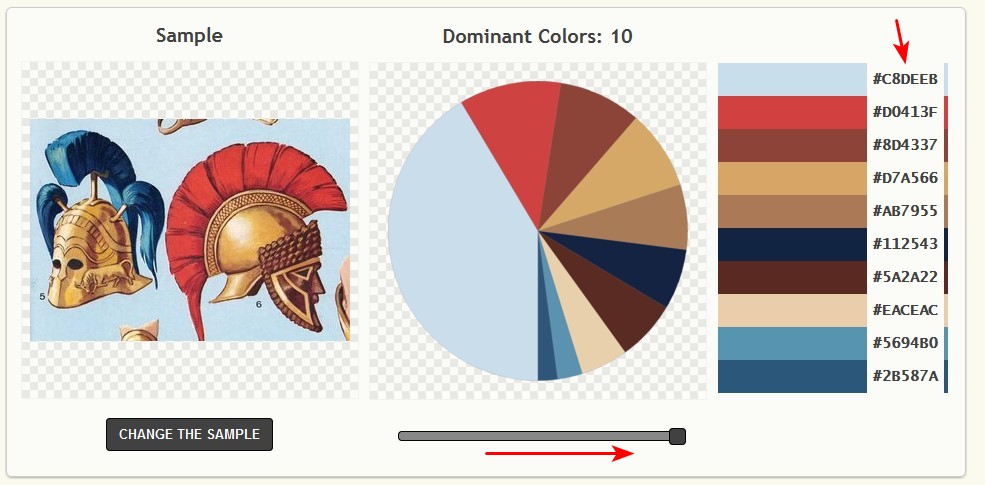
I remember there were sites where you could even save the palette in aco files (from Photoshop) and gpl (from Gimp). Unfortunately, I couldn’t find them in the search…
1 Like
kinda off topic but I got interested and found a write up - about the process .
If anyone is interested. 
1 Like
Advanced colour selector has a tiny button with a circle that you click and it makes a colour Swatch from the image.
Also imagine board you can just pick directly from an image as it holds all colours.
1 Like
Thanks, how do u change how many dominant colors? I went to the site, it was only 3 colors.
There is a slider below the cake diagram, it allows adjusting the number of dominant colors.
Michelist
Michelist, You are referring to the software generator for color palette?
Yes, I thought you asked @Guerreiro64 about that, didn’t you?
By the way, I also did a search for easy-to-use tools for creating color palettes, and I found this website, among others, whose palette tool appeals to me a lot. With it, you can convert much more colors into a palette, and it can be exported in ACO format, and Krita can use that.
So now you can create extensive palettes for Krita from images you need as palettes, which can be imported via ‘‘Settings’’ >> ‘‘Manage Resources…’’ >> ‘‘Import Resources’’.
There is only one issue I found so far, the site only accepts PNG’s & JPG’s with a maximum size of 1 MB. So, sometimes you have to shrink a picture before uploading.
Link to the website mentioned above:
http://www.cssdrive.com/imagepalette/index.php
Michelist
3 Likes
EyeOdin, Thanks, but as I posted earlier I created my own way to create a color palette that works fine.
for what I read your really just doing it on top of your knee but if it works it works I guess.
Eyeodin…it works fine, it take about 5 minutes or less to do. By the way, what does the context of “top of your knee” mean?
This topic was automatically closed 15 days after the last reply. New replies are no longer allowed.