I’m using ver 5.2.13 from the official Arch Linux package repos.
It appears that this issue also happens with the AppImage version.
Okay, then this is ruled out and we really need @seguso’s help here.
Unfortunately, I fear, that something happened to @seguso, because with other issues he already was quickly present in the forum to help, but his last visit was two months ago. Let’s hope for him that he is currently traveling around the world and enjoying himself, or something like that.
Michelist
1 Like
If you hover your cursor over the plugin, it will indicate the error or something similar. I remember Krita does that.
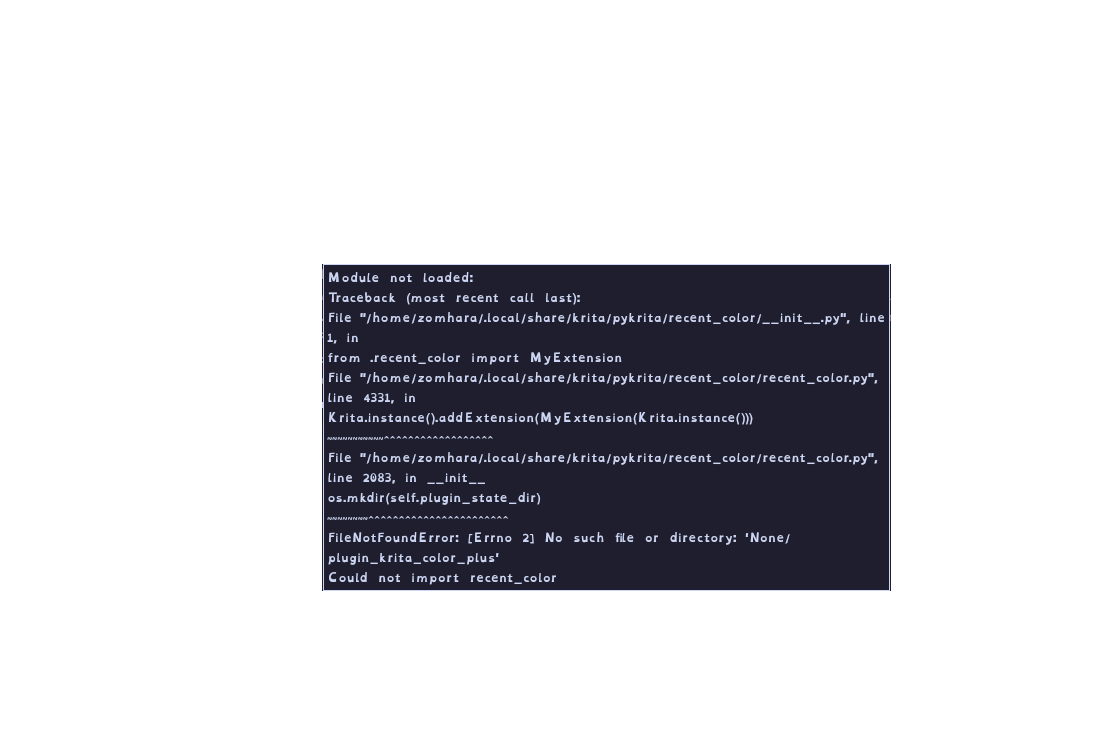
Based on error message & source code issue is %APPDATA% env variable that is not set (normally this is only defined on Windows.) Following replacement should fix that issue (not tested).
old code in recent_color.py starting at line: 2070
...
home = str(Path.home())

home = os.getenv('APPDATA')
...
new replacement code
...
home = Krita.instance().getAppDataLocation()
...
/AkiR
2 Likes
This looks like it fixed it, thank you!
1 Like
Hi @seguso ,
i hope you are doing well, just want to tell you, ColorPlus crashes Krita5.3.0-Alpha. For comparison, other plugins i have running well. See this thread:krita-5-3-6-0-beta-1-released/
Happy painting 
For those using MacOS, there’s a Windows-specific line of code in recent_color.py that will mean this plug-in fails to load.
In order to fix it, install the plugin normally, then do that ‘actions’ thing @Michelist mentioned earlier and finally navigate to the pykrita folder in the same resources folder, then:
-
Open your
recent_color.pyfile in a text editor (like TextEdit, VS Code, or Notepad). -
Find line 2070.
-
Replace lines 2070 to 2074 with this:
Python
home = os.getenv('APPDATA') or str(Path.home()) self.plugin_state_dir = os.path.join(home, "plugin_krita_color_plus") -
Find line 2081 and replace the folder creation block with this:
Python
os.makedirs(self.plugin_state_dir, exist_ok=True) -
Save the file and restart Krita.
EDIT I’m not sure if it’s working as intended with this change. But I’m struggling to use the plug-in properly so may just simply not work on MacOS.