Dark backgrounds in tool thumbnails

Problem:
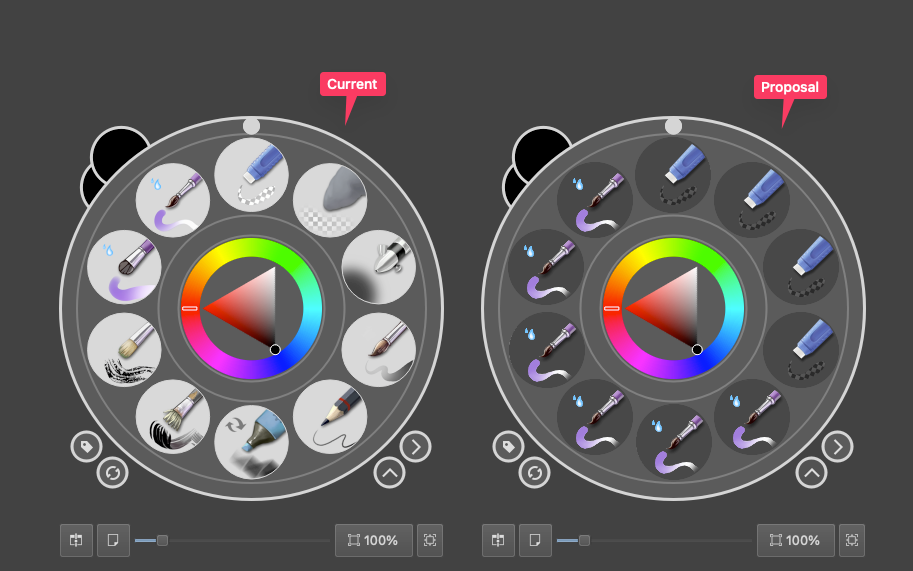
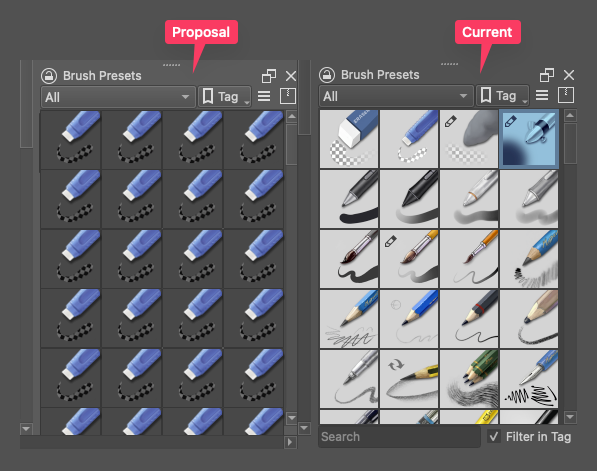
Tool thumbnails have white backgrounds while Krita is on dark theme.
It would be easier for eyes to have tool background colored dark as well.
It also would add up to more harmonic & consistent UX.

Proposal:
Here’s a lazy mockups with a dark background in the tool thumbnails.
Black colored brush strokes on thumbnails would be inverted to white color etc.

Not sure can those thumbnails be downloaded (with layers) and edited like in this proposal?


I don’t think this one is doable currently without an overhaul of how the brushes work.

AFAIK the icon is fixed and depends on the brush. The background is not transparent, it’s just that all icons use the same base color as a convention. If you install a brush pack, it will come with its own brush icons that may clash with the UI theme.

I also don’t think it’s possible. The icons are made like that because the one who created them wanted that light grey background. There are brushes with a dark background, even transparent or colorful. It’s up to the one who created the brushes to choose the thumbnail. If it’s annoying to you, you can edit them:

+1 for this, Im new to Krita and frankly shocked more people havent requested a dark mode template/thumbnail replacement for brushes. When everything else is darkmode and you go to check a brush its like a flashlight being shined into my eyes.

:slight_smile: Hello @Swin, and welcome to the forum!

As it already was said correctly two times, these icons are what the brush makers gave their brushes, it was a deliberate design decision.

That means, to change their look to dark, someone (i.e. you) has to change those you find too bright, because inverting all would brighten the dark ones. So, it will probably be the best to change each brush preset manually and then save it back to disk, to change its icon. It has to be done one by one, or at least you have to write program code that will do this. But “how bright is too bright”, so which icon has to be touched and which is okay, and what about those icons that “do not work” with other colors?

Additionally, how should Krita handle this without breaking some brushes license and without creating some (a lot?) icons that could look very awkward after the changes?

There are more questions than solutions to this. How should they be solved?

Michelist

Hey, sorry for the obsense.

Why wouldn’t it be doable :slight_smile: If the artist(s) still have the brush icons files as layered, then it wouldn’t take that much time to change all of them, like this:

  1. brush
  2. brush stroke
  3. background

Where could I contact the creator(s) of the brush icons, to ask for the layered files Katamaheen / Michelist?

Have you ever created a new brush?

You’re planning the work that others would have to do to help make your wish a reality. I find this immoral.

When I think about how often we’ve already had trouble reaching some brush creators in the first week after release. Not to mention the creators of bundles released a long time ago - I think it’s hopeless to try to find them all. And whether they’d even be willing to change their icons is just as questionable.
Then the bundles would have to be completely recreated - no, sorry, if that’s what you want, then you’ll have to take it upon yourself to track down the creators and convince them of your request. And don’t wonder if they then name you unfriendly.

Michelist

On top of what Michelist said: Most brushes’ icons are made of a stroke sample and one of the tool icons that come with Krita, both of which are easy to use when creating or modifying brushes in Krita’s brush editor. There is probably not even a layered file for most of them. So, you’d be asking the brushes’ creators to do work for you that would be no easier for them to do than it would be for you.

That said, the fixed thumbnails are rather inconvenient. They may offer a fun field for creativity for some, but for me creating thumbnails is just an annoying extra step, especially for those brushes where the marks one can make in the scratch pad can’t show its distinctive qualities. I hope shape/stamp and stroke previews, as requested in threads like this one, will be added eventually. Like the existing stroke preview in the brush settings editor, these can use the current theme colours.

So, you’d be asking the brushes’ creators to do work for you that would be no easier for them to do than it would be for you.

No, I’m not asking them to do work for me, I would simply ask if they have the icon files with layers, so that I could modify them by myself.

I doubt that creators who have spend great amout of times wouldn’t have the workfiles somewhere, I could be wrong though, but usually designers keep the original work files, not just .pngs.

…

Michelist

I find this immoral.

Sorry, I don’t know how open source community works, is it so that I can’t ask help here how to find the creators? I tried to check Github, but it’s still unfamiliar to me, so no luck there. These dark brush icons wouldn’t be for myself, they would be for Krita users who like dark/dark themes, not dark/white themes.

I’m not here to ask people to work on my behalf, I just really didn’t know how can I find the creators. Now that I know it’s impossible, I’m not going to try to find them.

Maybe I’ll modify the pngs by separating the layers manually, you mentioned something about license, I’ll have to check that, if it allows to do modifications.

And don’t wonder if they then name you unfriendly.

Okay, that’s rude man. Why so passive-aggressive?

…

BeARToys
No I haven’t.

…

Sorry for all if my writings felt stupid, my only purpose was to ask help. Didn’t mean to ask it the wrong way, nor hurt anyones feelings.

I’ll try to edit the icons.
I dont think this one would work either. Each brush would mean making 2 icons. And tgat sounds like double the work. I would be bored making a brush pack. I know i am bored when making theme compatibility for my dockers. I made theme viewer because theme compatibility is harder than it looks.

I think this idea would only have legs to work on pre generated strokes for each brush. Beyond that 1 icon is enough.

Like white paint on dark themes and black paint on light themes.

Then that should be your starting point :wink:
Brush preferences → Save new brush
You will see, what can be done.
Most brushes are made that way.

You select a brush save as new brush and than clear the thumbnail, load an icon from the library and put a stroke down.

So the brush maker do not have the files you think they have.

You could probably ask to add a functionality, to fill the thumbnail with another color as white, but then again you could just load an image, which has the color you want. So that would probably not be implemented as no one really needs it.

We don’t know where to reach someone if the person leaves no traces, and the immorality is meant because it sounded you want them to create a second version of their bundles/brushes.
But here I’m out, because it is impossible to find them all, you won’t find even a third and if those are happy about your request is more than questionable.

Michelist

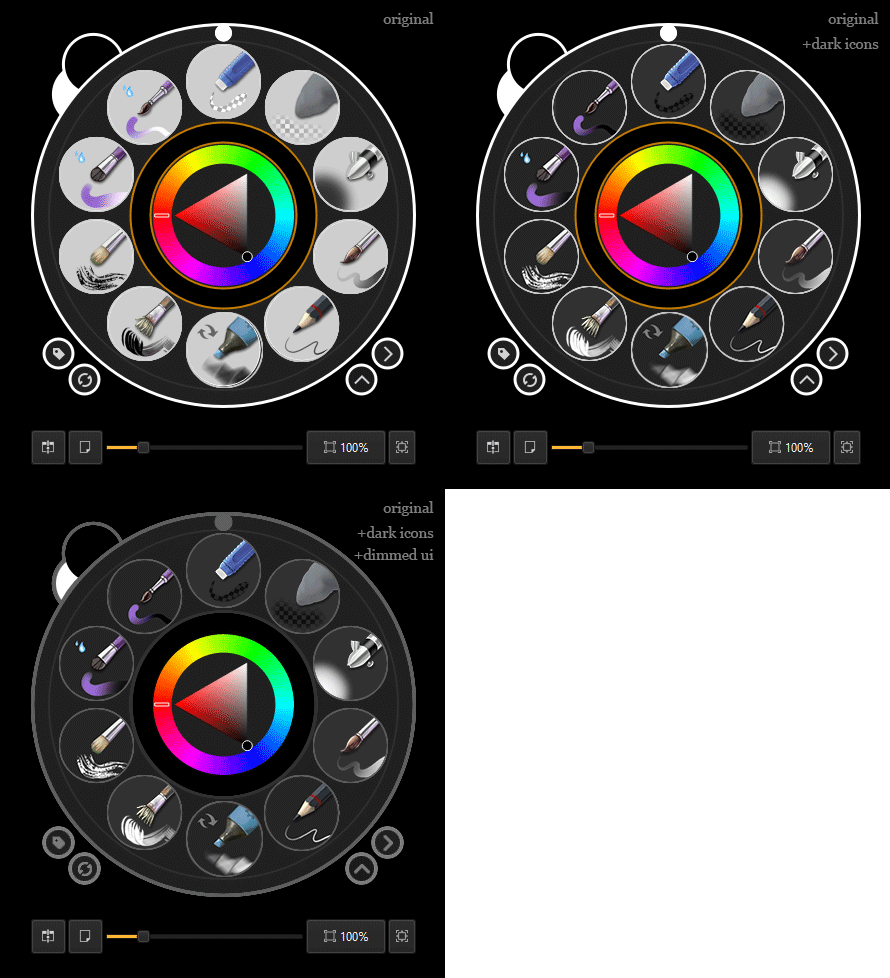
I did some testing 100% manually, 0% gen-ai.

Any opinions about these?
I did find Michelist’s download link to the 512x512px brush icons, but they didn’t include the strokes. Not sure could I find icons with strokse somewhere?

Gif, you might need to open the image in new tab:

krita-ui-ring

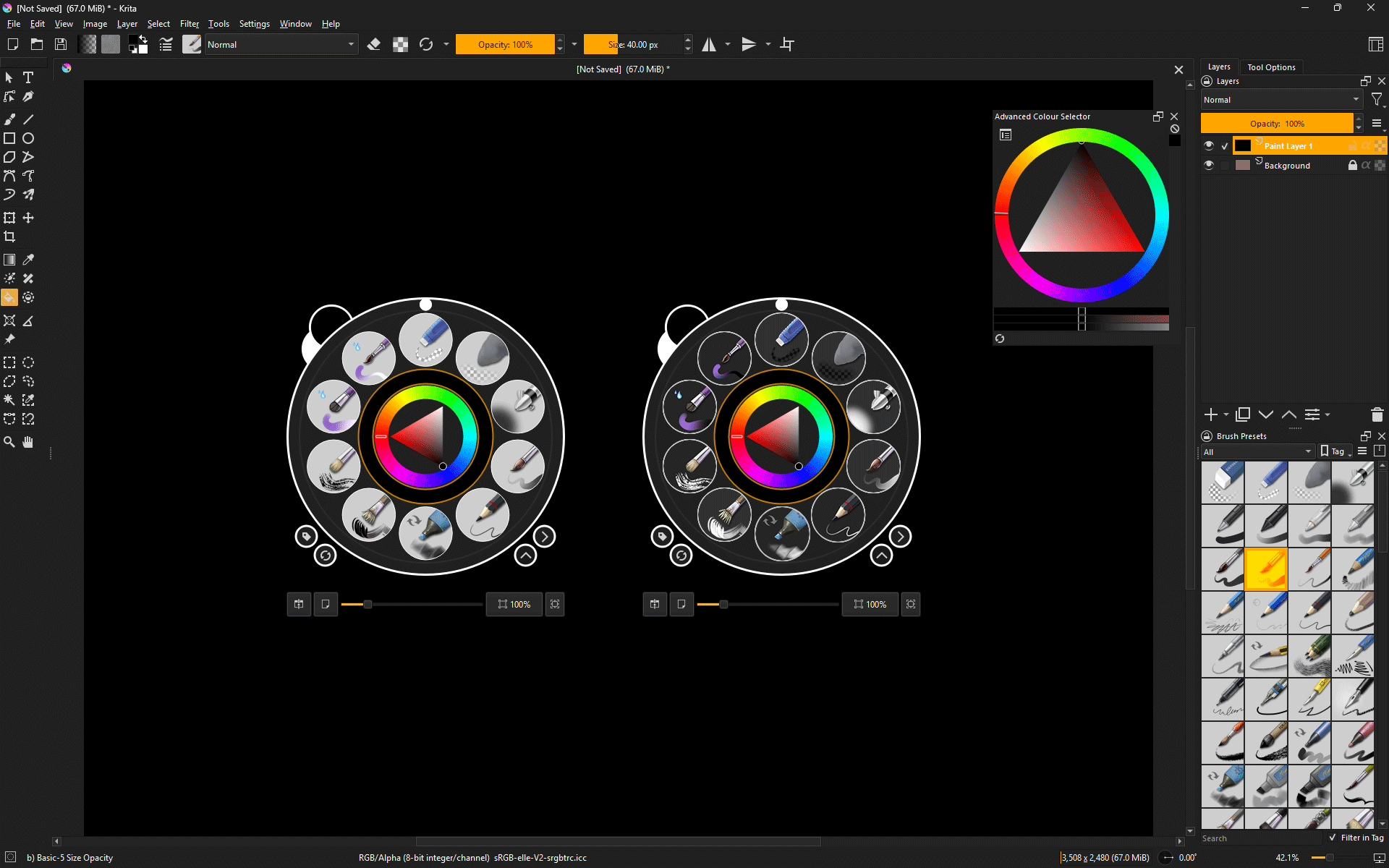
How would it look with rest of the UI:

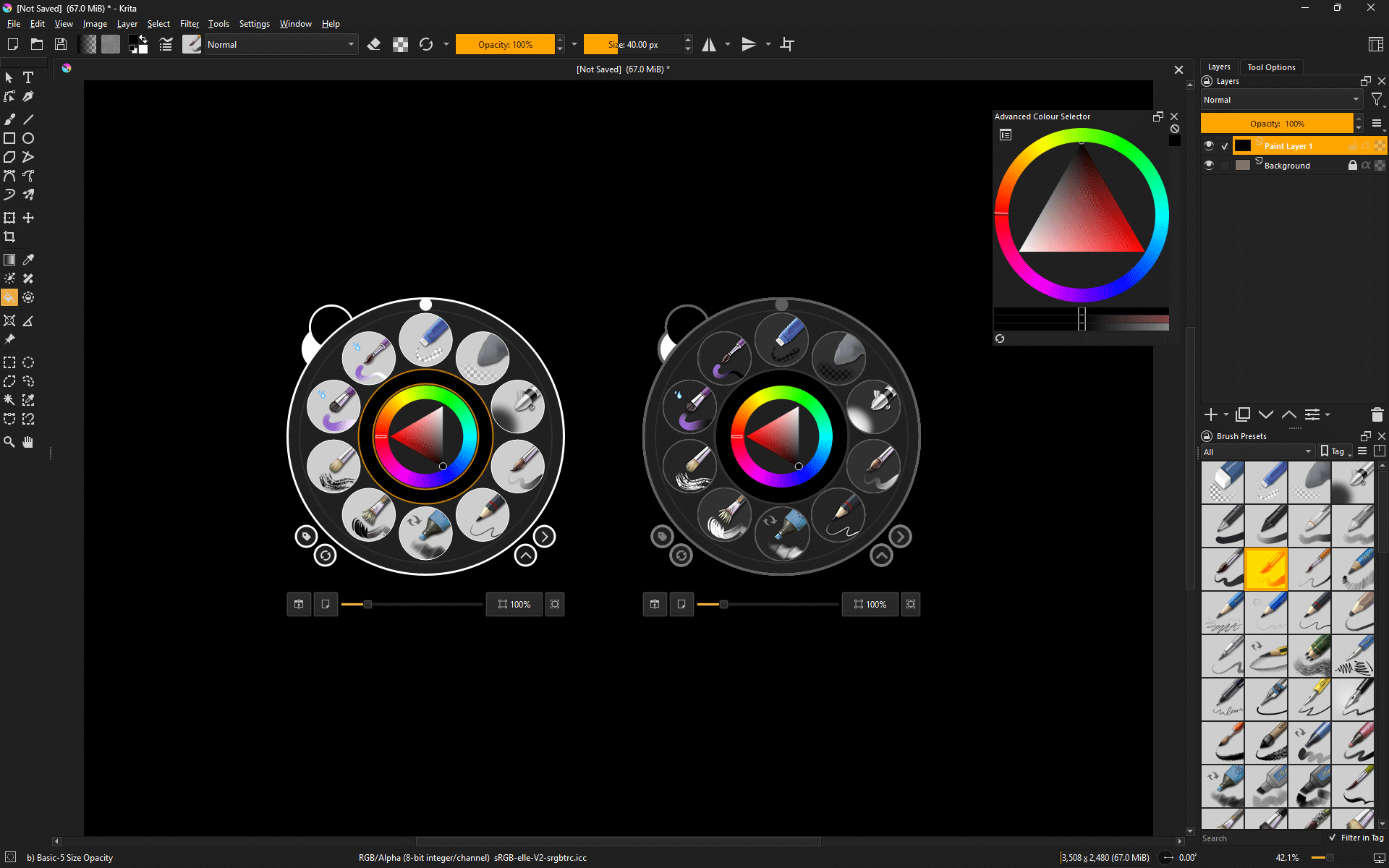
in this mockup there’s also dimmed rings):

While doing these in Photoshop, the way Krita has main focus on how the physical tool looks (uses most space), Photoshop has focus only on the brush stroke looks, no physical tool at all.

Photoshop way is much more user friendly, since you don’t have to use so much working memory looking at pretty hand painted tool icons.

Maybe I’ll do mockup from that as well later on.

Don’t bother. There is a merge request for displaying the stroke instead of the thumbnail. Go vote there. :+1:

This one?

Edit: oh it might be this, can’t vote it though.

Yeah that one. I think your account has not reached the age to be able to do that.

This is not completely true. When I make brushes and I want to load a default icon from the library, it gives me a white background by default. If I want a black background I need to make each thumbnail from scratch. Some people do this, but the fact that it’s time consuming means that most available brushes have a bright white background in the thumbnail.

This could be changed if the thumbnail system was very slightly adjusted and those default icons had transparency.

@potatojungle This is a good suggestion but in the meanwhile, there is this older brush pack you can use as a template for your own brushes (not for redistribution) where the creator manually made dark backgrounds. idk if the download link is still up though. Concept Art & Illustration Bundle

@BeARToys tbh black bg thumbnails would still be a lifesaver. Brush preview is nice, but I think it’d be difficult to navigate different flavors of smudge brushes for example. Unless they are getting rid of thumbnails entirely for the sake of brush previews.

Well start a feature request for color selection in the brush creation window, then :wink:

In my opinion, artists should be able to post feature request without an autistic level of precision as to exactly how a problem is supposed to be solved. Otherwise nobody will take the time to come in here with actual good requests (and votes).

The OP stated the original problem with the white backgrounds. I added some context from brush/thumbnail saving. It’s not that hard to see these are connected. :wink: