How would I make Krita darken or lighten, with only using the next possible color from the palette. I am making pixel art.
- Choose the color you want to paint;
- When you use the K shortcut, the color gets darker;
- Using the L shortcut, the tone becomes lighter.
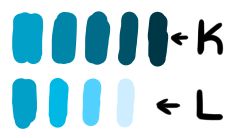
Works for most colors…
2 Likes
 Hello @owqe, and welcome to the forum!
But additionally to @Guerreiro64’s hint, you have to do the following to meet your requirement →
in Krita under ‘‘Settings’’ >> ‘‘Configure Krita’’ >> ‘‘Color Management’’ in the tab ‘‘General’’ you should set the checkmark in front of ‘‘Enforce palette colors: always select the nearest color from the active palette.’’, this way you can use @Guerreiro64’s hint and will match the next nearest color from the palette.
In case of further questions, feel free to ask them here in the forum!
I wish you much fun with Krita, and always happy pixeling!
Michelist
1 Like
What algorithm does it use, and can I change it as it took colours all over the palette, when I tried it with concept cookie.
I don’t know the underlying algorithm, but it should theoretically find the nearest color in the palette when going a step up or down. I believe you can reduce the step size it goes up and down with darken and lighten, but currently I’m searching for the setting. But if you can reduce the step size, then it should snap to even nearer colors in the palette.
I’ll tell you if I’ll find the setting.
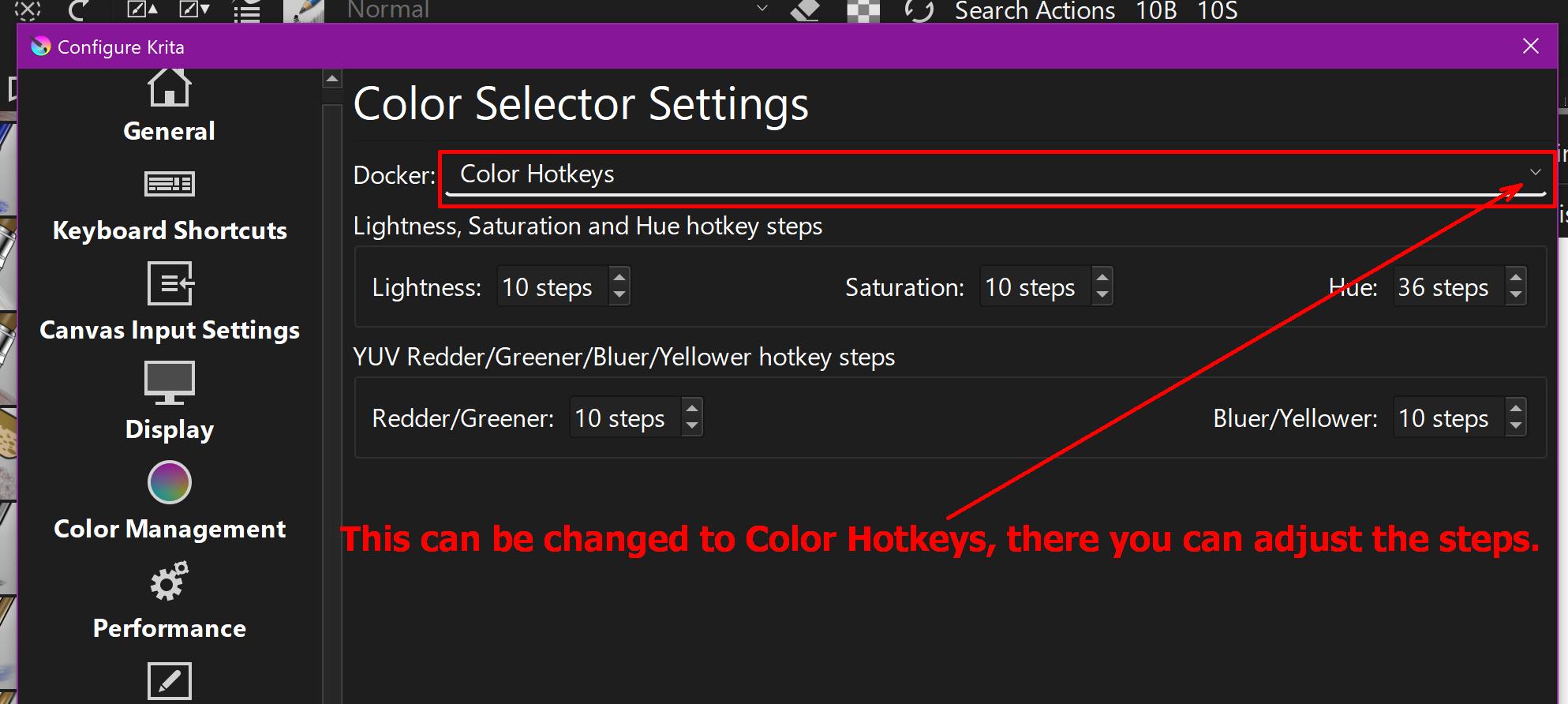
AHH, found it: In Krita under ‘‘Settings’’ >> ‘‘Configure Krita’’ >> ‘‘Color Selector Settings’’ select as Docker (that is the topmost entry on that page) ‘‘Color Hotkeys’’ >> and there you can adjust the steps your Hotkeys should have.
Here you can set smaller steps:
Michelist
It still produces the same results with different settings, it changes vibrancy a lot.
I suspect your problem is that you expect only the COLOR to the left or right of the currently selected color to be jumped to, but Krita seems to select the color whose brightness value is closest to the selected step of lightening or darkening. This may be mathematically correct, but it does not coincide with your requirements.
Unfortunately, I don’t know any other method to achieve your goal, if this is possible with the plugin “Pigment.O” by @EyeOdin, you would have to read up in its manual, which you can find after installing the plugin in Krita under ‘‘Settings’’ >> ‘‘Configure Krita’’ >> ‘‘Python Plugin Manager’’, with the plugin selected, below the list of all plugins.
Pigment.O can be found here:
Michelist
hmm, is there a short cut to do this same thing but with hues? like if i have red, press a shortcut to make itgo slightly towards yellow to make it warmer, an another for blue ish / cold colors?

There are shortcuts for “Shift brush color hue clockwise”/“counter-clockwise”, but they’re not assigned to anything by default. Under Configure->Keyboard Shortcuts, you can find them by searching for “hue” and assign them.
1 Like
I have installed Pigment.O and looked all around the dockers and couldn’t find anything related to darkening and lightening.
I didn’t say it is capable of this trick. I said that you have to figure it out for yourself. Also, I told you where to look, which is in the manual. I did that because it is a very complex plugin, with a lot of hidden features that are not obvious to discover. The complexity of the plugin was also the reason for telling you where to find the manual, because many users don’t look in the place where manuals are found, look everywhere except the most natural place for manuals ever.
As I said before:
Pigment.O was only the last guess I had.
Michelist
1 Like
Thanks!
Of course pigmento does it… Just activate the shortcuts and then assign the colour space to the key set you want to use and your good to go. Pigmento is easier to set up and change if you want to go into another space for how strange it might feel at first.
And searching darkening and lightening you will find nothing as those are really ambiguous terms. Pigmento does at least 7 versions of that operation that I can recall.
1 Like
What are the shortcuts? I can’t find them
Settings > Configure Krita > Keyboard Shortcuts > Pigment.O
None of them work
yeah sure
What?
This topic was automatically closed 30 days after the last reply. New replies are no longer allowed.