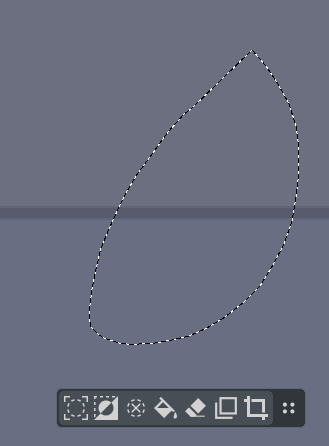
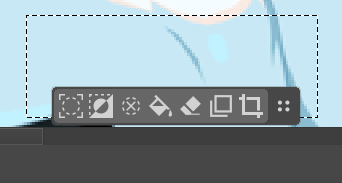
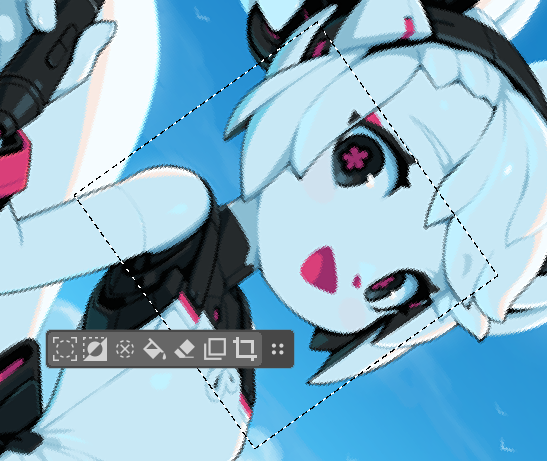
how do I close this floating menu ? PLEASE HELP. I can’t find the option. I never thought this would be upsetting but it is deeply upsetting. I used it for 1 day and I am already annoyed with this menu just walking all over the canvas with no sense of direction not to mention it BLOCKS the canvas constantly !
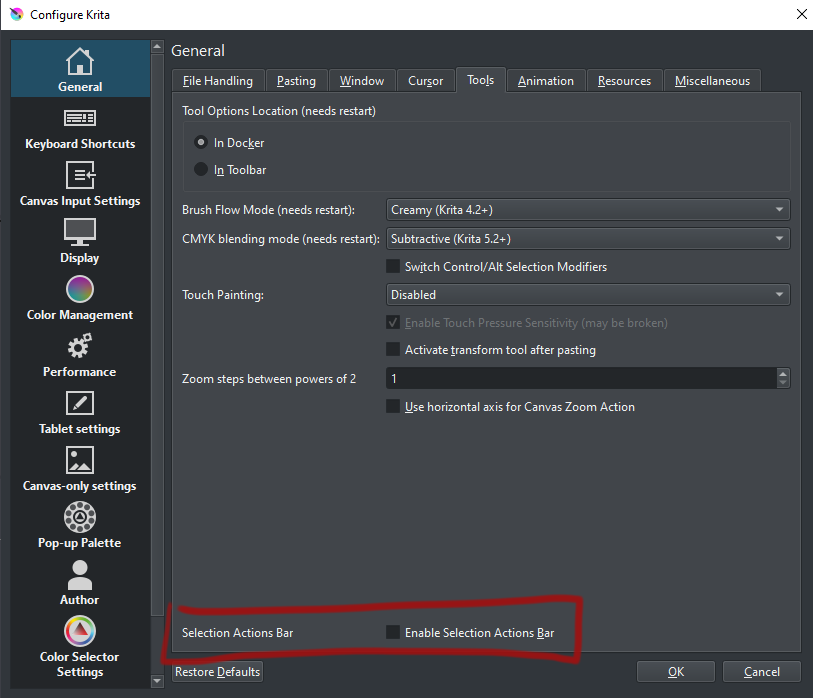
P.S. - Thank god I found it. I never unchecked something with so much conviction. I must say I passed through here several times looking for it. it is strangely the only option glued to the bottom that I have noticed which is a odd framing. It is strange to find the option in Kritarc quicker than on the GUI menu, that is for sure.
How about pinning it down like the guides, where you can pin the guides at a position? And if you want to move it, you unpinned it. Should be the same code, as it is the same widget.
If I were going to come us with a feature request for 5.3 it would be to enable tablets to use the new bounding box shift. It requires ctrl+alt which isn’t available on tablets.
this to me at least is kinda like the annoying autocomplete on IDE’s. if I want the menu I should be the one calling it not be something that pops up automatically as soon as I type. because forbid I take too long to type I am already on the autocomplete menu.
here there is not even a chance to think that I want the menu, it is already there unrequested. I thought this would be a cool feature but I am not a fan. I rather just use shortcuts or something else.
If you are working at that place in the code, can you look at the activation though the pop-up pallette?
I had my selection and the selection bar was visible. I changed to the brush and opened the pop-up pallette. When I selected a brush I also clicked a button on the selection bar. It was the button to cut the canvas to the selection. A strg +z fixed that, but it could be potentially dangerous.
I like the idea of the feature, it gets in the way for me tho, so i think a “remember position” checkbox would be nice so i can have it always pop up in the same location :] (i have it disabled rn cus it kinda ragebaits me a little)
In regards to the selection action bar, it also annoyed me to the degree that I implemented one into Drawpile to show what I would want it to act like. That was last year though, I don’t think @Ciubix was working on it yet at that point. Anecdotally, the bar there has received only positive feedback, but it’s also more obvious to disable, so maybe most people still turn it off and don’t find that annoying enough to mention it.
I guess to also write them down so that you don’t have to look at a video to see some text:
The bar has a fixed position instead of floating around unpredictably and getting in my way.
Text indicating what the buttons do.
Deselect is the most important action so it comes first. The other actions are what I’d consider more useful.
“Select All” has no business being there. It doesn’t pertain to the current selection, it just obliterates it.
“Display Selection Mask” really needs a presence here in Krita. Like probably most users, I’ve accidentally pressed the dreaded Ctrl+H shortcut and gotten confused why nothing worked anymore.
There’s an overflow menu that also has the option to get rid of the thing instead of having to hunt for it elsewhere.
There is a shortcuttable action to toggle the bar.
The bar changes to a transform action bar during transforms, since the selection is “gone” during it.
Not saying all of these must be applied to Krita’s bar and I’m sure other people have different preferences, especially in regards to the floating/fixed behavior. Like it says in the video, this is supposed to be something to steal ideas from, not me dictating how it should act.
(Maybe a moderator could break this thread of conversation into a separate topic, it’s kind of long and I suspect will get longer.)
I like all your bullet points above, especially this one:
Would it be possible to add an icon for the new transform feature that allows one to change the angle of the transform bounding box so that tablet users would also have access?
I think this feature should be disabled by default on computers and enabled by default on Android tablets.
Its movement with the selection is meant to improve operation efficiency without a keyboard (for example, after creating a selection, you can immediately use the pen to click on transform to switch to the transform tool). With a keyboard, shortcut keys should be used.
Also, I still don’t understand why it no longer has the transform tool now. I remember it was available in the earlier versions.
Transforming after creating a selection is really commonly used.
It moves along with the selection to improve efficiency when operating without a keyboard (for example, clicking to transform with a pen right after creating a selection to switch to the transform tool). When a keyboard is available, shortcut keys should be used.
I don’t think forcing a fixed position is a good idea, because that would make the actual operation take longer and become less efficient.
I also don’t oppose providing an option for a fixed position.
Without a keyboard, it provides a convenient and quick way to select all.
Also, I think the transform tool should have something similar.
It would be even better if the custom display function and order could be allowed.
clicking to transform with a pen right after creating a selection to switch to the transform tool
I guess that makes sense. In Drawpile this is not a reason to make it float in your way because you can just click on the selection to start a transform and drag it to move it, but since Krita doesn’t have those abilities, there’s a case of floating the bar closer to your cursor.
The problem is really when you switch to a different tool or pan the canvas, the bar just stays where it’s at and ends up in the way. Maybe it could move to a fixed position if you start panning the canvas or switch tools, but that seems like it’d be really annoying in a different way.
Edit:
Without a keyboard, it provides a convenient and quick way to select all.
No it doesn’t, the bar doesn’t show up until you make a selection. So you have to first make a useless selection to make the bar show up only to then obliterate it to select all. Having to make a pointless action first is pretty inconvenient.
1. Its position should not move when the canvas moves, but should always follow the selection.
(Note: I am not against adding an option to fix its position.)
1.1 After creating a new selection, it should follow to the new selection instead of staying in the original place.
2.It defaults to the bottom of the selection. When creating a selection near the bottom edge, it should be at the top of the selection.
This can prevent the selected content from being obscured.
2.1When creating a selection after rotating the canvas, it should still be at the bottom of the selection, rather than covering the selected content.
(Additionally, I think rotating the canvas should not cause selections created afterward to rotate with the canvas.)
3.To retain the quick actions it provides and avoid obstruction, a minimize icon can be added in the upper right corner. Clicking it will minimize the window, turning it into an expand icon (for example □). Clicking the expand icon (for example □) will restore it to its original state.
No it doesn’t, the bar doesn’t show up until you make a selection. So you have to first make a useless selection to make the bar show up only to then obliterate it to select all. Having to make a pointless action first is pretty inconvenient.
Currently, without a keyboard, there is no way to directly select all. Creating a selection and then using it to click ‘Select All’ to select everything, I think, is more intuitive than clicking ‘Select All’ in the menu bar.