Type of device* : Android tablet
Brand and version of the device: Huawei Matepad 12X 2024 - M-pencil 3
System** : HarmonyOS 4.2.0 (Android 12)
* graphics tablet/display tablet/2-in-1 laptop/Android tablet
** Windows/Linux/Mac/Android, + version (you’ll find it in Help -> Show system information for bug reports)
Description of the issue (you can include screenshots):
The Huawei M-pencil 3 has a gesture where if you double tap the body of the pen an action is performed. Trying to set a shortcut for this gesture, Krita seems to detect the action (the dialog to set the shortcut stops just after doing the gesture) but the shortcut remains unchanged.
Looking around i found this thread:
Trying to find what key code this gesture triggers, i did an adb log performing the gesture while on Krita. This is what shows up:
04-04 12:41:52.170 8782 8782 V InputMethodManager: dispatchInputEvent 04-04 12:41:52.176 8782 8782 W krita : Unhandled key code 718 ! 04-04 12:41:52.177 8782 8782 V InputMethodManager: dispatchInputEvent 04-04 12:41:52.183 8782 8782 W krita : Unhandled key code 718 ! 04-04 12:41:52.183 8782 8782 V InputMethodManager: dispatchInputEvent 04-04 12:41:52.185 8782 8782 W krita : Unhandled key code 718 ! 04-04 12:41:52.186 8782 8782 V InputMethodManager: dispatchInputEvent 04-04 12:41:52.191 8782 8782 W krita : Unhandled key code 718 !
Would it be possible to capture the key code for this gesture to use it in Krita?
Thanks.
Yeah that’s an invalid key code both in Android and in Qt, but I can patch in handling for it. Is there any particular key it should map to? Otherwise I’d probably use F25, since Android only has F1 to F24 that’s still free.
Edit: and is there other gestures as well? Might as well do them all at once if there’s multiple.
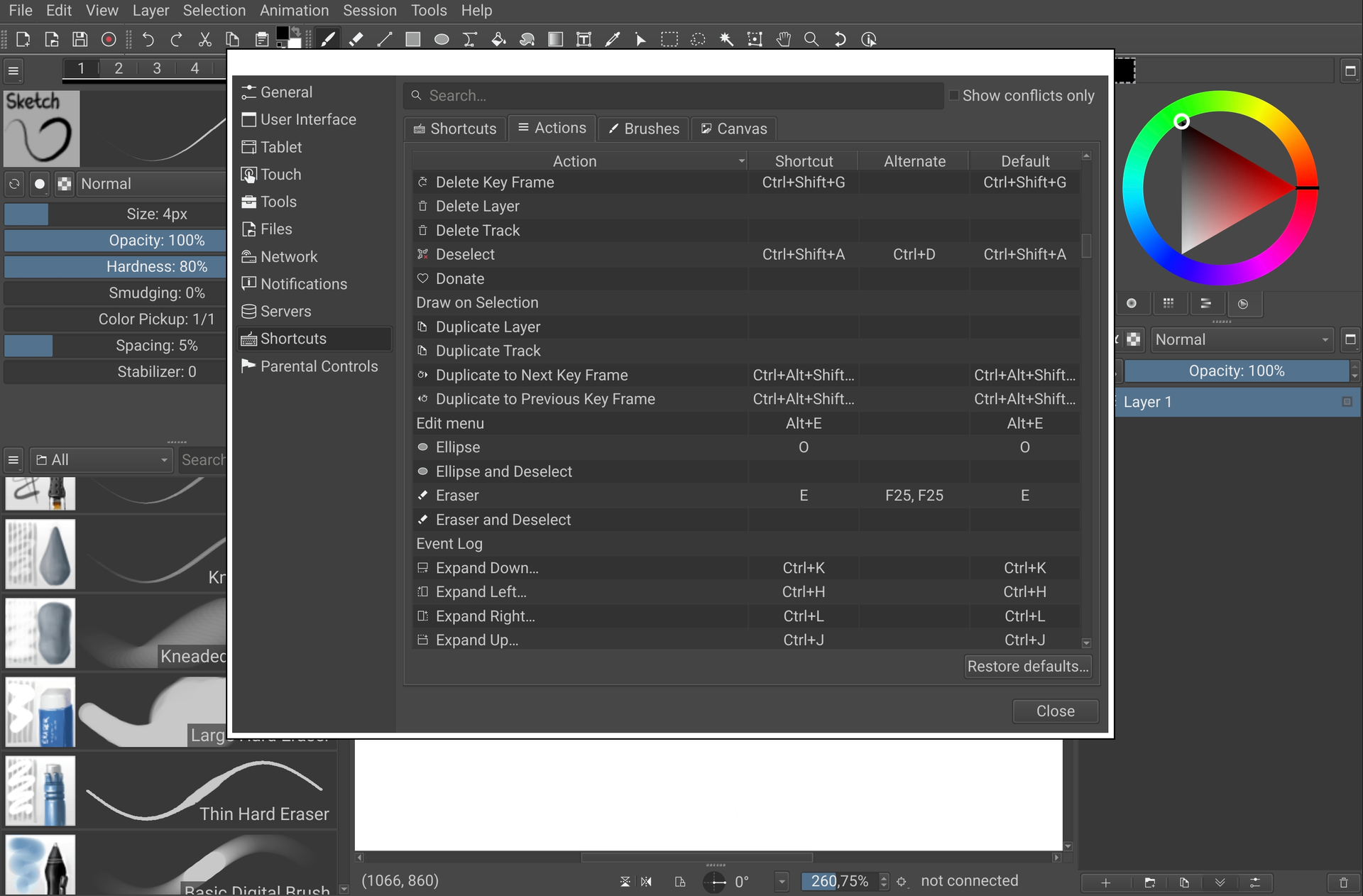
Scroll down to where it says “Assets” and get the “Android APK 64 Bit”. Then in the program, use Edit → Preferences → Shortcuts, go into the Action shortcuts and try to assign an action to your gesture. It should show up as F25 and then doing it in the program should activate that action.
Just tried it with the shortcut to change to the eraser. It works perfectly.
The only weird thing is that it seems to register twice? It shows up as F25, F25:
Thanks! It should be fine if that’s how the input comes through, yeah. It’s pressing the “key” twice and so the program binds the double-press to the shortcut. The reason you see it four times in the log is probably because it does two presses and two releases, so that’s four warnings about unknown key codes.
Is this version of drawpile expected to have some bugs? Maybe it will be better to report this elsewhere but, trying this out, the brush preview that shows under the tip of the pen disappears when:
1.You have a window open (like preferences).
2. Go back to the home menu.
3. Come back to drawpile.
It keeps drawing normally but the brush preview under the tip of the pen doesn’t show up until you change the brush to another one.
Probably better to report issues in direct messages or through Drawpile’s channels, but thanks regardless! I’ll take a look if I can make that happen, there’s definitely some cases where the brush outline disappears that I haven’t been able to make happen consistently enough to track them down, but maybe this way will be.