Drawing a quick curve makes the line angular

Windows 10, Krita 5.2.2
Using Mouse.

I recently learned about Krita and decided to stick with it because it supports quite a few features.

However, there’s a problem: Whenever I draw a curve, I get angular lines.

I tried the following methods to solve this problem.

  1. change the graphics settings
  2. set the refresh rate of my monitor
  3. reinstalling Krita
  4. other solutions on the internet…

…and none of the above resolved the issue.
Stabilizier seemed to have some effect, but it creates lines that I didn’t intend.

How can I fix this issue?

Can you make a screenshot (not a photo, please) and show it to us so we can get an idea what kind of lines you’re talking about?

:slight_smile: Hello @Killbot and welcome to the forum!

That sounds similar to a tablet/stylus with a too low reporting rate, an issue @AhabGreybeard described well in the past. Does your stroke look like the pictures in the linked postings below?

Since the accuracy of mice also depends on reporting rates, and especially the cheaper ones can have far lower reporting rates like good gaming mice often have, this may be the issue. If you are lucky, your mouse driver offers a setting to set higher reporting rates.
But let’s see what you will answer.

Michelist

Can’t upload a file, so I’ll give you a link instead.

If you draw slowly, it will look smooth. It’s a tablet report rate thing.

Same problem as in that post! I don’t think it’s a mouse issue, I’m using a logitech g1 and my mouse works fine with all other graphics software.

The point is, I use Krita to have brushes that vary in thickness based on mouse speed (like MS Paint 3D).

Can you set the reporting rate higher in your G1, all my Logitech mice allow that?

Michelist
edit. sorry was aimed @Killbot

Michelist

Well, G1 does not support driver settings.

So you’re not using a graphics tablet?

Can you try version 5.2.3-beta1 available from here:
https://invent.kde.org/graphics/krita/-/jobs/1916687/artifacts/raw/krita-x64-5.2.3.zip

That is a portable .zip package that will not affect your current 5.2.2 installation but will share the existing config/settings and resources folder.

I’ve tried versioning up in steps from Krita 3 to the latest beta release, but they all have the same issue.

Is the curve smooth if you move your drawing device slowly?

And how powerful is your computer?

That’s right, if I move my mouse slowly, the curve is drawn smoothly. But what I want is a change thickness based on speed, so moving the mouse slowly is not the solution.

My PC is very old… I’ll write down the detailed specs.
MoBo : Asus H81M-E
CPU : Intel Xeon E3-1231 v3
GPU : Nvidia GTX 1050-Ti

That’s an old CPU but it’s more powerful than the CPU on my old computer.

However, I don’t have a problem with fast mouse drawn curves.
Your Logitech mouse driver may be a little on the slow side.
(Did you install the Logitech mouse driver?)

If you disconnect the Logitech mouse then connect an ‘ordinary’ mouse and do a full power down restart, you may find that the standard generic mouse driver is better.

Also, don’t run any other application at all when running krita.

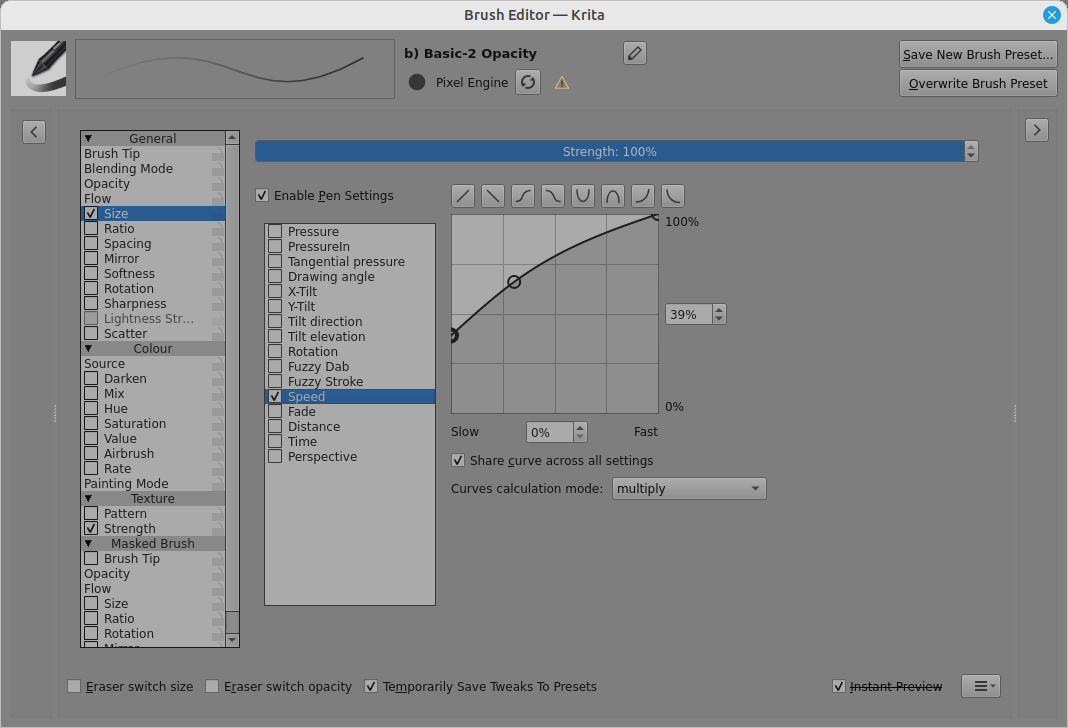
Brush size variation controlled by speed is done in the brush editor (F5):

The ‘scaling’ of the drawing speed sensitivity is controlled in
Settings → Configure Krita → Tablet Settings with the ‘Maximum brush speed’ slider.

With the cheap budget mouse I have at work I have the same issue. The mouse does not report its position fast enough when the mouse dpi setting (it has a button with preconfigured DPI settings I can’t change) or mouse speed is too high in windows. I can mitigate it by setting brush smoothing to Basic in the Krita’s tool options docker.

Not ideal when you work with a pen but should not have any downsides when working with a mouse.

There doesn’t seem to be any difference between Logitech driver and standard driver.

Closing all programs except Krita kinda worked.

So maybe it is a CPU power thing?

How do the performance settings look in Krita’s settings? Although it would surprise me if it’s the CPU. I have a powerful CPU here at work it’s just that my mouse is kinda bad, maybe costs 10 bucks or less. It’s basically trash.

I just ran a test, and stressing the CPU made no difference. I think I was mistaken for a moment.

I’ve already tried adjusting everything in the performance settings and found that it didn’t make a difference.