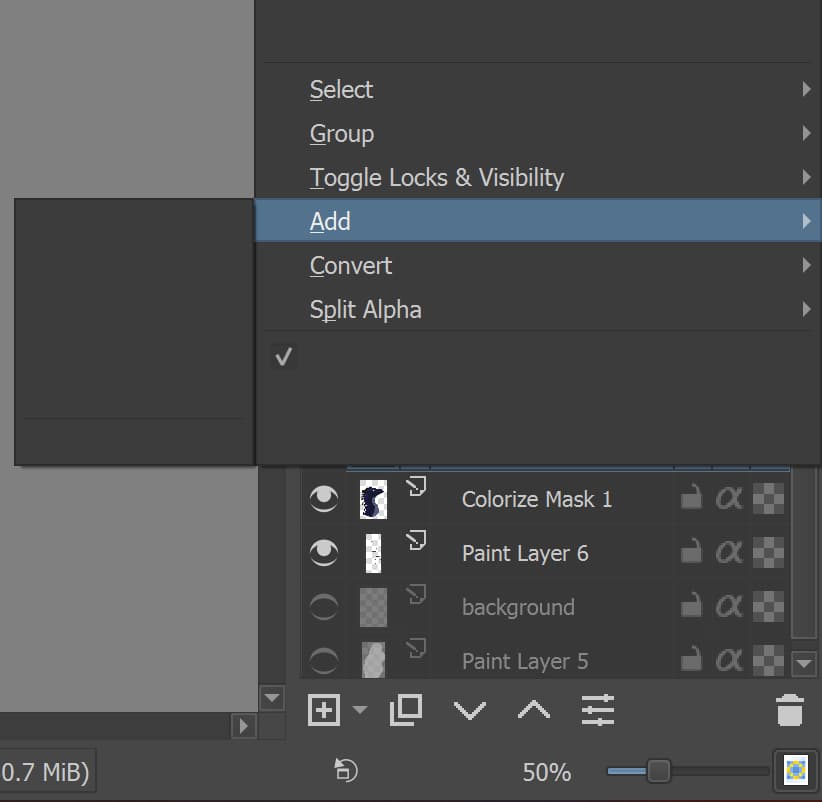
I’ve been having a bit of trouble with krita today, and this is the latest: the dropdowns are blank. Some of them are filled in, but mostly not. Even the thing that pops up when you right-click a layer is largely blank. They all work perfectly fine, I used the colorize mask feature and everything. But the thing is, I had to do a bunch of guess and check to figure out which button exactly activated the thing.
The version number is shown on the splash screen at startup time.
The latest formal release version is 5.0.6 and that will soon be replaced by version 5.1.0.
Is there a reason why you’re still using version 4.4.2?
I guess it never crossed my mind I should. That, and I don’t know how to update? Do I have to download that version and delete the old one? Seems like a hassle every time a new version is released.
Then you run it and it replaces your existing old version with 5.0.6.
The configurations, settings and resources will not be affected except that you will lose any custom tags you may have made. These will have to be manually remade.