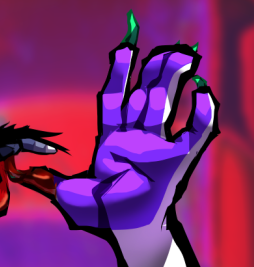
I’ve always had a fascination with those flash cartoons posted in sites like youtube or newgrounds throughout the 00s. How would one emulate such as style? Vector brushes aren’t possible in krita I know that, but I could try emulating the style using basic brushes only? Screenshot example:
Just copy what you’re seeing then analyze: How did they do the shading? How did they do any highlights? How did they shape the character’s features? Etc.
In my eyes, the brushes Krita ships with are enough, but you can always go for specialized sets. The “Jarry H. Line Brush Set for KRITA” for example, this is the link to the download, Or also excellent brushes for inking are “Rudluff’s MyPaint-Brushes” (link to the download of only this bundle) converted for use in Krita by fizzyflower¹ (at least in my eyes they are very good). And there are other brushes that may appeal to you.
So I think by me, sorry, but what is there to explain? The style is given, you will have seen enough of these representations as examples and can now decide either to imitate something very closely or to interpret the style freely. Grab your brushes, start with sketches or directly with the line art if you are confident enough with it. Then you need to color and shade it.
Keep in mind to divide it into groups and layers to separate the elements and make possible changes easier (at least I as a layer freak would do this). So in your example I would at least create a group for the car, the person and the background and then split the single part into layers again.
Michelist
¹If you want to check out all MyPaint-Brushes and Bundles converted by @fizzyflower and not only the Rudluff-Bundle, they can be found here:
It is possible to make the character with vector shapes, then assemble and animate according to the cut-out method. The only problem with this method is that you have to take a copy of the character and convert all parts of it from vector layer to paint layer.
In this topic there are three videos showing the cutout animation method.
I don’t know the inner workings of flash to know how it comes to have ‘that look’, but everything in krita is enough since it uses very basic techniques (basic because the techniques rely on features that are present in basically any decent drawing program ever)
For lineart, what makes it interesting is how many inconsistencies it has. This can be easily replicated by the “Shapes Fill” brush - have a sketch, and ‘cutout’ the lineart.
Due to how you’re cutting up a shape and not drawing an actual line, it’s harder to make actual consistent lineart this way than getting organic lines.
Here’s an example of how that looks if you do it a bit sloppily:
For the shading, use pure black on 50% opacity and multiply layer mode. It’s that easy. (though that’s more of a common practice, you’re of course not limited to only black. If you want colored lineart, it’s usually a 75% dark desaturated version of the base colors, such as for skin, it’s a dark gray-orange.)
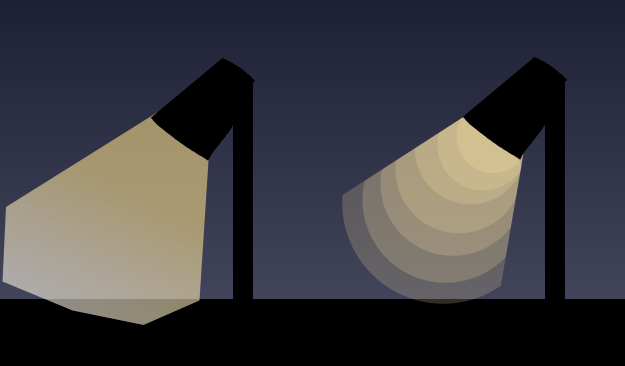
For other lighting effects, you’ll either use gradients or many shapes of different opacities to imitate glazing, such as 5 circles inside each other to give the idea of light coming out of a lamp shade.
For the opacity transitions, they’re usually not this obvious.
For local colors, sometimes you’ll want to use a linear gradient; in your example image, that’s how the character’s hair looks. The important part here is that you’ll have to limit yourself to the gradients themselves - no brush mixing or anything that you can’t do only with the gradient tool.
Concluding: you’ll have to work within the confines of what you can do with vectors, basically. You’ll only be able to draw inconsistent lineart, use the polygon tool or other basic shapes for everything, and gradients will be limited to those too. Brushes, besides the shape fill one, and all they allow you to do - mixing, dabs, their stamping behavior - do not exist in this style.


 would do this). So in your example I would at least create a group for the car, the person and the background and then split the single part into layers again.