Samsung tab A 8
Android 14 one UI 6
Krita latest play store 5.2.2
Every time I try to export or save a new picture krita crashes.
An empty file is saved but that’s it.
Anyone know how to fix this or should I open a ticket?
@AhabGreybeard sorry to at you but you have been the greatest help to me in the past
It is not the A8 it is a different model the A 8 do not ask me why Samsung did it this way but it is the difference that was made but no I have my tablet dedicated solely to Krita so it is not a memory issue I fixed that long ago.
A 8 seems to have only 2 MB RAM, if i have got the right model, not sure. That would for sure would be a problem.
In case you think its more of an app issue, then try this nightly build which should not disturb your existing install. If this works then at least its functional for now. Samsung on my tab also supports virtual memory which you could try. I am using Tab s7+
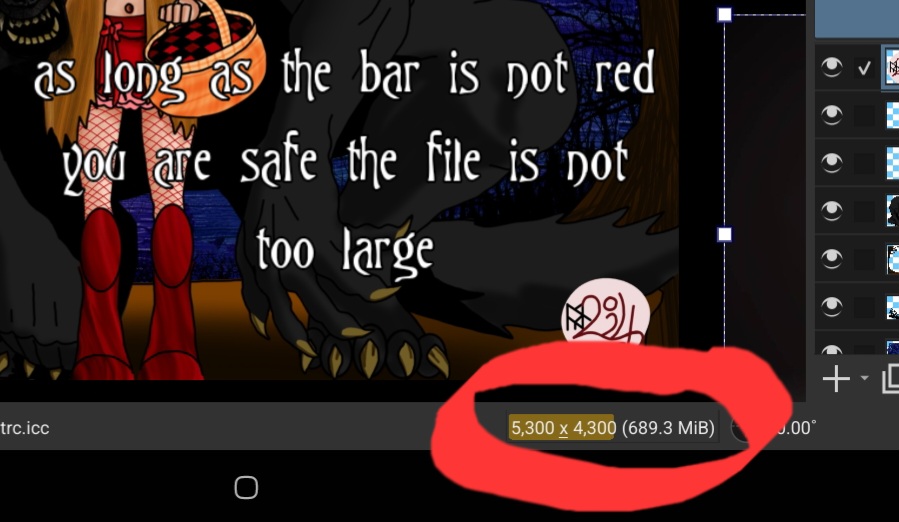
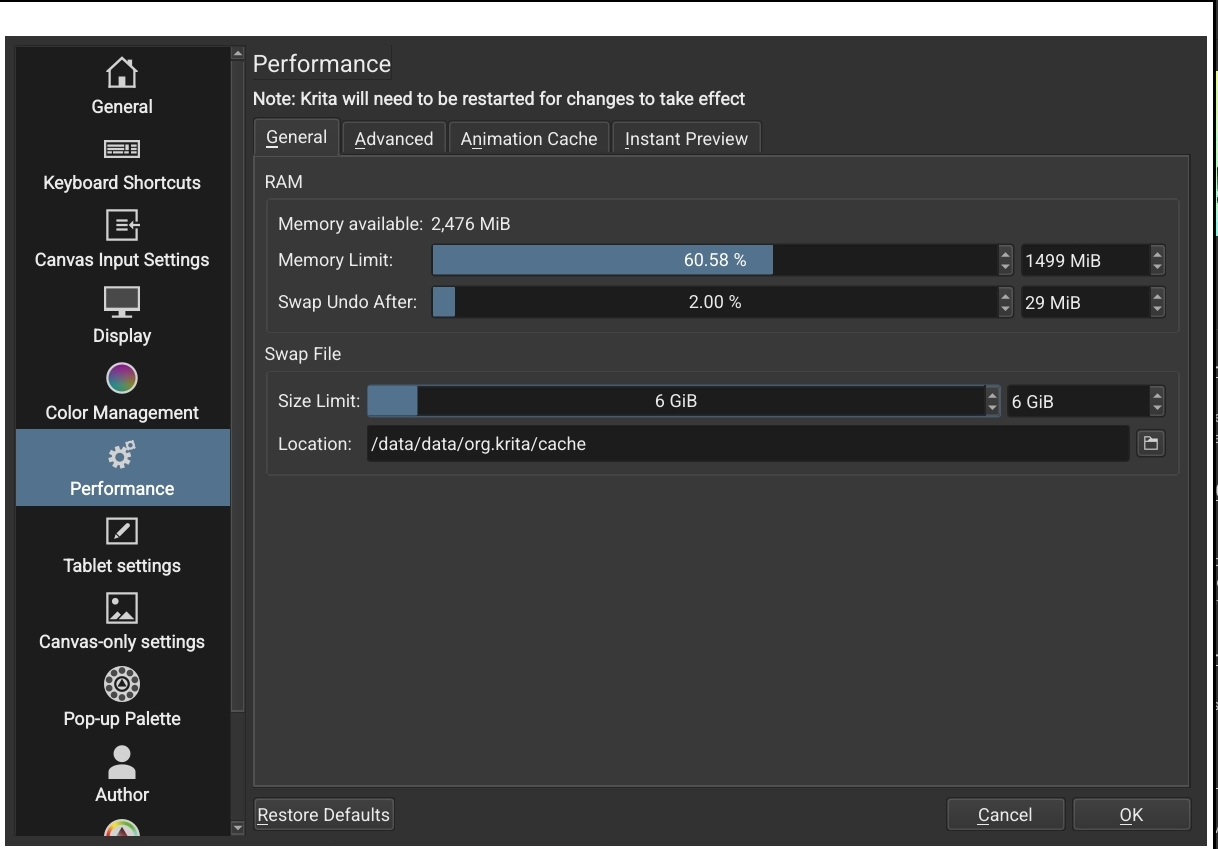
Ram is 3gb half of which is is the other half is free krita has a setting that allows use of a specific amount of ram and virtual storage, using an SD card you can partition a portion for virtual ram as much or as little as you wish it burns the SD card faster but is Helpful. To put the nightly build would be a problem I would have to export a secondary set of brushes yatta yatta space internally is also small much of which is alotted to kritas virtual storage which limits what can be placed for apps and not enough of kritas can be placed onto the SD card sadly. No again I fixed the memory and ram situation long ago with help from others here in the forum. Now I can have kritas go up to 1.2 the the bar in the bottom that keeps track is at about 650mb of space the layers take up it’s a little restrictive but you get used to keeping within the confined space. I will screenshot what I mean in a second reply.
RAM will be used by other operating system parts too. So even with 3 Gigs you may only get 1.5 GB worth RAM for Krita.
I also notice that you work on a real big canvas size too, Maybe you should scale down a bit
Adding Swap will still have poor performance if on external drive or emmc storage. it only makes sense if you have UFS like fast storage. degradation is a problem but unless you want the device to run for like 6 or more years.
adding nightly would only take small space, if everything works then you can delete all stuff from main installation and just run nightly saving space. but obviously it means random stability issue.
As far as i can see its more of a hardware issue rather than krita issue. of course I am only trying to guess. try too paint in 4k or 2k and see if it helps
I really wish you were listening it’s not a memory issue and I can not risk the stability issue destroying a piece I’ve put 10+ hours into I’m sorry but these are not helpful.
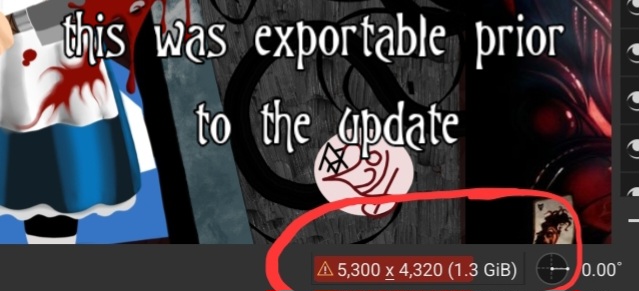
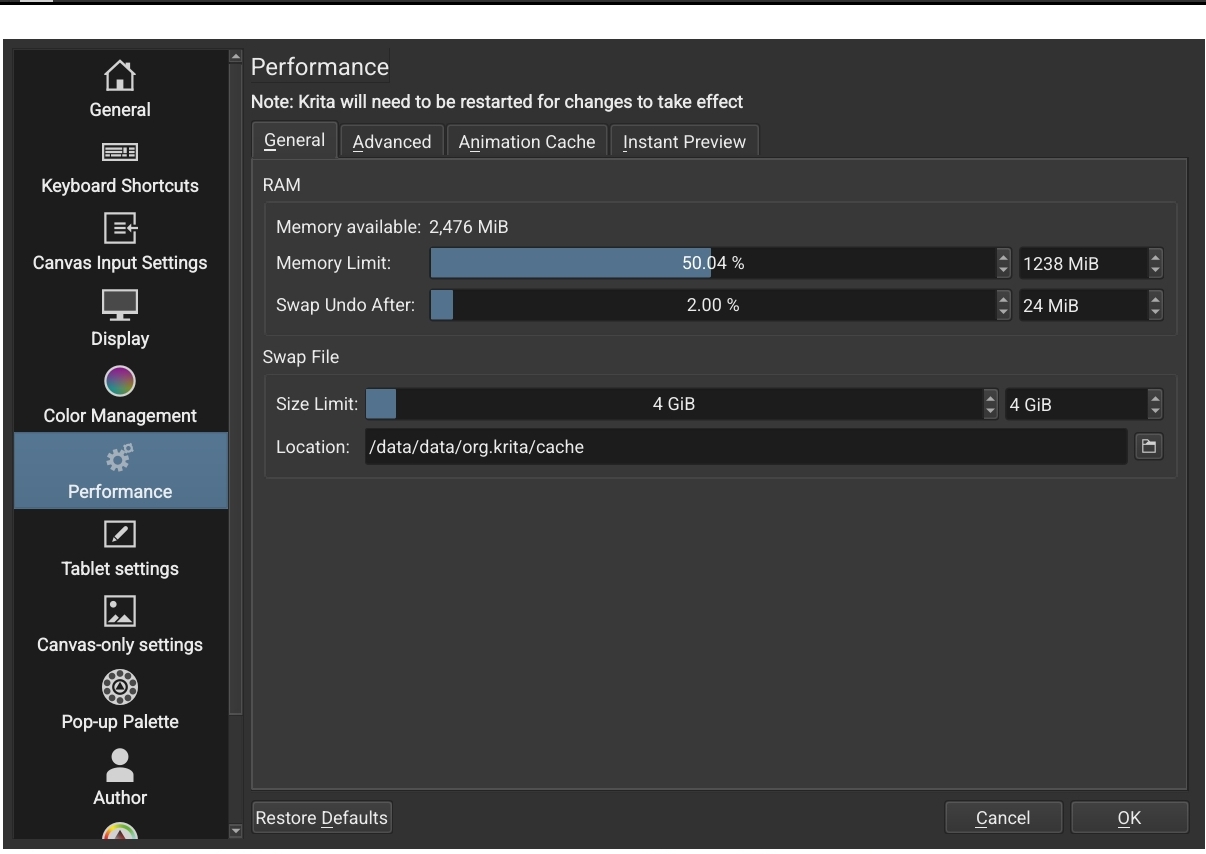
The current memory limit for krita is set to 50% (1.238 GB) and your document is showing RAM use of 1.3 GB.
I’d suggest setting the memory limit to 1.5 GB to see if that allows you to Export it without doing any work on it.
If that is ok, you could scale the image down to 75% of its current size then Save, restart and see if that gives a better working experience.
You say, “this was exportable prior to the update”. I assume this means that you recently updated krita to 5.2.2.
It’s quite possible that krita 5.2.2 uses more RAM for the krita application itself and that is what pushed the total RAM use into a situation that was not viable for your device.
It may be possible to uninstall krita 5.2.2 and get the .apk for 5.2.1 or whatever version you were using and manually install that to go back to your previous situation.
I don’t know where that could be downloaded from.
Even if you have an SD card being used as virtual RAM, that does not seem to be visible to krita and may not be usable. Krita can see only about 2.5 GB of RAM.
If you use the Android settings/monitoring facilities, that might give a better understanding of the situation in terms of how much RAM is being used by what applications.
AA no no the image that can not save is the first one 689.3 mb so you can see I hope where my problem is.
If I scale down I will lose definition so that is not a viable option.
Where can I find the monitoring facilities? Is this one of the logs? I saved the logs for Krita bugs, system information, android log, and crash log. Shall I post them here?
On my last Android device, I installed a real time monitoring utility which told me how much RAM was being used, among other things.
I didn’t bother to install it on my current device that I bought four years ago.
If you did install it then it would use RAM and CPU power and that would probably not be good in your current situation.
You can try but I wouldn’t understand much of their content. Somebody might.
You have a 5,300 x 4,320 canvas and that is massive. Do you look at your work on a 4K monitor? It’s up to you to control your own work and I have no idea why you need such a high resolution.
I see what you mean I think if the developer tools are
on the tablet there is something there.
The canvas size is in pixels the page in inches is only 11x14 or some such this is why making it 75% smaller would destroy the image quality my client wants a 26 x 16 I size up usually to export but I just wanted the 11x14 exported to see on a print.
I have given in and tried reducing the image size by 7 inches, I can still
not export the image. I increased the size krita can use for memory this
Did not help either. Please this has become dire, I do not wish to lose my
works that I have on kritas. I’m able to start and save .kra files of my
usual size I just can’t export or save the image. If krita now requires
More ram then I have I will have to switch off krita I don’t wish to do this!
Please help me find a solution.
Sorry to hear that Is there any specific feature you need in 5.2.2? Is it possible for you to roll back to 5.1.5? Krita teams seems have no manpower for android right now, so it’s better to stay in version that work for you
You can still get 5.1.5 apk on KDE - Experience Freedom! Uninstall the 5.2.2 (if i’m not wrong, you can uninstall app without deleting app data on android, so your setting won’t be deleted, hopefully ) and reinstall the apk.
 but no I have my tablet dedicated solely to Krita so it is not a memory issue I fixed that long ago.
 The canvas size is in pixels the page in inches is only 11x14 or some such this is why making it 75% smaller would destroy the image quality my client wants a 26 x 16 I size up usually to export but I just wanted the 11x14 exported to see on a print.
 I don’t wish to do this!
 ) and reinstall the apk.