@tiar mentioned it before…
Michelist
@tiar mentioned it before…
Michelist
This topic starts to look like a fight 
Grum999
i repeat : i don’t say that krita is perfect and that you can’t propose things that will make it better. i just say that most of your arguments are “it is like that in photoshop… photoshop do it better… krita has to implement it for helping people transiting from PS…”
i recommand you to read this for feature requests 
This is what straw-maning can lead to. If everybody stays on the topic, this is nothing but a simple request. I’m not interested in which Software is better or worse, I just care about Krita becoming a better and more accessible program. That’s all.
This isn’t right, at all. Your only argument was for a eraser tool, without any reason why Krita’s eraser are bad, or more importantly, why a eraser tool is needed. You only said to do like Photoshop does.
Then after going in circles and misurderstanding you clearly stated exactly which feature you need.
That’s it. That is the feature you want. A shortcut similar to / ( use previous preset), but only for erasers.
I can see how this can be useful and I might even try to implement myself. Is adapting the code used by the shortcut / a good way to do it @tiar ?
Also, it seems the blender plugin doesn’t work with Krita 5.
I’m out of here. Maybe some developer gives this a try. But I don’t care about being analyzed and straw-maned any more. What a simple request can turn into…
I put me now times even more stupid than I am anyway. I have also only roughly skimmed the topic here.
Your Cintiq tool hopefully has, like most of these tools, the possibility to create profiles, so one for Krita, one for PS, one for CSP, et cetera, or not?
And now I looked for erasers in my currently activated bundles and found 7 different presets that only erase and it’s not enough for you to be able to activate such an exclusive eraser preset using one of these scripts and your Cintiq tool?
Okay. Is it because you might have to press a second button afterwards? I mean there was also a script or plugin that did that recently, something called “Temporary Tool Invocation”, could that solve your problem in conjunction with the “Ten Brushes” or the “Three Brushes” plugin? This “tool” did just that, a tool worked as long as the (or a) button (or whatever) was pressed and when released the previous tool was back. Is it something like this?
Ah, found it: Temporary tool switching
If it is something like that, then look here.
I haven’t read up there now, but on the quick found in the topic that the plugin works, whether it meets your need I don’t know.
Michelist
Oh yeah, the temporary tool switching feature is something I really want!  It’s potentially so powerful since it can be used for so much more than just erasing! I imagine it working similar to the straight lines in Krita, holding V for lines, releasing to go back to previous tool! And similar to the eraser(and others) switch in PS. That way we get a potential flexible system for latest erasing preset, multibrushes, latest smudge preset, reference moving/editing, assistant editing, lasso selections and so on on the fly. If these are customizable in Canvas Input settings it would be a dream for both existing and new users
Temporarily switching feature is good that is dedicated to eraser. we already “/” and thats probably the starting point.
A request is easier to palate and understand if its presented clearly with its advantages than saying this is how its in ps now do it because its better without clearing what exactly it is.
But for the love of cats, I dont want E key to default to the way its in PS. if you want it that way im all for having an option for it.
I like the way krita do its eraser. Anybrush as Eraser is a feature i adore alot.
I think the reason you got such a response was mostly due to phrasing. It is generally important to emphasis your workflow over simply saying “hey, photoshop does this, this should be added too to be more friendly towards photoshop users”
I mean think about it, if Krita implements everything photoshop, CSP, SAI and etc the same exact way it will turn into a bloated mess no one wants to use. For example, I personally don’t want a separate eraser tool. Personally, I would like to see more tools merged then having a tool for everything. At the very least, more tools to be more context aware instead of a separate tool for each context. (like colorized mask brush and brush tool, magic wand and similar color selection). Maybe ability to make custom tools based on preconfigured default settings for those who want say a dedicated eraser tool.
Overall, making it remember the last eraser you use and switch back to it shouldn’t be that hard to make as a python plugin.
Short feedback on the ThreeSlots plugin. It doesn’t seem to work properly (at least in Krita 5). It always switches to the same eraser and doesn’t seem to remember the latest eraser. And when you switch to another eraser after hitting the “Select Eraser” shortcut. It switches between two erasers instead of back to the brush. So this one unfortunately isn’t a solution for the issue.
i repeat, there is no “issue”. it’s just a different approach of a thing. like @KnowZero said, every software don’t have to implement fonctionnality the same way.
I can use it normally on 5.0, it may be a problem with your usage.
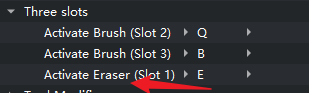
Any brush in this shortcut will turn into an eraser. The other two brush slots can be normal brushes or erasers.
You can first switch to slot1 and select a brush; then switch to slot2 and select another brush. Then you will find that they can switch to each other
Seriously, I like the design that slot1 can turn any brush into an eraser and record it.
If you don’t have any productive to contribute, please stay out of this thread. You derailed the conversation to begin with and still continue to do so. This is not helpful at all. Cheers.
I’m not sure how the whole “slot” concept works yet. Those are virtual slots, right? Or do I also have to have Ten Brushes activated and these 3 slots are the first 3 slots there?
It has no connection with “Ten Brushes”. My understanding is that when you switch from a “slot”, it will record the brushes you use in this “slot”.
When you open krita, no “slot” is actually activated. So you directly press a few shortcut keys and use the same brush
I will have to try that again. In the first test it didn’t seem to work properly or I could not make sense of the way those slots are assigned. Cheers for the feedback.
@AndreasResch Please don’t target any user. If you have a counter argument state it and leave it or ignore the comment.
I request to everyone to stay civil during the discussion and debate practically rather than emotionally.
Also @AndreasResch Please do not ressurect old thread. Please make a new thread for your requests and questions. Hijacking an old thread is not a good forum etiquette.
@AndreasResch There is a dedicated Eraser tool, it’s whatever shortcut key you’ve mapped to whatever eraser brush preset you like, via Ten Brushes.
The arrangement is flexible and variable according to your needs.