Feature Request: shape engine - add the ability to draw straight lines

Hi all!

I’m aware, that all the developers are really busy right now (great thanks for that - can’t wait for the new RGBA brushes and resource rewrite), but I have an idea for making the shape engine more useful.

Currently there are 2 ways to draw specific shapes in krita - using shape engine and outline selection tool. The first is rather for faster workflow, while selection gives you more possibilities, requiring more actions to take if you want just to fill area with color (select, fill and deselect for each shape).

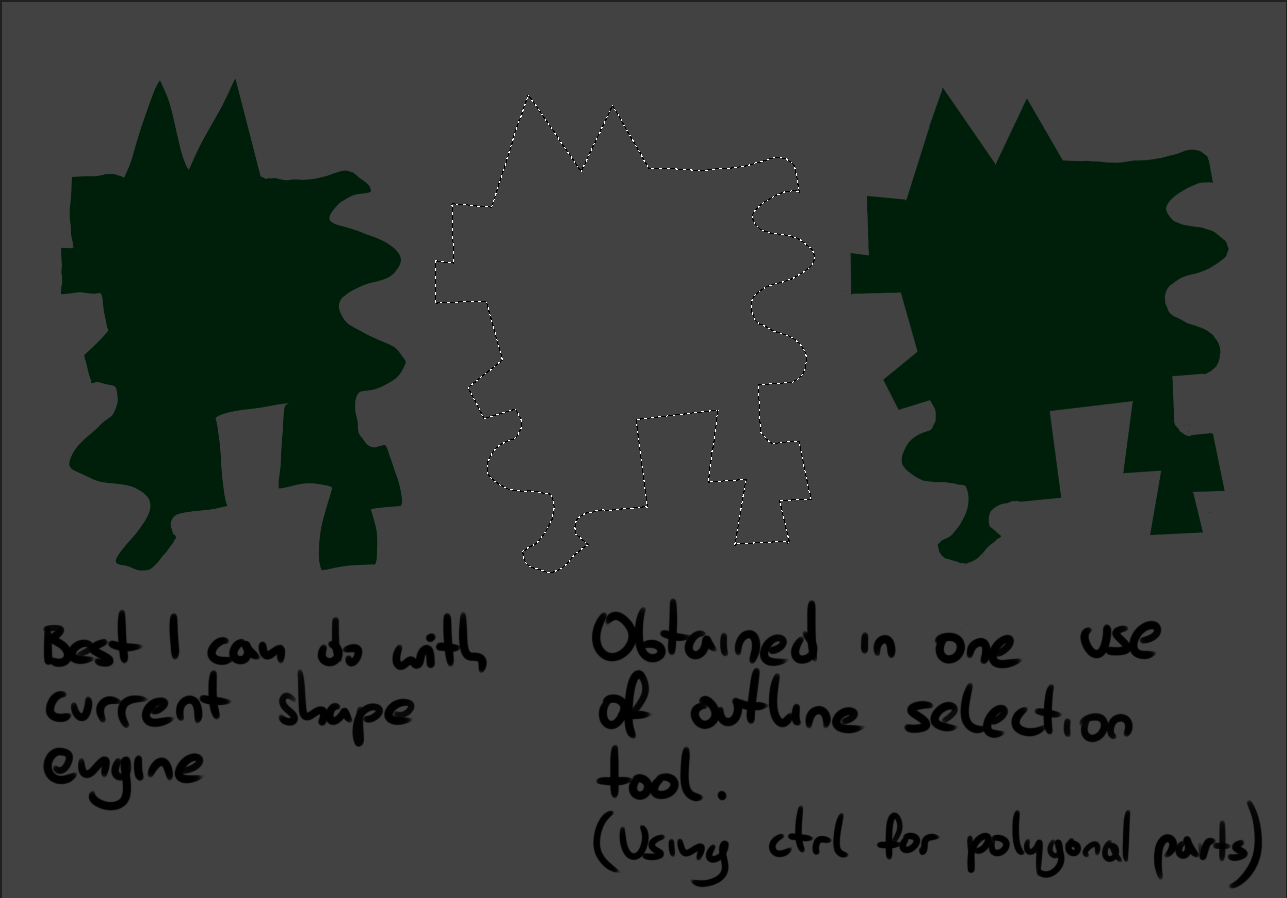
There is one feature though, that shape engine is missing comparing it to the selection tool - when selecting, you can press ‘ctrl’ to get straight lines - the shape won’t be finished until you release this button. This gives a lot of possibilities, as I can make a quick break in drawing the outline or combine freehand and straight lines. Unluckily, every time I want to draw clear shapes, I have to choose between fast and precise workflow.

So here comes my request: is it possible to add the ability to prevent shape brush from finishing the ‘stroke’ if user presses a modifier key, just like the outline selection tool? Of course maintaining the possibility to pick colors with ctrl, and having the shape preview as you draw.

The default key could be ctrl (have to be pressed once you start drawing, as it is used to color pick from canvas) or shift (not used in the engine as there is no brush size here, though it would be different modifier than in selection tool).

Nice things about this request are:

  1. It doesn’t come from any other painting app as far as I know
  2. It’s extending current tool, without changing the workflow of people who currently use it
  3. This type of action is already in krita, so I hope some code could be reused

I wasn’t sure if it is possible to easily change the use of modifiers in a specific brush engine, rather than in a separate tool, but the clone engine seems to do it quite well.

I would love to hear if anybody would want that feature (I don’t want to bother the developers with wishes on a bugtracker, unless you think it’s a good idea). I attach the presentation of a complex shape done with both methods. It don’t really represent how easier is to create something with outline due to this ‘ctrl’ feature, but I hope you can at least see that I can combine freehand and straight lines in one stroke.
Cheers :slight_smile:

5 Likes

One thing that Krita can already do (if I understand your suggestion) is the line tool. It fits quite nicely your description, and if you assign a shortcut to it (I use K), you can toggle quickly between the line tool and then hitting B to go back to the brush tool.

Maybe this helps :slight_smile:

I know, but it’s more about creating shapes fast, than straight lines.
To use line tool here, I would have to pay dawn a shape on a different layer, and erase side of it with line tool. It’s a lot more complex than just using shape engine, even in current state, which allows to have exactly one straight shape edge.
My suggestion is more about creating shapes fast, and making current tool more precise.
Thank you for trying to help though

More specifically: the Shapes Tool is very distracting with the instant preview enabled because it covers up whatever’s underneath. It at least needs a way to turn that function off.

Also, how come drawing a straight line is its own tool instead of being able to hold Shift to make straight lines with the brush like other programs?

Don’t get me wrong, I’m really enjoying Krita, but certain things seem to be more difficult just because. Or are the devs trying to avoid lawsuits from other entities?

When you’re using the brush tool (but not the shape engine brushes), you can switch to the line tool by pressing and holding the ‘V’ key. Then release it when you want to go back to the brush tool.

With the Shapes Fill brush in use, you can use the polyline, polygon, bezier and freehand path tool. The freehand path tool may be what you’re looking for (for filling a random shape) because it leaves a line outline around the drawn shape before filling it when you release the mouse button or lift the stylus.

[Edit:Additional: I’ve just noticed: The Freehand Path tool can be used with a pixel brush and in the Tool Options docker it can be set to fill the drawn outline, which happens at the end of the stroke, with a colour or a pattern.]

When it comes to using applications, I tend to work with the principle of “it is what is it”. The great thing about krita is that you can ask for something to be implemented or changes to be made and have discussions about it and then if your idea/request has enough support, it can be implemented by someone who has the time, effort and ability available to do it.
Serious faults tend to get fixed quite quickly. Ideas for new stuff or changes take longer.

2 Likes

With the Shapes Fill brush in use, you can use the polyline, polygon, bezier and freehand path tool.

Yes! Thank you very much @AhabGreybeard

@AhabGreybeard Wow. I never used freehand path tool, but with filling switched on, it seems really useful. I never noticed there are so many alternatives to the shape engine.

Now going back to my request, I thought I’ll show one more example of the way I would use it:


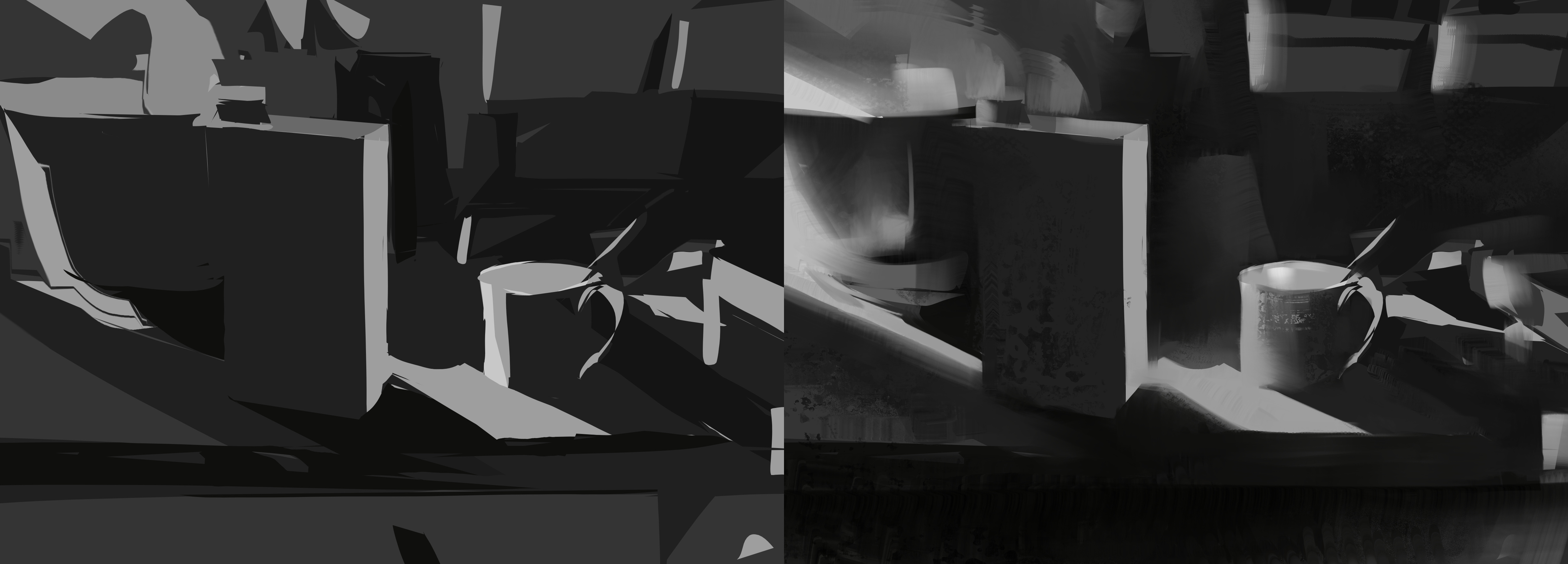
The left one was the first stage of my painting - blocking shapes with shape engine and outline selection tool, before I started drawing with regular brushes (right picture).
When you want to lay down hundreds of shapes, being able to constantly undo them a lot of times, I found it more comfortable to use shape engine instead of selection most of the time - You may see many lines like those in the cup are actually quite clumsy for example. The box with milk, and some shadows however, were done with selection tool. This slowed my process, as I had to switch to the tool, then couldn’t fill with shift+backspace (it should be possible), and often have to undo multiple times to undo both filling and selecting, if the shape was not satisfying.
I just thought it would give me a lot more precision and speed if I could stay in one tool - shape engine - and do lots of different shapes, freehand, with straight lines, and mixed, all considered as single strokes that can be removed with single undo each.

Anyway I hope this illustrates my point a bit better, if it wasn’t clear at the beginning. Thank you for your feedback so far :slight_smile:

1 Like