
I changed the settings of the filling tool, but it can’t take effect
I can confirm, the options are not responding on kubuntu 20.04.
Clicking on “what to fill” and “fill with” buttons do not change the settings and don’t cause the sliders below to hide/appear. The buttons themselves get highlighted correctly when clicked.
Tested it with and without the “redesign” plugin. Options for other tools work correctly.
Ok, I just pushed a fix. Thanks for reporting.
5 Likes

From the perspective of the icon, I think it has a similar principle to the “continuous selection tool”. Is it feasible to make a “similar color selection” scheme (or an independent tool)? In the initial color matching stage, this helps to change the color at one time. Nowadays, people usually use selection and filter.
I think this option can be used as an enclosing method of “enclose and fill tool”. Generally speaking, there are things like balloons, birds or flowers in a single layer that need to be filled. If you can click once to automatically determine the closed area in the layer, it will be more convenient.If there is no selection, it should be equivalent to pulling the entire canvas with a rectangle.
1 Like
On top of this redesign, I’ve made various changes to the texts of the fill/selection tool options, so that they’re a bit more readable in general.
The MR can be found here, while the specific changes can be found here.
Notable text changes include:
- “Multiple fill” option is renamed to “Drag fill behavior” to better convey the functionality and its usage to users that might not be familiar with the feature.
- Enclose and fill tool’s “What to fill” option is renamed to “Target regions”, and its item strings have been tweaked, in order to remove redundancies so that the dropdown interface is more concise.
Before:

After:

- “What to fill” option in the traditional fill tool is also renamed to “Target regions”
- “Fill with” option is renamed to “Fill source” as I just believe it sounds better.
- “Reference” option is renamed to “Reference layers” to better convey its usage without relying on tooltips, and to better differentiate its potential meaning from “Target regions” and “Fill source”.
- “Region extent” option of the fill tools is renamed to “Fill extent”.
- Various tooltip changes that can be found in the second link above.
Please let me know if there are any concerns or additional suggestions regarding these text changes. Otherwise, this should be merged for 5.2.
5 Likes
The reduction of words in the options or the enclosed fill tool are great. To me the amount of text was always a problem cause all the options just meld together when reading. And was one of my main criticisms to the tool.
I wish there was a way to reduce it even more but i don’t have any ideas for text.
Though honestly i still think it’s so confusing having an option that is all regions. Especially when the invert button doesnt work as no regions.
Deif_lou explained to me that’s not how it supposed to work but still that doesn’t make any sense for a user looking at the tool. All regions also doesn’t convey any meaning in this sense imo.
Maybe “closed regions” would give a much better meaning and would make sense with invert or something like that.
One thing i had mentioned before that i still think its a worth addition is adding what invert does to each como box option in the combo box item tool options, it would be much clearer to know how invert would affect each option.
Other than that i just have a doubt about changing reference to reference layers, wouldn’t that become too long? My worry is it making so you need to roll the docker to the right to see.
Especially when the invert button doesnt work as no regions.
From what I can tell, “Invert” basically fills open areas instead of closed areas. Following this, maybe the option could be renamed to either “Fill opposite areas” or “Fill open areas instead”.
Maybe “closed regions” would give a much better meaning and would make sense with invert or something like that.
Maybe instead of “Target regions”, the option can be renamed “Target color” like it apparently is in CSP, or “Target enclosed color”.
Other than that i just have a doubt about changing reference to reference layers, wouldn’t that become too long? My worry is it making so you need to roll the docker to the right to see.
Also had this concern. Here’s a comparison of the enclose+fill options docker, using the minimum width and height before scrollbars are shown:
5.1 strings:
https://i.imgur.com/EacxqWX.png
Initial proposed changes:
https://i.imgur.com/HtZogsk.png
There’s a difference, but this case might be a bit bikeshed-y. Instead of “Reference” the option could be called “Sample” as that might be more readily understandable to the average artist, but I’m not sure.
Overall:
https://i.imgur.com/PH8j9VD.png
In the traditional fill tool’s case, I think I’ll also rename “Target regions”/“What to fill” to “Target mode”, or simply “Fill mode” (especially as it has a new similar color fill mode in 5.2 contributed by @Deif_Lou ), and also “Drag fill behavior”/“Multiple Fill” to “Drag-fill mode”.
5.1 strings:
https://i.imgur.com/qug91MO.png
Proposed:
https://i.imgur.com/lfS25yq.png
Let me know what you think.
i tested here, i think fill open areas instead seems to reflect well what it does, even though it can still fill some contours in closed areas. its for sure a tricky option to name, i think fill opposite areas would fall in the same naming issue if the “all” is kept
after seeing this i went to csp to check the options and wow thats so much text. i have used this tool before there but never looked at the options since the defaults seem to work well
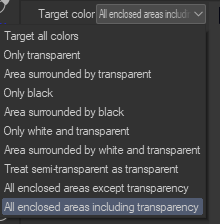
But indeed they use colors, i am unsure about changing to colors in krita though. As doesnt feel like color is the defining factor on how the tool works in krita. after doing some tests in csp and krita both behave a bit differently so i think its better to leave as region to not lead into confusion.
Sample was the name used before, though i dont know if its necessarily easier to understand than reference. I think reference layers is fine since you showed that the issue of needing to roll to the right doesnt happen. The only issue would be it being one line below instead of the side (though this is a minor issue). Dont know about others but i use the reference part a lot, I honestly wish it was more towards the top, but thats another talk.
But going back on topic, between sample and reference i prefer reference.
Other than the sample i like your proposed changes, i think the options starting with fill + word works really well.
Can you explain this better?
What invert does is simple. It takes the resulting mask of the operation, inverts it, and fills. So it fills the opposite to what is filled when the option was not checked. I don’t know if the users will find “open areas” more explanatory.
What do you mean by “as doesnt feel like color is the defining factor on how the tool works in krita”? And what differences in behavior with respect to csp did you find? They do essentially the same, although I made the options different since I find those in csp more confusing, specially the las 3.
The whole purpose of the tool is to fill regions that lie entirely inside the region the user makes. In other words, regions that do not touch the contour of the region that the user makes. In the case of “regions of specific color” and “regions except specific color” there is an “include contour regions” for convenience in some situations and that will also fill regions of the selected color that touch the contour.
The exact color of the regions can only be chosen if you delect “regions of specific color”. In the other cases regions of multiple colors that satisfy the criteria will be selected.
That’s not really simple to the user. The user will not perceive this at all. You know there is a mask in place cause you implemented it, but this is not clear when using the tool.
When using the tool for my tests yesterday, invert would only fill the areas outside, that might be the inverse of the mask you are saying but that’s not really what i perceived.
And again my issue with invert is exactly the all regions options options like i had told you before. The issue being that when you have a button called invert how most users will understand it is that they will read the option and try to invert it. So all regions would become no regions.
And yes you did explain that that’s not how it works but i believe that’s how most users will interpret it. Cause that’s the natural behavior you look at an option, see invert then you try to invert the option wording in your head.
Invert also doesn’t carry much meaning to the user, cause from what you said it inverts the mask not the operation(by that i mean the operation you can choose in the combo box). open areas gives an idea of what that option will do.
That’s why I said before that having an explanation about how invert affects each option would be a good idea in the tooltips
Some times what the code is doing is not the same the user is perceiving and the naming needs to be tweaked even if it’s not accurate.
The behavior in CSP and krita is different for some options. I will say that this one is difficult for me to explain but that’s how it felt to me, in CSP most options would replace the colors while in krita they seem to respect the boundaries way more. I can provide some examples with images later but the most notable thing i saw was that in krita sometimes it would fill a faint outline around the region while CSP would fill the region selected.
But this difference in behavior is what makes me not think that the color is the defining factor and reason why i don’t think changing the name to target color is a good idea.
Yeah i wasn’t even talking about that option, was talking about the all regions and transparent regions options as those were the ones i tested more.
Yeah i also understand that’s how the tool works, maybe i am not using the equivalent configuration in both CSP and krita to replicate the exact settings, this is always a possibility considering yesterday i did just a few quick tests. And didn’t mess with contours and things like that. I will do more tests today later.
If you check invert you get filled the inverse of what gets filled when the option is unchecked. I still don’t see any issue. I think it is clear once the user tries with a similar selection, but I don’t know. I’m ok with changing the strings, just wanted to say that the user may have problems understanding what “open/closed region” refers to also. This is a non-conventional tool and I think the users are going to have a harder time learning it than for example the simple fill tool, no matter what the strings say.
This is the correspondence between krita and csp:
| CSP | Krita |
|---|---|
| target all colors | all regions |
| only transparent | Transparent regions |
| only black | regions of specific color with black as the color |
| only white and transparent | regions of specific color or transparent with white as the color |
| area surrounded by transparent | regions surrounded by transparent |
| area surrounded by black | regions surrounded by specific color with black as the color |
| area surrounded by white and transparent | regions surrounded by specific color or transparent with white as the color |
| treat semi-transparent as transparent | - |
| all enclosed areas except transparency | - |
| all enclosed areas including transparency | - |
If you know what the 3 last options are supposed to convey and why they are useful let me know.
Thank you for the table this will help me a lot in my tests. First of all let me illustrate what I meant by
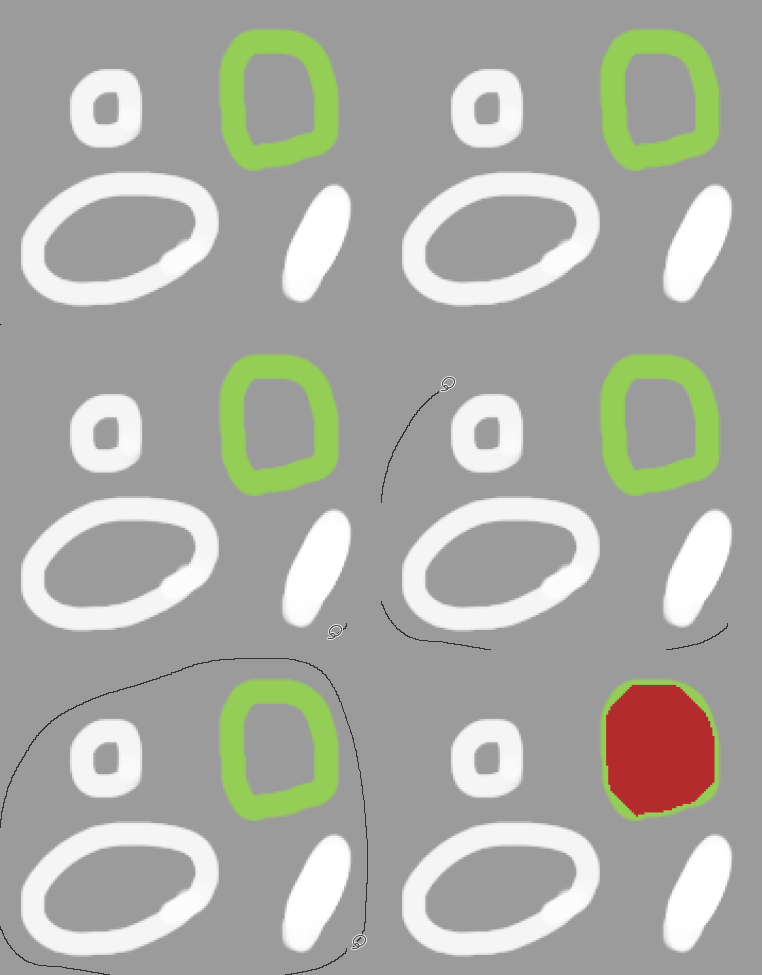
Krita: all regions
Csp: all colors
In krita:
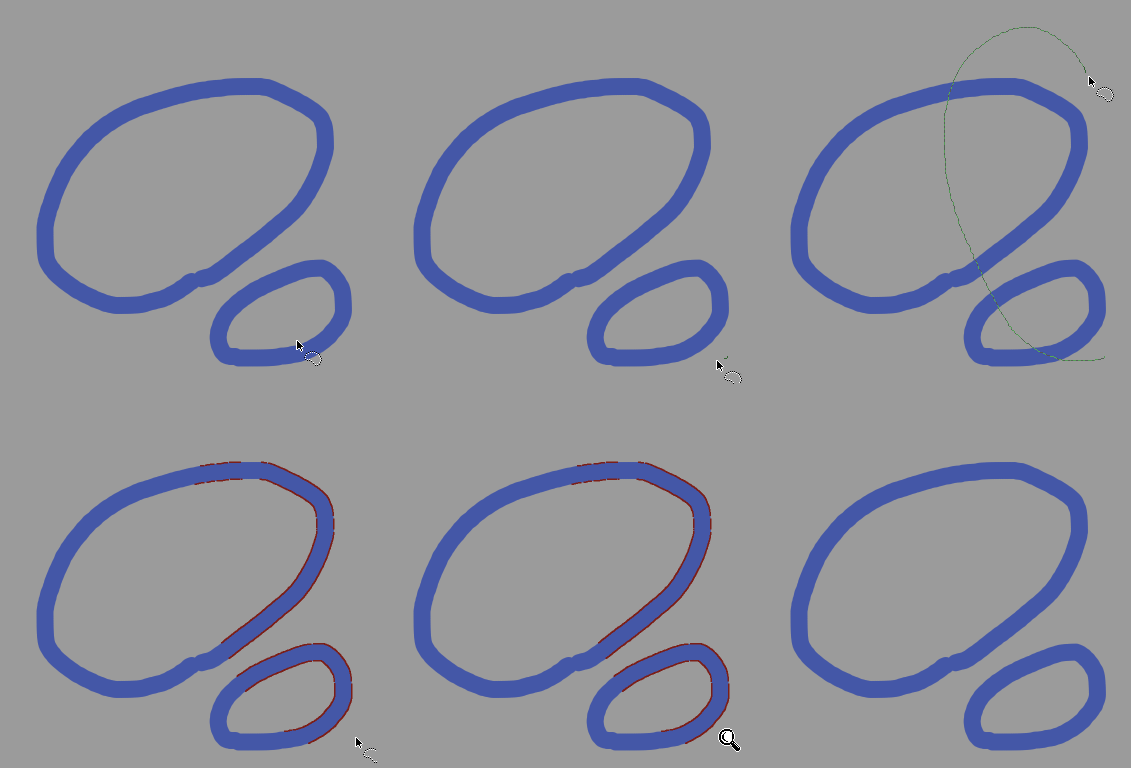
In csp:

In krita it tried to fill the region around the line, while in csp it tried to fill inside line. That was the reasoning for my sentence.
also import to note that i was using grow 1 for krita and csp by default has area scale of 10
other than that both seem to behave the same.
Krita: transparent regions
CSP: only transparent
From my tests both seem to behave the same
Krita: regions of specific color with black as the color
CSP: only black
Same behavior though i will say krita fill is much smoother
Krita: regions surrounded by specific color with black as the color
CSP: area surrounded by black
also works fine
Krita: regions surrounded by specific color or transparent with white as the color
CSP:area surrounded by white and transparent
works fine though again krita fill is much better
Krita: regions of specific color or transparent with white as the color
CSP: only white and transparent
i will be honest i dont see the point of this option in csp doesnt seem to fill what its supposed to fill.
Krita:
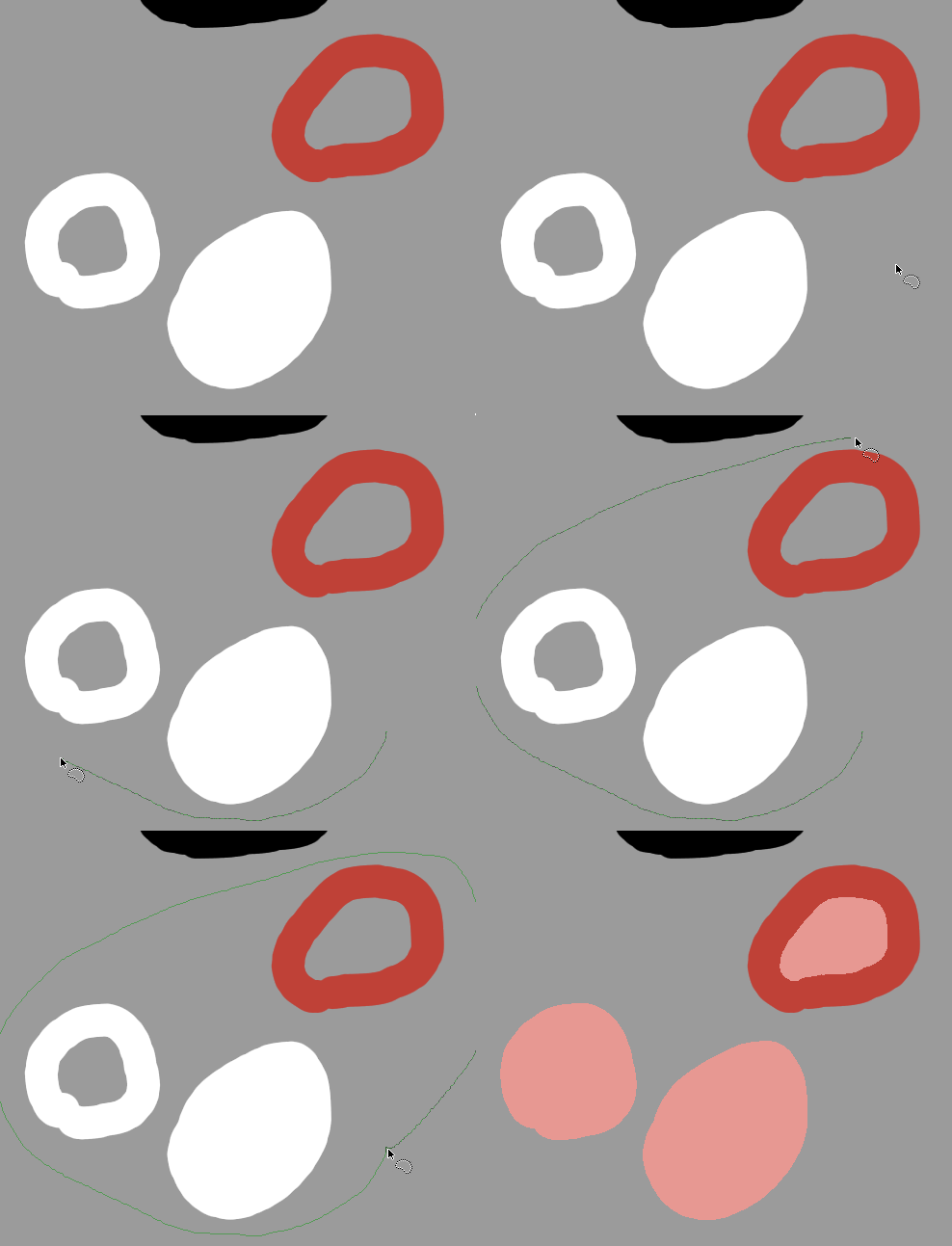
CSP:
Now for csp special cases
treat semi-transparent as transparent
What it does: it behaves like area surrounded by transparent with the difference that anything under 100% opacity is treated as transparent. i wasnt able to find an equivalent in krita also, in csp like you can see in the gif if you circle inside the semi transparent part it fills inside
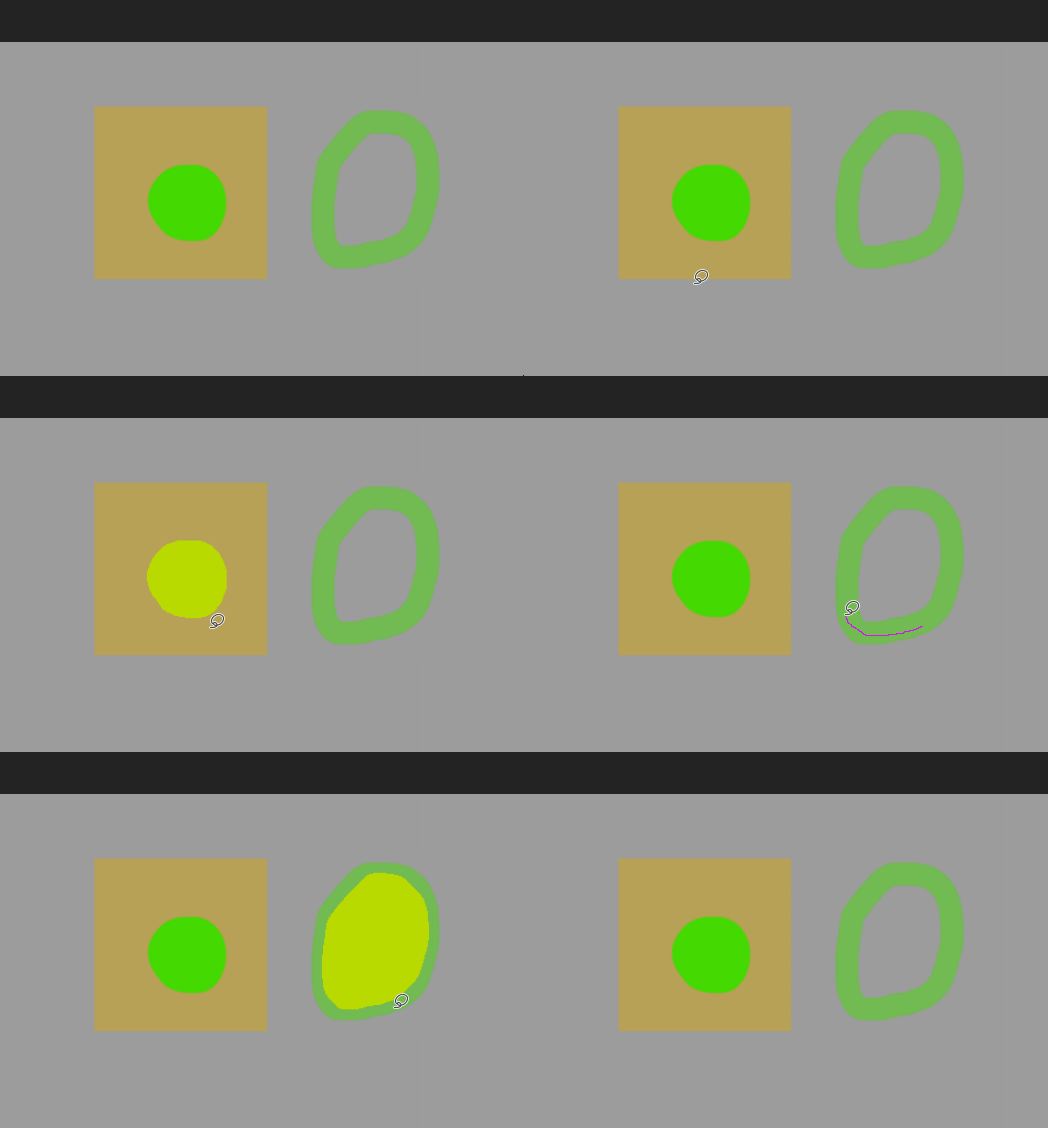
all enclosed areas except transparency
i could only tell what it does compared to the other enclosed areas. To me this only fill areas completely enclosed ignoring areas that were not completely enclosed by the lasso.

all enclosed areas including transparency
This is the mode used by the most popular select fill tools in csp. fills all areas inside the lasso even if not completely enclosed, seems really good for filling areas, its also the default mode of the close and fill tool.
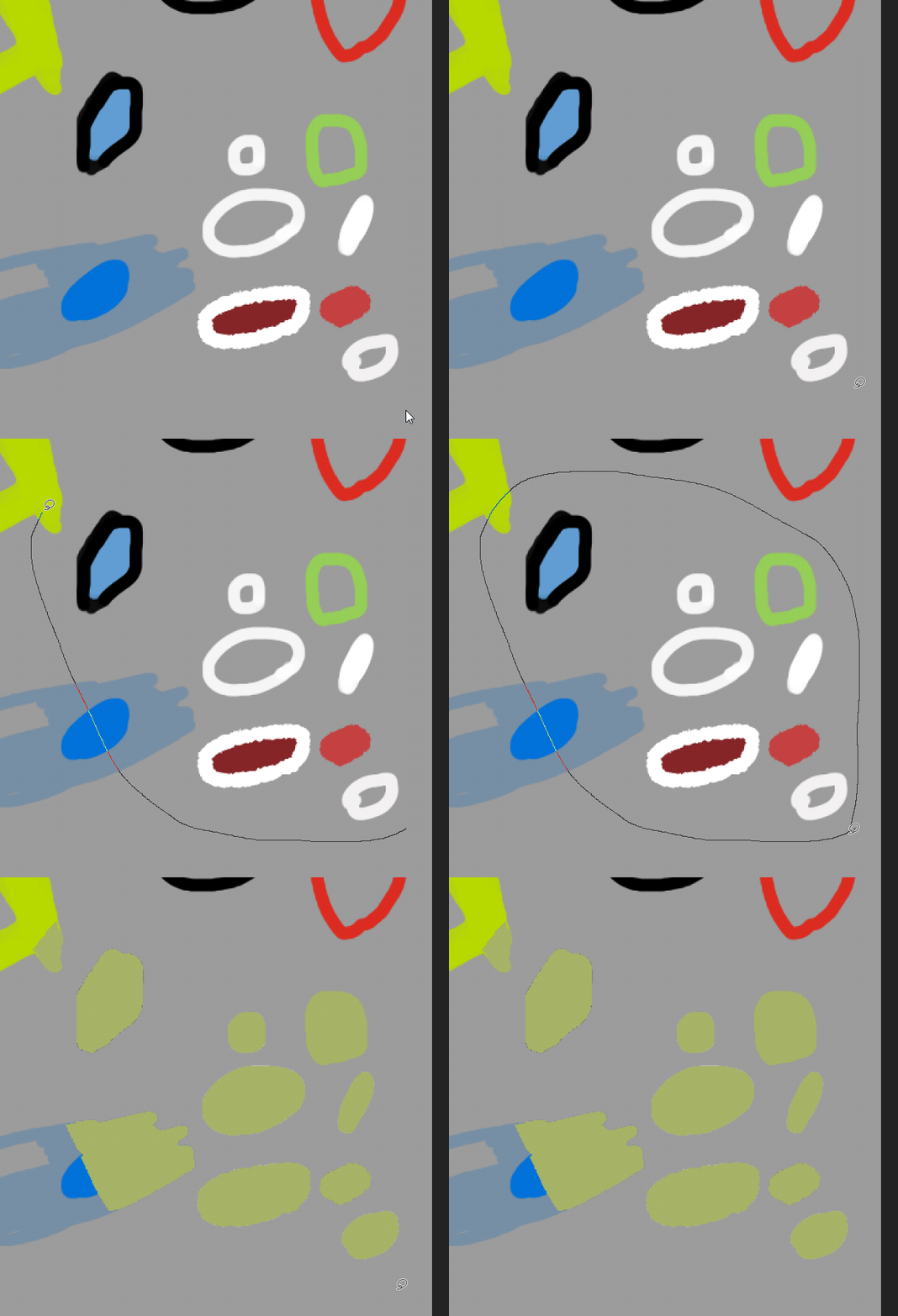
I honestly couldnt find equivalents in krita for the first 2 but the last one seems like krita almost tries to fill but it only makes an outline instead of filling the inside.
Though they do seem useful in specific use cases for the semi-transparent and the all enclosed areas except transparency. the last one i think there is a reason everyone seems to use only this mode in tools.as it can quickly fill all the areas touched.
i hope this is helpful
6 Likes
In the all colors case, you should not use grow/scale to test. And the threshold should be similar. In krita what happens is that the threshold is low so those semi-transparent pixels around the blue (or mix of blue and grey if the colors are in the same layer) are treated as independent regions that do not touch the contour of the region you made, and they are filled. Similar thing should happen in csp if you have a similar threshold and grow values.
To avoid that you have to upper the threshold.
I think csp does not make a distinction between transparent and white so it doesn’t fill the white blobs since they are connected to the transparent, which is connected to the contour of the region you made. Imagine it like if you first replace the white with transparent and then you perform the enclose and fill.
For the special cases:
- “treat semi-transparent as transparent” your example is not very clear. If you make other examples please don’t use scale.
- “all enclosed areas except transparency”. Seems like “all colors” but removing the blobs that are connected to a color that touches the contour. Almost as if you replaced all the color regions with a unique color and then performed the “all colors” filling.
- “all enclosed areas including transparency”. Seems like “all colors” but keeping the non transparent regions that touch the contour.
I’ll see if I can implement those in the future. Maybe it’s just me but I find their names extremely confusing.
But we should go back to giving tom more feedback regarding the strings.
I can’t speak for anyone else, but invert was pretty clear to me while fill open areas was confusing.
2 Likes