@Egor_Tankov : Hello and welcome to the forum 
It does have animated transform masks.
These have been in the 5.0.0-prealpha for some time and are in the 5.0.0-beta1.
@Egor_Tankov : Hello and welcome to the forum
It does have animated transform masks.
These have been in the 5.0.0-prealpha for some time and are in the 5.0.0-beta1.
EH… The role of the path is to be faster? I like the previous settings because I tend to classify resources after the fact. It seems I want to change my habit
In addition, there is also an error in Ramon’s “muse” bundle. It has no subfolders, which may be another anomaly.
I almost jizzed in my pants when I saw the notification.
I have been really impressed with Krita 5 beta, especially the RGBA smudge brushes. 
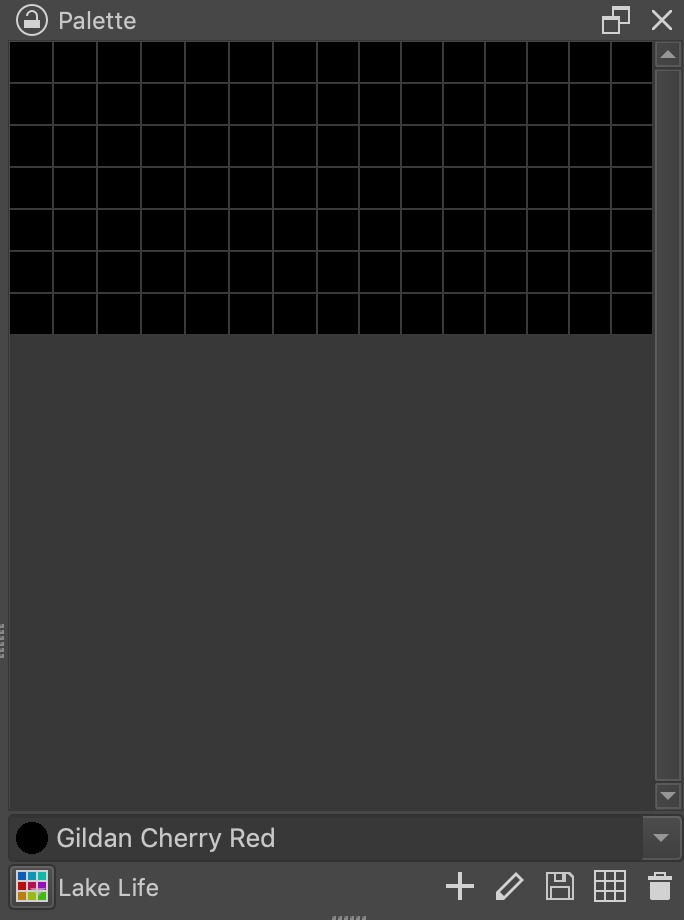
However, I’ve noticed something really odd on macOS. I use kpl color palettes in my work I generate using a script that use Lab values so the colors in the palette are independent of a color profile. Has worked great in the past in Krita, but on Krita 5 beta all of the colors in the palette show up as black. I’ve attached a screenshot shown in the screenshot. Krita 4.4 doesn’t have any trouble with the palette (except its known issues with loading any palette not in the profile folder that’s been fixed in Krita 5).
I can’t seem to be able to attach the kpl palette shown loaded in that screenshot, so here’s a download on a Nextcloud.
please report a bug to bugs.kde.org, and I’ll look at it, I suspect I’m the one who is responsible for the related code change.
Okay. Thanks!
Hi,
I noticed an issue with the Storyboard Docker. I have attached a recording of the issue.
Drive Link: Storyboard Docker Recording.webm - Google Drive
I have noticed that when I create a panel in the storyboard docker and draw, it works perfect; however, when I move the corresponding keyframe in the timeline docker to a new frame number, it does not update the new frame number in the storyboard docker (number next to “scene 2” in the upper left-hand corner of the panel). This causes that when I click on the panel in the storyboard docker, it takes me to the original frame when the panel was created, not to the updated frame.
Thank you so much for this release, I absolutely love it and I have been anxiously waiting for Krita 5 since it was first announced. Thank you so much to all the developers for their hard work and for making Krita 5 possible!
Can you report this bug at bugs.kde.org, please
How do you even restore brush tags and whatnot ? Say, from prealpha version for instance ?
Hi @Komorebi,
I have reported the bug as “Bug 441150 – Storyboard Docker Bug - Krita 5.0 Beta”. Thank you for your help!
Thank you for Android release at same time as the mainstream platforms.
This is amazing. But I think I will wait to have a new laptop to install it, or at least update this one (I’m on win7). For now I’d like to know if there is a change in the pop-up palet? I’ve been waiting for it to allow to change the color picker.
Yes it can finally be changed without having to edit kritarc manually, and the wide-gamut selector also got a few tweaks to make it work a bit better at small sizes. Plus, the selector size is configurable, so it doesn’t have to be that tiny anyway.
liquify got way slower even with texture buffer enabled. 
on the bright side the artifacts of pointer went away when texture buffer is enabled.
EDIT: Turning of instant preview fixed it. actually it’s much faster it seems!
I wonder what other tools this new feature gimps!
Instant preview isn’t a new feature - it was implemented a few years go. I don’t know if the functionality has been expanded though (I always leave it off!). 
Uhm, not that i’m complaining, i really appreciate the time, effort they put into this, because of them we have a great free software! I still am hopeful that they would consider updating the reference thing like Medibang does or something similar.
@remiah have a look here 
just downloaded it yesterday! love the updated aesthetic, its so clean! And as an animator that bounces between different programs, i really appreciate the new features and timeline layout, its going to a great boost to my workflow!
One small thing i noticed is the “Skip back/forward” button doesn’t always work?
i also had it crash immediately when attempting to use an animated transform mask on a folder but that seemed to be resolved by swapping animation cache settings to in-memory, and it made previewing my animations faster and lag less in general which is super appreciated!
Very appreciate KDE contributors for hard work at Krita!
But I’m so curious and worried about that quote says.
If not guaranteed to support previous project format, is there will be have migration pipeline or like things are planned?
Hi @Creta_Park The potential incompatibility is the other way around to what you think it is.
Any .kra file made with 4.x.y can be opened and worked on in 5.0.0.
5.0.0 has additional features that are not compatible with 4.x.y, e.g. animated transform masks.
So, if you make a .kra file with 5.0.0, it may not be possible to do further work on it, or properly see it, in 4.x.y.
Brush presets made with 4.x.y will be ‘converted’ by 5.0.0 when you first use it, where needed, and will work.
A brush preset made in 5.0.0 is not guarenteed to work in 4.x.y depending on what it is and how it’s made. I don’t know those details.