First Beta for Krita 5.0 released
The Krita team releases the first beta for Krita 5.0. Krita 5.0 is a major release, with a lot of new features and a lot of changes.
Published on Krita.org - 8/18/2021
Today, the Krita team releases the first beta for Krita 5.0. Krita 5.0 is a major release, with a lot of new features and a lot of changes.

The new splash screen, by Tyson Tan
First some warnings:
Now, what’s in it? The answer is a lot! Check out the full release notes for all the detail, but here’s short list of highlights:
And a host of smaller improvements, smaller features and lots of performance improvements!

We intend to release the final version in September, but that is not a hard promise! We will continue fixing issues that come in from testing the beta and the nightly builds so we can release a solid Krita 5. Please consider supporting Krita’s development through the development fund:

If you’re using the portable zip files, just open the zip file in Explorer and drag the folder somewhere convenient, then double-click on the krita icon in the folder. This will not impact an installed version of Krita, though it will share your settings and custom resources with your regular installed version of Krita. For reporting crashes, also get the debug symbols folder.
Note that from this release on we are not making 32 bits Windows builds anymore.
The separate gmic-qt appimage is no longer needed.
(If, for some reason, Firefox thinks it needs to load this as text: to download, right-click on the link.)
Note: if you use macOS Sierra or High Sierra, please check this video to learn how to enable starting developer-signed binaries, instead of just Apple Store binaries.
This time, the Android releases are made from the release tarball, so there are translations. We consider Krita on ChromeOS and Android still beta. There are many things that don’t work and other things that are impossible without a real keyboard.
For all downloads:
The Linux appimage and the source .tar.gz and .tar.xz tarballs are signed. You can retrieve the public key here. The signatures are here (filenames ending in .sig).
Krita is a free and open source project. Please consider supporting the project with donations or by buying training videos! With your support, we can keep the core team working on Krita full-time.
The Krita 5.0 manual is also ‘finished’, I’ve asked sysadmin to have the website builder use it, so that will happen later tonight.
(This will also be the cause of the broken links in the release notes, if any)
Cool! On the final straight now! 
Is it safe to master brush presets now? - I mean; are all changes to brush engines, parameters and sensors frozen?
I really want to try out the new version, but I need to finish the hard work on the current stable version. I’m torn in half) Patnouts on the “animation panel” promise a lot.
Yes, right now only fixes for serious regressions (bugs that were not present in 4.4.x) will be added to beta.
Can’t wait  what a monumental effort from all devs! Hats off!
Krita 5 looks awesome.

This is really a big step up and I thought 4 was already awesome. Congrats on the hard work for this.
@tiar: For bugs in the 5.0.0-beta1, should we post them here (or in a different topic) first or use the usual bug reporting forum?
If a bug is not a regression wrt 4.4.x, should it then be reported normally in the bug reporting forum (paying attention to whether it’s in the latest 5.0.0-prealpha nightly) ?
I think that is a theme supplied by Qt it is like windows 95 theme for me on Linux. Fusion is the official theme
bugs should now go to bugs.kde.org, though people can always discuss them in other places first. We do need a report before we can get to work though 
If I update to this version, will my plugins and settings be gone? I am on windows.
Since it is a beta release, it is better to use a separate user account or use portable version, or backup the current settings etc. Also don’t use this for urgent projects.
I used the portable and it was good. even my plugins that were acting up in 4.4.7 acted as expected.
Well, I didn’t notice that there are so many bundles and there are two folders at the same time.Some brushes show “x”. Same as @fizzyflower encountered.
But there is also an abnormal brush in Ramon’s “muse” bundle but it has only one.
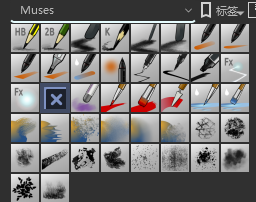
Hello, those brushes are from the Environment 2.0 pack by IForce73. I remember it was needed to manually copy the Brushtips from a folder inside the Brush pack to Krita’s own brush folder. Maybe you have to manually copy those brushtips to the right folder again?
I changed the description. I thought all its resources were in the bundle, but I forgot that there were two subfolders. After moving all patterns to brushes, the problem is solved. But there are still brush errors. So this should be a hidden danger
Will the new version have animation of layer movement with auto interpolation of keys in animation curves?
Kind of. I think that in Krita 4 the subfolders were ignored; and now in Krita 5 the subfolder is embedded into the path. So if you now create a brush preset with a brush tip from a subfolder, it will find it, because the preset will be looking for “brushes/subfolder/brushtip.png”. But if you created it earlier, it might be that they won’t be found because the preset will be looking for “brushes/brushtip.png”.
