I’d like to propose enhancements to the brush management system, addressing the pain points of brush organization and making brush experimentation more efficient.
Problem: Finding specific brushes scattered across different groups is a major burden. The inability to easily drag and drop brushes between groups, like in Photoshop’s panel, disrupts workflow. Furthermore, there’s no dedicated space for quickly trying new brushes or those from different categories without reorganizing my existing library. The current system lacks easy reordering, creating a cumbersome experience when managing a large library.
Proposed Solution:
Drag-and-Drop Grouping: Enable intuitive drag-and-drop movement of brushes between folders/groups in the brush panel, as seen in Photoshop.
Brush Workspace: Introduce the ability to create custom brush “workspaces” within the Brush Docker. These workspaces would allow the user to display a curated list of brushes from any category quickly.
Reordering: Allow drag-and-drop brush reordering within each folder/group/workspace
Rename Group/Folder Allow the renaming of folders or groups in the brush panel and rename them more than once.
Benefits:
Reduced Friction: Drastically reduces the time wasted searching and moving brushes.
Efficient Experimentation: A dedicated brush workspace fosters creativity and allows for fast exploration of new brushes.
Personalized Workflow: Users can tailor workspaces for specific tasks and projects.
Intuitive Organization: Drag and drop and nested folders create a more intuitive experience for managing custom brush sets.
Example:
Imagine a dedicated “Sketching” workspace with selected pencils, inks, and a few textural brushes, separate from a more comprehensive “Painting” brush set.
API Inquiry:
Is it currently possible, or could it be in the future, to achieve some of this functionality (like custom folder creation, brush reordering, or custom workspaces) using Krita’s Python API with community help? If so, could you point to any relevant API documentation or examples so I can try to create it myself?
You may have seen this already… You can use tags to create brush groups. Once tagged, you can easily view these tag groups in the brush preset docker or the popup widget. A brush can live in as many tags as you wish.
In terms of plugins, you might enjoy Shortcut Composer. It has some lovely configurable pie menus for brushes.
The thing is you have to switch windows every time you need that brush which is not usually that fast, and yes I am currently using workflow button + shortcut composer as some kind of workaround
Finally someone who made this request for the organitzation of brushes , this feature its is what brush management really needs to improve.
Especially the part where it is to sort by dragging brushes, as it requires extra steps from when you set it up by words for certain tags.
I had already made a similar comment about this, especially about dragging brushes to organize the brushes management putting the example the Clip studio Paint and the way of they managed to organize the brushes.
I think it would be very helpful, because when you sort the panels, certain brushes are covered by other panels. It would be necessary to modify the way some brushes are selected to organize and order them as the user wishes, since the labels only help to know which brush you have in a set, like the sub-tools, someting similar for that.
To all who want this useful feature, you should scroll up to the top of this topic and cast your vote on the left side of the heading, where the blue Vote-Button awaits your click.
That is why we have this mechanism, to show the devs our interest in a feature. Why should they consider developing a feature with no users wanting it, that would be wasted time and money, so please vote …
During years of working with Krita I thought that there is no need to bring that questions into “feature request” list because having ability to drag presets for sorting is so obvious. Just simple dragging preset with Ctrl or Shift withing a tag would be good. But seems I was wrong.
Major issue when I first launched Krita back in 2015 or something, was brush sorting. Since I am was set with PS and CSP, and have experienced other PC drawing apps I was strongly stumbled.
Since than years passed and I adopted to the Krita brush sorting system, and with developing skills became more free from tools restrictions. But have to admit that lack of something so Natural for Visual artist like Visual sorting brushes – main and most important tool for us – really is an obstacle to experiment more with powerful Krita’s brushes’ engines. ( You know, when every 10 minutes - 2 days you often create, change sorting and deleting brushes. )
What I feel in Krita: imagine you have 10 classical graphite pencils from H to B9 on you drawing table or near the easel, and they are sorting from H hardness to B9. Some time passed and you bought graphite monolith 2B and 9B pencil, and want to incorporate them into you work process. So the are two options where to put newcomers: place both after or before existing 10 pencils, or place them according to hardness they have. But you CAN’T do anything from it right away, because you NEED to RENAME them with thin acrylic Posca marker in order to all 12 pencils will be matched with system alphanumeric requirements. OK, you did it. Time passed, and you bought charcoal pencils, and want them incorporate too. But… you so desired to draw and paint that you don’t want to waste precious time to rename material again and you decided just put charcoal pencils into a drawer for ‘some future’…
Sound strange isn’t it? You take Krita’s brush sorting principles and bring them onto life? But isn’t so obvious bring something from life into a program?
So all passed years, up until recently I was thinking that ability to dragging brush presets are planning to bring into life in some future, bcs I repeat myself – Visual sorting with dragging is Natural, especially for Visual people like us – artists. And this is not implemented yet bcs of coding restrictions or mountains of problems in the path, so it is not wise to put dev’s limited powers into that feature.
After Wojtryb released v1.1.0 of Shorcut Composer I was quite surprised that dragging is actually is possible even through a plugin. And begin doubt – if actually ability to drag presets even have place in dev’s plans? And my dubts became stronger after last post about krita plans – no single word or thoughts about improvement in brush preset management.
Sorry about my blabbing, I know there are lot requests “I know how to make Krita better”, but someone could bring some clarity in this question?
I don’t have much knowledge about how things are implemented in krita, but here are my thoughts on the subject as I did this feature in a plugin.
Qt allows to implement drag and drop operations, and it seems to work just fine. The problem is that while my solution was rather simple (there are not that many realted features there), krita already has a lot of other things going on - tags, tag filtering, name filtering…
Questions that come to my mind at first glance:
should the order changed in “all presets” affect the order when switching to a specific tag and vice-versa?
what about the same but for filtering by typing name?
should you be able to change between custom order and alphabetical order?
how GUI should like for doing so?
what about order in RMB popup? Should it remember order separately from the brush selector?
Once any ordering feature is added, it has to be maintained in future releases - so I guess it won’t be started before this topic is thought trough.
So if you want to have this feature, I’d start with trying to answer those questions, as think about other possible implications to existing preset related features. Those questions I gave here, are barely an example.
I’m all for having drag and drop operations for custom order in RMB popup and preset selector, but it has to be handled with care. And there must be someone willing to handle this task and then maintain it.
“Alphanumeric” mode make brush presets manager behave like it do currently. “Custom” mode enable ability to dragging.
It would be good if each tag can be optioned individually which mode to follow. At least “All presets” should have separated options from other tags. In case to option individual tag bringing tag into bundle saves this options to the bundle too.
How is “Custom” mode behaves:
Each tag has individual sorting information – in which position brush was placed.
Initially, when you create new tag, or use existing tag never been sorted customly, all presets appears in alphanumeric order. (Also, maybe there is need a “reset” button with question prompt, in case you need to bring all to the initial alphanumeric order in “custom” mode)
New brushes assigned to tag appears in the bottom of the list. In “All presets” tag new created brushes and new imported brushes appears in the bottom of the list.
In case you deleted brush from tag or disable bundle and after while changed you mind, the brush presets are considered like new presets and appears in bottom of the list.
While there is some keywords in search filter you shouldn’t be able to perform drag operations.
“Filter in tag” checked: behaves like usual – all presets that don’t consist keywords are deleting from the list while saving the existing dragging order.
“Filter in tag” unchecked: all presets that don’t consist keywords should be deleting from the list while saving the existing dragging order plus on the bottom of list brush from all presets appears in alphanumeric order.
Popup circle brushes currently depends from tag, so I suggest to leave as it: if tag is in “custom” mode, popup sorted accordingly.
How I see to operate dragging:
Ctrl + LMB selects individual presets or deselects if clicking on selected
It would be great to have this, for example you could define a grid with X number of slots and move the brush to slot 1, or click on the brush and add an index, for example brush 1, giving it index 1 and therefore first place in the grid, etc…
I think that @tiar, as the person who created the new resource management, is probably the most qualified person to talk to. Let’s wait and see if she can tell us anything about it.
Furthermore, I suspect that our forum member @Grum999 also has a certain insight into this matter, on the one hand because he is familiar with databases and on the other hand because the programming of the Buli Brush Switch plugin and the Buli Commander plugin may also “dock to the resource management” in parts, there could be points of contact.
It is therefore possible that they could tell us something about the feasibility of your request.
there is another feature requests that seems to ask for the same as this one, maybe they can be merged, I only noticed because both appeared in my votes tab
@443eb9 Please read and consider the Feature Request topic linked by @Dynline above.
Does that topic cover your requirements? If so, the two topics can be merged.
If not, they could still be merged and your requirements regarded as additional to the first one.
Looks like something, someone who is not used to krita would want to have. If I remember correctly that is not the first or second feature request of that kind, and I can read a lot of frustration in the way you are writing (or am I interpreting that wrongly ), but I can not agree to this feature request, as there no clear specifications as to how that brush filtering/ordering is supposed to work. All I see is: look at that program, that is how it is supposed to be done. If I would compare it to a cake. It would be like: look at that cake that is how it is supposed to be done. But we all know, that we need the list of ingredients and the process steps to reach the same result.
If I am reading your wishlist correctly, it comes down to enabling manual ordering. As we do have tags which can be uses like folders. And you can rename the tags.
Correct me if I am wrong, but I think your feature request should look like this:
user story
As user I want to order my brushes manually
current behaviour
You can appoint brushes to different tags, but their order is determined by their name
wanted behaviour
Enable manual ordering by drag and drop inside the brush selector menu/docker
definition of done
The brush icons in the brush selector menu/docker can be dragged like a layer inside a tag.
The order of the brush stays after dragging it to a specific position.
After closing and reopening krita the order stays the same.
The order in the popup pallet is the same as in the brush selector menu/docker
I’ve been using Krita since the 3.x versions , and I’ve been consistently impressed by the improvements, particularly in the brush engine, transform tool, and layer management. Since version 5.x, the brush organization has improved so dramatically that I’ve decided to make Krita my primary software. That said, while the brush engine is industry-leading, some UI aspects still present challenges. Specifically, tagging allows for organization, but the resulting alphabetical order and the risk of disrupting hierarchies with renaming are frustrating. I propose an external workspace or “kit” system that would allow users to freely organize brushes. I know the team is very busy, especially with the QT6 port. I don’t currently have the time to delve into C++ and QT, so I’m trying to prototype this in Python. I’d be very grateful for some mentorship on navigating the Krita Python API. I’m particularly interested in learning how to interact with the brush management system. I understand open-source software often forges its own path, but learning from established industry standards can be a valuable approach.
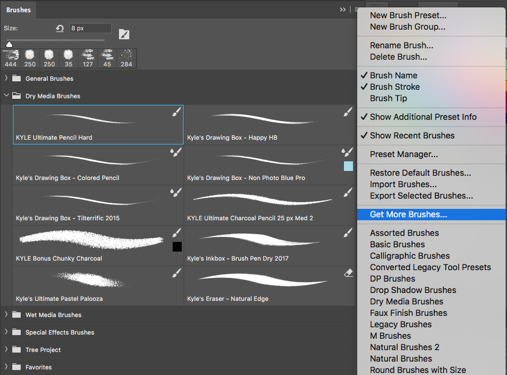
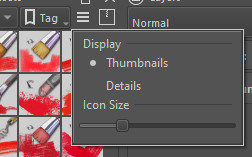
 Hello
Hello  ), but I can not agree to this feature request, as there no clear specifications as to how that brush filtering/ordering is supposed to work. All I see is: look at that program, that is how it is supposed to be done. If I would compare it to a cake. It would be like: look at that cake that is how it is supposed to be done. But we all know, that we need the list of ingredients and the process steps to reach the same result.
 , and I’ve been consistently impressed by the improvements, particularly in the brush engine, transform tool, and layer management. Since version 5.x, the brush organization has improved so dramatically that I’ve decided to make Krita my primary software. That said, while the brush engine is industry-leading, some UI aspects still present challenges. Specifically, tagging allows for organization, but the resulting alphabetical order and the risk of disrupting hierarchies with renaming are frustrating. I propose an external workspace or “kit” system that would allow users to freely organize brushes. I know the team is very busy, especially with the QT6 port. I don’t currently have the time to delve into C++ and QT, so I’m trying to prototype this in Python. I’d be very grateful for some mentorship on navigating the Krita Python API. I’m particularly interested in learning how to interact with the brush management system. I understand open-source software often forges its own path, but learning from established industry standards can be a valuable approach.