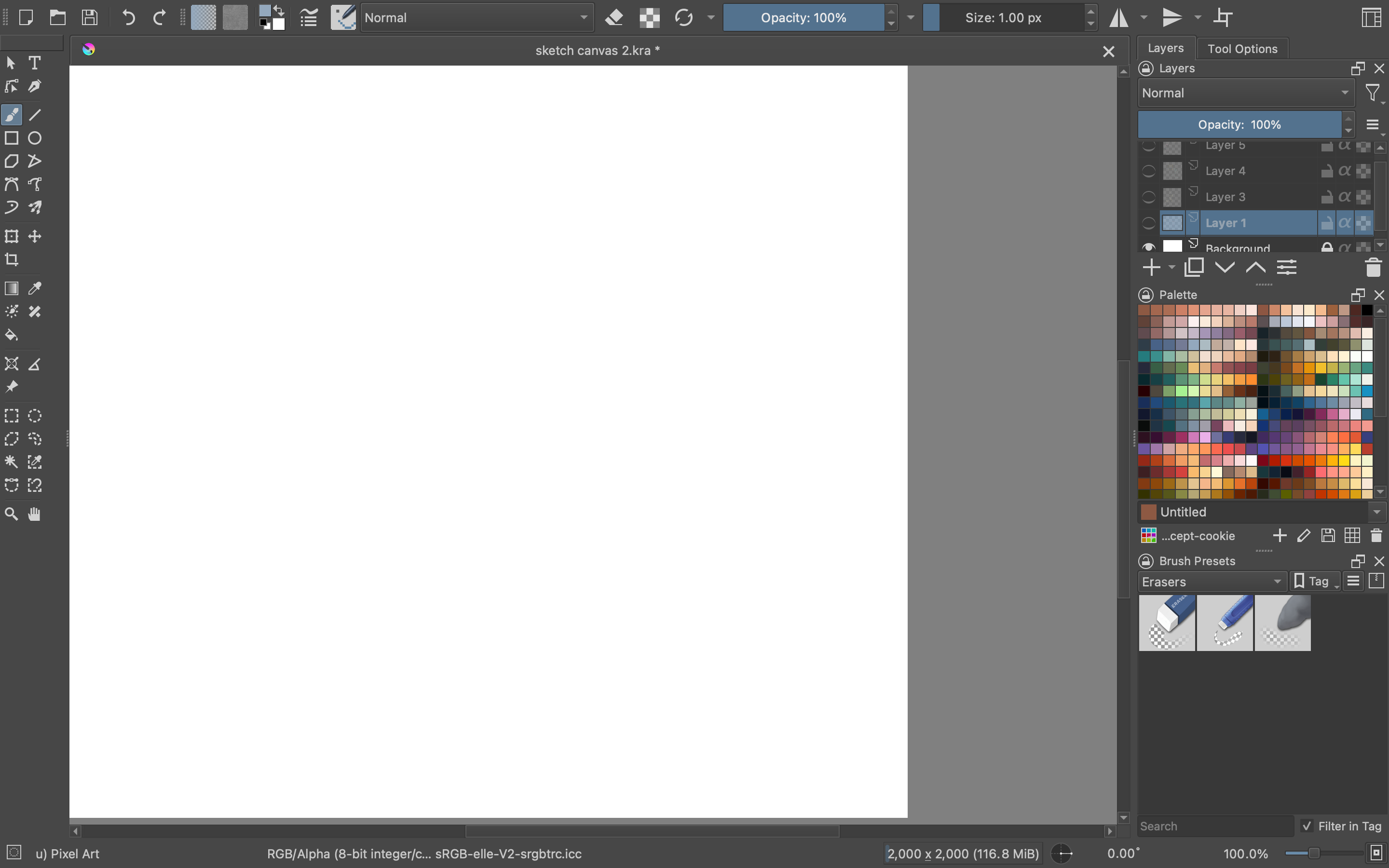
Gets stuck on Magnifying glass, then literally cannot use any tool buttons

Type of device* : Graphics Tablet
Brand and version of the device: Wacom Intros Pro (6.3.46-1)
System** : Macbook Pro OSX Monterey 5


Description of the issue (you can include screenshots): At seeming random, my brush or whatever will turn into a magnifying glass, but be utterly unable to use any tool, even zoom itself. It can click on the tools but it can’t use them. The only thing that works is to close Arita and restart it. Turning off Canvas Grid Acceleration or discrete something-or-other hasn’t worked.

I understand that this problem has gone on for years and nobody has solved it. It’s a minor nuisance, but I’m sick of it, and I’d like a solution if there’s one out there.

Krita doesn’t have a magnifying glas feature but the operating system you have may do. I know of another topic where someone had accidentally turned it on with some keyboard shortcut, perhaps it’s the same for you.

Apparently it’s control+command+L on Mac

https://discussions.apple.com/thread/251135993

I think Zoom is meant, as you can see in the screenshot (since I use the ReDesign plugin, my toolbox looks a little different).

:slight_smile: Hello @Elizabeth_Manser, and welcome to the forum!

It’s a shame you waited so long to ask for assistance with your problem. And although I’ve been trying to help other users on this forum for almost a year and a half, this is the first time I’ve heard of the difficulties you describe. So I’m also a bit surprised that it’s supposed to be a bug that’s been known for a long time, which doesn’t mean it’s any different than you’re describing.
While we are on the subject of description, I must confess to having difficulty understanding your description of the error. It is difficult for someone whose native language is not English to fathom the important parts.

Is this an inconvenience that has been happening to you for a long time, or have you been able to discover and know from old bug reports of these difficulties you have, and if so, where did you find this? Do you have a link to it for us? And how do you know that no one has tried to fix it? The way you describe it, you seem to know more. And it would drive me crazy if this happened to me.

So, if I understand it correctly, the Zoom-Tool/magnifying glass icon appears regardless of the tool you are working with at the time. Once it’s active you can’t activate any other tool such as the eyedropper tool, the various selection tools (Freehand Selection Tool, Rectangular Selection Tool, etc.), Bezier Curve Tool and you have to restart Krita to use Krita again, right? Can’t you get rid of it by pressing the Escape key (or the Mac equivalent of this key)? Have you tried using the shortcuts for Zoom? So CTRL + 0, CTRL + +, CTRL + -?

Now comes the most difficult passage for me. You seem to have tried disabling/enabling Canvas Graphics Acceleration. This is a common way that often eliminates common errors in macOS. Or do you mean something completely different with “Canvas Grid Acceleration”? (I’ve never owned a Mac.) The conglomerate of terms “or discrete something-or-other” just puzzles me, what did you mean by that? It seems to me that you wrote this text under a lot of tension and anger, something I can understand to a certain extent, especially if I would lose a lot of work because of the blockage and have to restart Krita being unable to save. Would it be possible for you to describe your problem to us again in peace and if possible in detail? There is little more that can be done with the terms you have chosen than to guess.
We also need a screenshot of your complete uncropped Krita program window as you have it set up for your work with Krita. And we also need to see the Tool Options docker (bring it to the front, please) so that it is visible at full size. Also, if you have by chance a screenshot of it when Krita is trapped in this state that could/would be very helpful/important too, please post such a screenshot as well. Furthermore, please tell us which version of Krita you use.
With all that said, I can’t promise you that we will find a solution to your issue, but without an understandable description and one or better two screenshots, it should be almost impossible to find a solution.

Michelist

1 Like

This has been happening since I first got Krita sometime in 2019/2020. There are a few posts on Reddit about it, plus the following link.

https://bugs.kde.org/show_bug.cgi?id=390642

I tried turning canvas graphics acceleration on and off, and it didn’t help. The “discrete” bit I found on a reddit thread

All right, here’s the problem. I will be using Krita, going about my merry way, when all of a sudden I’ll press something and it’ll turn into a zoom tool and get stuck (if it helps, usually either the trackpad or the tablet has been touched). The zoom icon won’t zoom, and won’t use any of the brushes or other image making tools. I can still save, close, open, etc. files.

I actually think the best way to say it is that when the cursor gets stuck on zoom, it doesn’t let me work on the canvas.

I’m not sure what “untrimmed” means, but I have enclosed a full-screen screenshot of my Krita workspace.

Thank you for your help. It is a pity that the workaround from Vanyossi doesn’t work for you, or have you overlooked that he can get Krita back working, so Krita gets responsive again for the rest of a session? Here is what he wrote:
“There is a workaround if you have a mouse/trackpad. When the cursor gets stuck just move it with the trackpad/mouse. Not the best work around, but at least it lets me draw.”, you can find it here:
https://bugs.kde.org/show_bug.cgi?id=390642#c20

As far as I can tell, if even Vanyossi and Halla, as users of Mac’s, developers of Krita, and Halla furthermore as maintainer of Krita, don’t know how to solve this, then I have to give up with my lack of knowledge about Macs.

And please excuse “untrimmed”, I meant “not cropped/uncropped”, seems that I make more and more mistakes in my translations when I’m tired, sorry. I have to write everything down before I can translate it into English, and such a long post made me slack off.

Michelist

Good that you find a workaround. You were just another victim of a old bug on Windows specifically:
Pan tool not working At least it is what it looks like.
This bug has already been solved, but not implemented yet (I think). Bug 438784 Resolved

Cheers

Just tried Michelist’s advice. It didn’t work. I can’t draw with the trackpad or mouse, even when I remove the tablet. I can click on tools, but I can’t work on the canvas. I tried a bug fix wherein you move the pen far away from the tablet. Didn’t work.

As far as I can tell there are no workarounds whatsoever. And it kind of makes me want to cry.

Please don’t cry and please don’t give up. I’m sure this is super frustrating but there has to be a solution.

Here’s my stab at diagnosing the problem. Would you please open the tablet tester (it’s in Configure Krita). Open the tester and draw a few lines with your stylus, not the trackpad or mouse. Then reply to this comment by copy/pasting the first 12-15 lines of the text that will be generated.

I’ve figured out it happens when I have more than one writing/scrolling utensil (pen or finger) on the tablet service. Keeping my off-hand away from the tablet has helped a lot.

Here’s the first dozen or so lines.

Pen tip brought near

Stylus press X=90.86 Y=30.47 B=1 P=5.4%

Stylus move X=90.70 Y=30.84 B=1 P=12.5% (DRAW)

Stylus move X=90.70 Y=30.84 B=1 P=16.5% (DRAW)

Stylus move X=90.70 Y=30.84 B=1 P=18.6% (DRAW)

Stylus move X=90.70 Y=30.84 B=1 P=19.5% (DRAW)

Stylus move X=90.70 Y=30.84 B=1 P=21.0% (DRAW)

Stylus move X=90.70 Y=30.84 B=1 P=22.2% (DRAW)

Stylus move X=90.70 Y=30.84 B=1 P=23.6% (DRAW)

Stylus move X=90.70 Y=30.84 B=1 P=25.2% (DRAW)

Stylus move X=90.70 Y=30.84 B=1 P=27.2% (DRAW)

Stylus move X=90.70 Y=30.84 B=1 P=28.4% (DRAW)

Stylus move X=90.32 Y=28.59 B=1 P=29.4% (DRAW)

Stylus move X=90.32 Y=28.20 B=1 P=30.3% (DRAW)

Stylus move X=90.35 Y=27.83 B=1 P=31.0% (DRAW)

Stylus move X=90.54 Y=27.43 B=1 P=31.6% (DRAW)

2 Likes

I’m glad you’re still working at it! It does sound like @CadillacRancher identified the problem as well as a workaround.

Krita will always get confused if two input devices are attempting to give instructions to Krita at the same moment (i.e. mouse and stylus, stylus and finger/hand, or mouse and finger/hand). It’s not a bug, it’s a truly confusing situation for the app. It’s just not sure which signal is intentional and which is accidental.

I’d love to see some of your artwork if you feel inclined to share it. :grinning:

For what it’s worth, I have this same problem! I posted back in January (complete with a video demo!) but my post didn’t get much traction. :sweat_smile:

It’s not just sometimes either. I can reliably reproduce it every single time. I’ve tried it on multiple Mac machines too: one 2018 MacBook Air, a 2017 MacBook Pro, a 2020 MacBook Pro. etc. Oddly enough, if I trigger this bug and then open the tablet tester, my pen strokes register there just fine. I can even click around the UI and it’s nice and snappy. But the canvas itself becomes completely unusable.

Also none of the previously mentioned suggestions work:

  • Hitting the escape key
  • Using CMD+plus and CMD+minus
  • Using the normal trackpad to “unstick” the zoom
  • Clicking outside of the canvas/application
  • Turning off the “touch” features of the tablet so that only my pen will register input

I even ended up contacting Wacom and they had a technical support person walk me through tons of debugging steps, none of which worked. :sob:

Even the logs show nothing of note:

SESSION: 31 Aug 2022 16:44:49 -0700. Executing /Applications/krita.app/Contents/MacOS/krita
Krita Version: 5.1.0, Qt version compiled: 5.12.12, loaded: 5.12.12. Process ID: 5132
-- -- -- -- -- -- -- --
31 Aug 2022 16:44:49 -0700: Style: macintosh. Available styles: macintosh, Windows, Fusion
31 Aug 2022 16:44:50 -0700: Database is up to date. Version: 0.0.17, created by Krita 5.1.0, at Tue Aug 30 14:51:02 2022
31 Aug 2022 16:45:21 -0700: Created image "Unnamed", 3508 * 4960 pixels, 300 dpi. Color model: 8-bit integer/channel RGB/Alpha (sRGB-elle-V2-srgbtrc.icc). Layers: 2
31 Aug 2022 16:53:53 -0700: Autosaving: /Users/noah/.krita-5132-document_0-autosave.kra
31 Aug 2022 16:53:53 -0700: Converting from application/x-krita to application/x-krita. Location: /Users/noah/.krita-5132-document_0-autosave.kra. Real location: /Users/noah/.krita-5132-document_0-autosave.kra. Batchmode: 0. Configuration: none
31 Aug 2022 16:53:54 -0700: Completed saving /Users/noah/.krita-5132-document_0-autosave.kra (mime: application/x-krita). Result: OK. Warning: . Size: 444564
31 Aug 2022 17:02:27 -0700: Removing autosave file: /Users/noah/.krita-5132-document_0-autosave.kra
31 Aug 2022 17:02:28 -0700: CLOSING SESSION

The Log Viewer docker tool shows even less (with all log categories enabled). :sweat_smile:

EDIT: I filed a bug on the KDE forum.

1 Like

This topic was automatically closed 15 days after the last reply. New replies are no longer allowed.